
By using this website, you agree to our Terms of Use (click here)

Jotting down some notes here about Landed Cost functionality in Acumatica.
The way I see it, you have three options for how to process Landed Costs.
1. You can add Landed Costs to the LANDED COSTS tab on the Purchase Receipts (PO302000) screen.
With this option, you are depending on the Receiving department to enter the Vendor invoice information correctly and generate the AP Bill. The AP Bill will get generated, but if you uncheck the Release AP Documents Automatically box on the Purchase Orders Preferences (PO101000) screen, it won't get released automatically (this gives the Accounts Payable department an opportunity to review it).
2. You can add Landed Costs to the LANDED COSTS tab on the Purchase Receipts (PO302000) screen and check the Postpone AP Bill Creation checkbox.
With this option, the Receiving department can enter the Vendor invoice information, but the AP Bill is not created. The Accounts Payable department can then create the AP Bill later and add the landed costs to the AP Bill using the ADD POSTPONED LANDED COST button on the LANDED COSTS tab of the Bills and Adjustments (AP301000) screen.
If the amount entered on the Bills and Adjustments (AP301000) screen is different than the amount entered on the Purchase Receipts (PO302000) screen, then the difference gets booked to the GL Account listed in the Landed Cost Variance Account field on the Landed Cost Codes (PO202000) screen.
3. You can add Landed Costs to the LANDED COSTS tab on the Bills and Adjustments (AP301000) screen without ever entering them on the Purchase Receipts (PO302000) screen.
With this option, the Receiving department is not involved. Everything is done by the Accounts Payable department. You can lookup any Purchase Receipt on the LANDED COSTS tab of the Bills and Adjustments (AP301000) screen to add Landed Costs to that Purchase Receipt.
Also, note that in Acumatica 2018 R2, they created a separate screen specifically for Landed Costs.
Go here and scroll to page 93 for details:
http://acumatica-builds.s3.amazonaws.com/builds/2018R2/PDF/AcumaticaERP_2018R2_ReleaseNotes.pdf


Hey Tim,
You also have a fourth option, https://www.acumatica.com/extensions/acuboost-container-tracking/ very useful for those containers which have been filled with orders from multiple suppliers.

Hi
Do you know if there's been any questions around being able to set a standard landed cost percentage or amount of the purchase price that is automatically added when doing PO receipt/invoice? We've had some customers asking about this.

We had to purchase special code to apply HTS codes (variable percentages by item in a container) at the landed cost screen. It cost us about ~$9,000 USD. It works well and it is very straight forward. You may be forced to pay an outside company for this... I sure hope not though!
Thanks for pointing that out Carl. Here is another option that people might want to look at:
https://www.pcbennett.com/page/shipping-container-management
I'm not sure if either option does what VJW is looking for.
Thanks for the replies! I'll check what can be done, probably some add-on would be needed or we'll make a feature request
Learning a little more about the new Landed Costs (PO303000) screen in 2018 R2.
In 2018 R1, when you added landed costs to the LANDED COSTS tab of the Bills and Adjustments (AP301000) screen, you had to use the LANDED COST SPLIT button to allocate the Amount to multiple Purchase Receipts which wasn't so intuitive. Also, it didn't tell you up front how much it was going to allocate to each Purchase Receipt Line.

In 2018 R2, using the new Landed Costs (PO303000) screen, you add the Amount to the LANDED COSTS tab like this:

Then you add the Purchase Receipt Lines to the DOCUMENT DETAILS tab which feels more intuitive to me. I also like how this tab shows you the Receipt Qty., Weight, Volume, and Ext. Cost which can all be used as Allocation Method options on the Landed Cost Codes (PO202000) screen. Then, depending on which Landed Cost Code you choose, the Allocated Amount is displayed up front so you can see it for each Purchase Receipt Line before releasing the transaction.

Also, here are some useful video overviews:

Hello,
Do you know any good GI that will show the cost of an item by layer? We use FIFO and our trying to see each layer of an item by cost including the landed cost.
Thank you in advance

Nathan,
I suggest you start with the Inventory Valuation report and start reverse engineering from there.
Pick an item using FIFO for a valuation method and that has landed costs associated with it. Run the Inventory Valuation report in Detail format.
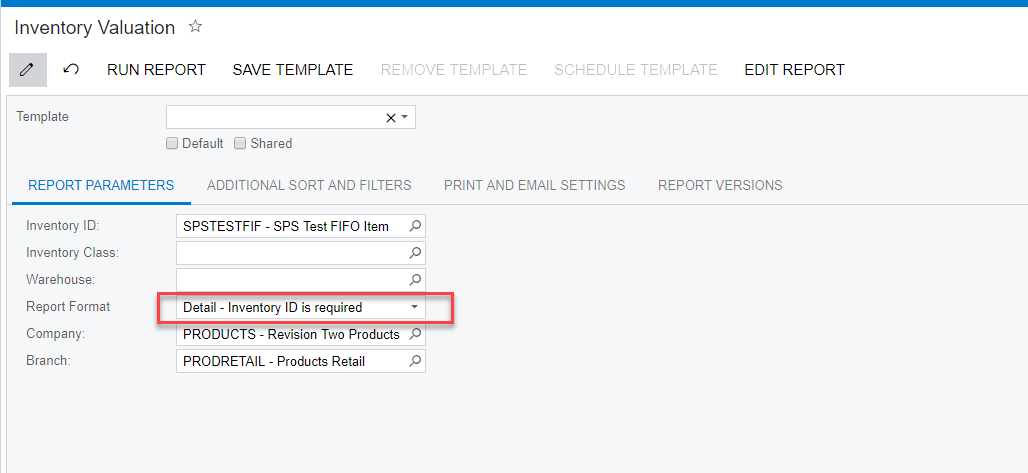
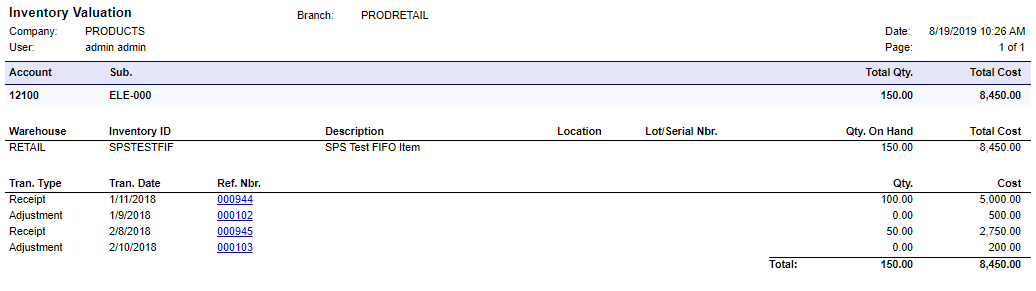
As you can see in the above screen capture, the report shows the detail that comprises each cost layer for an item.
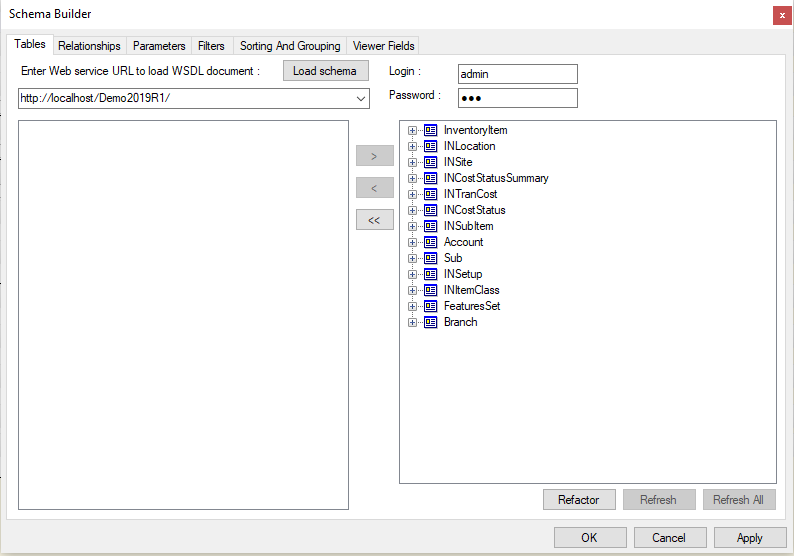
Here is a list of all the DAC's referenced in the report:
BTW, the 'Cost Separately' flag you reference at the Warehouse level is for something completely separate from what I think you are looking for. If selected, the system will begin tracking new cost layers for any items stored in this particular warehouse location, separate from costs from all other locations. I might understand why you MIGHT do this for Average valuations but not for FIFO (extra emphasis on MIGHT).
Enabling this feature must be done before any inventory is loaded into the location. The help text strongly recommends not changing the option once it has been set. I strongly recommend testing the hell out of this option in a test environment before rolling it out in production. I think it is going to add a great deal of detail and complexity to your inventory valuation. I also think it will confuse your sales staff with different valuations for the same item in the same cost layer.
Good luck.
Thank you sir! That's what I've been looking at, but it's just a little hard to read. My boss wants a report that shows how many have been sold per layer and how many are left in that layer. He also wants to see what our cost is AFTER landed costs hit. Per layer. Lol
Sorry. One more thing. Where did this form go? Lol
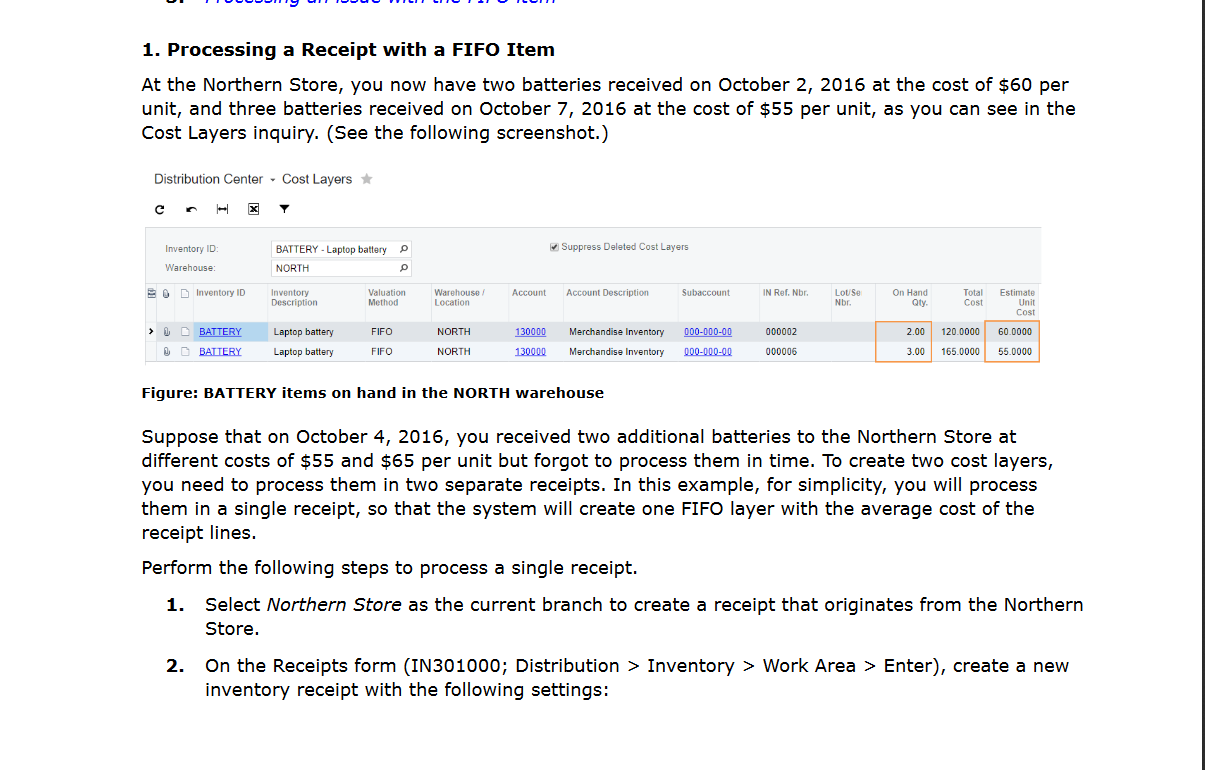
For FIFO Layers, try starting with the INCostStatus Data Access Class.