AugForums.com

An Acumatica User Group

  • Free
    • Start Here
    • Rolodex
    • Podcast
    • Blog
    • Forums
  • Paid
    • AugSQL
    • GI Course
    • GI Library
    • Consulting
  • Register
Acumatica Forums

By using this website, you agree to our Terms of Use (click here)

Forums
AUG Forums
Everything Else
Business Event not ...
 
Notifications
Clear all

Questions Business Event not triggering

 
Everything Else
Last Post by Richard Whight 4 years ago
24 Posts
9 Users
3 Reactions
10.6 K Views
RSS
Brandon
Posts: 26
 Brandon
Topic starter
May 6, 2019 12:54 am
(@brandon)
Member
Joined: 7 years ago

I had set up a business event based on a generic inquiry filtered to show only shipments where the ship-to phone number is blank. The business event was set to run for New Record Inserted and would then run an import scenario to add our company's phone number to this field (this is to avoid issues with creating labels through the Fed-Ex integration where that is a required field). This was working well for the past couple months but then suddenly about a week ago it stopped triggering the events when new shipments are created. In checking the shipments are showing on the generic inquiry results still it just isn't triggering the event for some reason. Has anyone else run into any similar issues of events not triggering correctly?


23 Replies
Kurt Bauer
Posts: 45
 Kurt Bauer
May 6, 2019 7:57 am
(@kurtybauer)
Trusted Member
Joined: 6 years ago

The business events that are triggered on a record change are very temperamental and don't always work.  If you are using 2018 R2 make sure you are on the latest build because Acumatica has been working to fix some of the issues.  For some of our clients I have used the run on schedule to get the process to work consistently.  Unfortunately, using the run on schedule usually requires an import scenario to also update some sort of flag to make sure emails aren't sent over and over.

Thanks,

Kurt


Reply
Brandon
 Brandon
(@brandon)
Joined: 7 years ago

Member
Posts: 26
May 6, 2019 5:37 pm
Reply toKurt BauerKurt Bauer

Hey Kurt,

Thanks for the reply, nice to know I'm not the only one having issues. It was odd as it was working fine then suddenly stopped triggering. It has been working without issue being on a schedule (though this is less convenient as not all shipments are created at the same time of day so random ones created in the middle of the day aren't getting the automatic update which adds a step for our warehouse team) and in this case there is no worry about duplicate updates.


Reply
 Brett Nothan
(@brett-nothan)
Joined: 7 years ago

Member
Posts: 14
May 24, 2019 11:16 am
Reply toKurt BauerKurt Bauer

Hi Kurt,

Any idea if these issues still existing in the latest 2019R1?   I'm having trouble getting a very simple business event to fire utilizing "Trigger by Record Change -> Record Changed".

Thanks,

Brett


Reply
Wyatt.ERP
 Wyatt.ERP
(@wyatt-erp)
Joined: 6 years ago

Estimable Member
Posts: 128
June 11, 2019 1:01 pm
Reply toBrett Nothan
Kurt Bauer

Brett,

Acumatica 2019 R1 19.103 (most recent atm is 104) I can confirm is still having fits about some "complicated" GIs when Triggered by Record Changed.  I ended up creating a new "simple" GI with only what was needed to fulfill the event's need thanks to the advice from your prior post.


Reply
Kurt Bauer
Posts: 45
 Kurt Bauer
May 25, 2019 6:31 am
(@kurtybauer)
Trusted Member
Joined: 6 years ago

Brett,

We haven't upgraded or put any new clients on 2019 R1 yet so I'm not sure if it runs any better.  I would recommend searching the known issues section on the Acumatica portal.   https://portal.acumatica.com/release-notes/known-issues/   There are a couple issues regarding business events that are fixed in certain versions and some that have workarounds.  Maybe one of them applies to you and you can figure out a way to work around the issue.

Good luck.

Kurt


Reply
Posts: 4
 Eugene Wanjira
May 31, 2019 8:40 am
(@eugene-wanjira)
Active Member
Joined: 7 years ago

Hi Kurt,

Been wondering why on after creating a business event to update case status and send email notification it would trigger record change for the top most record when it runs for the first time. I have been affected twice now after configuring this yet the record that has been affected has its status not matching my condition.  My configuration is as below.


Reply
Tim Rodman
Posts: 3195
 Tim Rodman
Admin
June 7, 2019 10:02 pm
(@timrodman)
Famed Member
Joined: 10 years ago

Eugene,

So the Business Event is picking up a record that doesn't meet your TRIGGER CONDITIONS?


Reply
 Eugene Wanjira
(@eugene-wanjira)
Joined: 7 years ago

Active Member
Posts: 4
June 10, 2019 2:15 am
Reply toTim RodmanTim Rodman

Yes its affecting the top most record and update it in regard to my business event setting even if it doesn't meet the condition


Reply
Kurt Bauer
Posts: 45
 Kurt Bauer
June 10, 2019 6:43 am
(@kurtybauer)
Trusted Member
Joined: 6 years ago

Try changing your Raise Event to 'For Each Record'.  That should run your event for all records in the inquiry.

Thanks,

Kurt


Reply
Megan Perry
Posts: 17
 Megan Perry
June 10, 2019 10:24 am
(@mperry2644)
Eminent Member
Joined: 6 years ago

We are having an issue in 19r1 creating a credit memo with multiple tran lines with a business event triggered by record insertion in a GI.

We have tried various settings, and the record add in the GI either does not kick off the event at all, or it only creates the first line.  Because we need it to trigger on record insertion (a certain type of new invoice document is created), we cannot schedule that I can see.

Has anyone executed a scenario like this where multiple lines create one transaction with detail?


Thanks,

Megan


Reply
 Brett Nothan
(@brett-nothan)
Joined: 7 years ago

Member
Posts: 14
June 10, 2019 11:16 am
Reply toMegan PerryMegan Perry

I opened a Case regarding my issue of the BE not firing on Record change but only on a Schedule.   Level I support confirmed this is a known issue with "complex" GIs.   I was able to simplify my GIs to only what was absolutely necessary/required for the BE and it started working properly.   

Megan - I have created an import scenario with header/detail records (not specifically Invoice/Credit Memos) successfully.   Can you attach a screenshot of your Import Scenario and I can see if anything jumps out?

Brett


Reply
Megan Perry
 Megan Perry
(@mperry2644)
Joined: 6 years ago

Eminent Member
Posts: 17
June 10, 2019 11:28 am
Reply toBrett Nothan
Megan Perry

Thanks, Brett.  The import scenario itself works when attached to a different datasource, but I am open to any and all suggestions.  This is a fairly simple one that is exhibiting the same behavior as the more complex ones we were working with.  


Reply
 Brett Nothan
(@brett-nothan)
Joined: 7 years ago

Member
Posts: 14
June 10, 2019 1:59 pm
Reply toMegan PerryMegan Perry
Megan Perry

Did you try "For each Record" instead of "For Group of Records" in your BE definition?


Reply
Megan Perry
 Megan Perry
(@mperry2644)
Joined: 6 years ago

Eminent Member
Posts: 17
June 10, 2019 2:07 pm
Reply toBrett Nothan
Megan Perry
Megan Perry

I did.  In this particular setup, it works both ways for 1 line item.

For 2 Line items:

For Each Record - Nothing is triggered in the business event

For Group of Records - the document is created with the first line item.  nothing happens with the second line item

It is pretty strange.   I am going to send it up to Acumatica - I will let you know what they say.


Reply
 Brett Nothan
(@brett-nothan)
Joined: 7 years ago

Member
Posts: 14
June 10, 2019 2:29 pm
Reply toMegan PerryMegan Perry
Megan Perry
Megan Perry

Please do.  I have found BE triggered on Record Change to be very finicky.    On Schedule seems to work more consistent...


Reply
Megan Perry
 Megan Perry
(@mperry2644)
Joined: 6 years ago

Eminent Member
Posts: 17
June 10, 2019 2:31 pm
Reply toBrett Nothan
Megan Perry
Megan Perry
Megan Perry

I will.  Our other thought was to just do a straight import scenario linked to a GI data provider with Incremental - New Records only and see if that works (or a SQL View), but I haven't had the most success with Incremental - New Records in the past either.... 


Reply
Wyatt.ERP
 Wyatt.ERP
(@wyatt-erp)
Joined: 6 years ago

Estimable Member
Posts: 128
June 11, 2019 2:14 pm
Reply toMegan PerryMegan Perry
Megan Perry
Megan Perry

@megan-perry,

I have had success with adding multiple lines by explicitly setting the Source Field/ Value for the <Line Number> Mapping field to an int index starting with 0.  If you are interested in the first row (Ex: set Vendor Details for an Item), you can set <Line Number> to have the value of "=0".  You could target a second or third line by using "=1" or "=2".  It also works for creating a new record or updating an existing record (if the index you target would be the next new record). 

The trick is it has nothing to do with the actual Line Number, but instead is based on the sort order of the grid.  If, for ex, you are trying to get ARTran of a new invoice to match ARTran of an existing invoice, you could set <Line number> of your import scenario to be "=[ARTran.SortOrder]-1" and your lines should matchup and import that way.

Good luck!


Reply
Megan Perry
 Megan Perry
(@mperry2644)
Joined: 6 years ago

Eminent Member
Posts: 17
July 18, 2019 8:46 am
Reply toBrett Nothan
Megan Perry
Megan Perry
Megan Perry

@brett-nothan

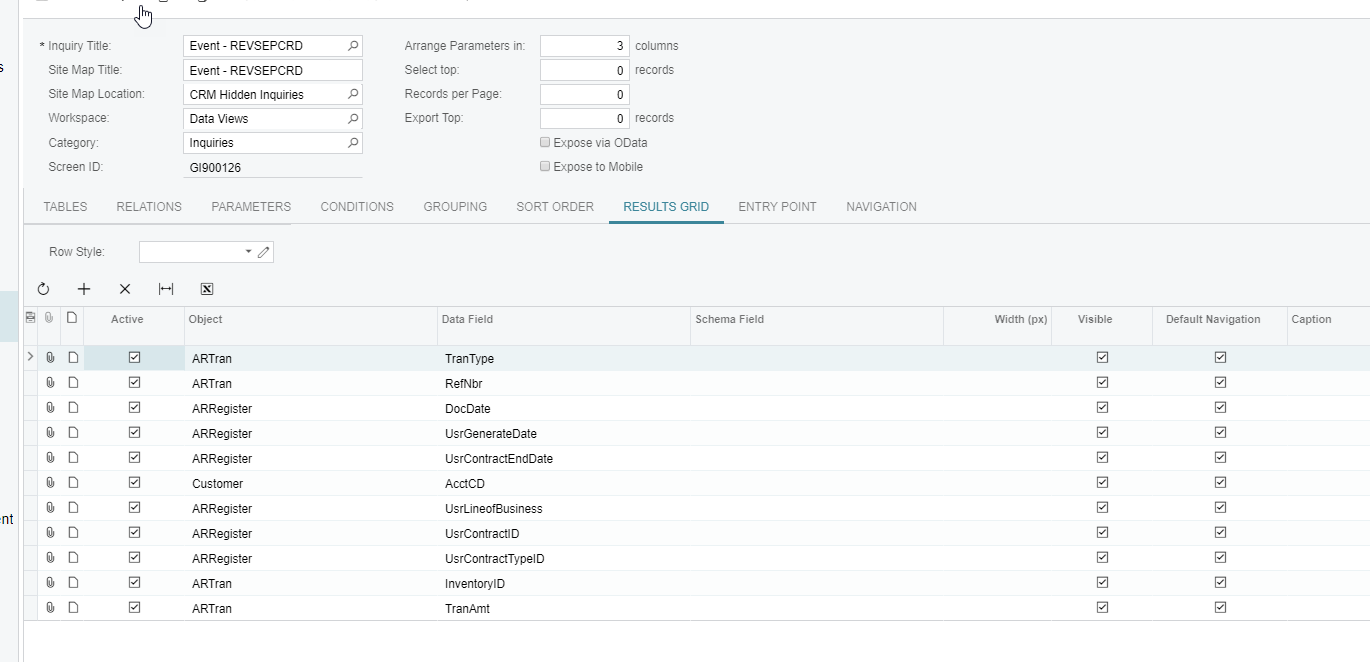
Just as an update, the Acumatica fix for not recognizing multiple line items for a single record in our Business Event was to add additional artran fields to the data source GI (trantype, refnbr, linenbr).  We did that and used For Groups of Records with the artran.refnbr field and had success.

We still ultimately put the event on a schedule.  We haven't solved for the creation inconsistency yet, but will circle back.

We also had an issue where on first pass a large group of records creating (on a schedule) and failing actually stopped all other automation schedules running for the duration.   That is a clue to something, I think, but I am not yet sure what :).


Reply
 Brett Nothan
(@brett-nothan)
Joined: 7 years ago

Member
Posts: 14
July 18, 2019 4:23 pm
Reply toMegan PerryMegan Perry
Megan Perry
Megan Perry

@megan-perry

Thanks for the update.

Brett


Reply
Jeff Beck
 Jeff Beck
(@jbeck)
Joined: 5 years ago

Eminent Member
Posts: 21
March 5, 2020 1:01 pm
Reply toBrett Nothan
Megan Perry
Megan Perry
Megan Perry

Another thing to remember is that if your GI is using grouping, the BE will not be triggered. Acumatica is aware of this flaw but has not stated when this will be fixed. 


Reply
Tim Rodman reacted
Richard Whight
 Richard Whight
(@richard-whight)
Joined: 4 years ago

Eminent Member
Posts: 17
August 22, 2021 5:44 pm
Reply toJeff BeckJeff Beck
Megan Perry
Megan Perry

@jbeck From what I just read they just say you can't do Grouping. In fact I believe you can't pick a GI that has grouping. Excellent fix!


image

Reply
Tim Rodman reacted
Brandon
 Brandon
(@brandon)
Joined: 7 years ago

Member
Posts: 26
June 11, 2019 4:18 pm
Reply toBrett Nothan
Megan Perry

To update our BE's are now working correctly. It was a similar issue where we had actually created a BE to send an email notification anytime there was a failed BE as we were missing that there was an occasional even that would fail. It turned out that this notification BE that was set up to run on record change was causing an issue with all of the by record events triggering correctly. We eliminated this and things are working normally again.


Reply
Tim Rodman reacted
Tim Rodman
Posts: 3195
 Tim Rodman
Admin
September 7, 2019 9:32 pm
(@timrodman)
Famed Member
Joined: 10 years ago

That Automation Schedule clue is interesting @megan-perry.

I personally haven't dug into the depths of Business Events to understand how they get triggered and what carries out the action. Is it done entirely by IIS or is there some Windows Service involved? Where are all the places that you need to check for error logs? I'd love to dig into it at some point, but I know that it will be involved.

I'd love to see any good documentation that anyone has found.


Reply
Forum Jump:
  Previous Topic
Next Topic  

Currently viewing this topic 2 guests.

Forum Information
Recent Posts
Unread Posts
Tags
  • 12 Forums
  • 2,526 Topics
  • 10.9 K Posts
  • 37 Online
  • 2,411 Members
Our newest member: thollings
Latest Post: Generic inquiry with information from Audit history(CT301000)
Forum Icons: Forum contains no unread posts Forum contains unread posts
Topic Icons: Not Replied Replied Active Hot Sticky Unapproved Solved Private Closed

Online Members

 No online members at the moment

Acumatica Forums

Terms of Use & Disclaimers :: Privacy Policy

Copyright © 2025 · AUG Forums, LLC. All rights reserved. This website is not owned, affiliated with, or endorsed by Acumatica, Inc.

‹›×

    ‹›×