
By using this website, you agree to our Terms of Use (click here)

We just upgraded to 2018 r2.
Our users are noticing that their last sign in date is 5 hours ahead of local time. It seems like it is GMT and we are on EST.
Our site settings are Eastern USA Canada.
Any idea how to correct this?
Update on this , it seems like the User sign off is 2 - 1/2 hrs ahead. not 5 as i stated before. I have checked both the site tome setting and the profile preference.

Hi Patrick,
Are you talking about this Last sign-in field?

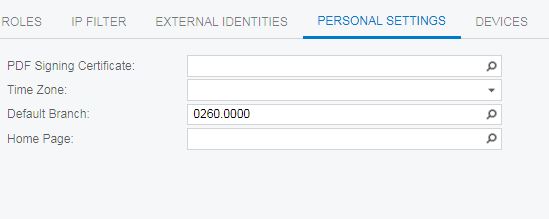
What does the Time Zone field on the PERSONAL SETTINGS tab of the Users (SM201010) screen say?


Patrick,
Tim winning a 'number of tweets' contest is a little like Barry Bonds winning a home run contest at the local high school. The contest was over before the other guy ever took a pitch!
That's a weird one Patrick.
I've experienced three time zones at play in various places:
1. The Time Zone field in the PERSONAL SETTINGS section of the User Profile (SM203010) screen.
2. The Login Time Zone field in the GENERAL DEFAULTS section of the Site Preferences (SM200505) screen.
3. Hardcoded UTC 00:00.
But none of those should be 2.5 hours off in your case.
As for the Tweets, thank you both for the congrats. I definitely abuse it though for an unintended purpose. Twitter is just the easiest way for me to associate notes with screenshots, then roll them up into blog posts like this one later.

Hi there Patrick,
We experienced this too, and when we contacted Acumatica they said that the date is being driven by the Application Web Server time.
Our client is using service appointments and this time difference was affecting our client's ability to restrict making appointments in the past because the login time was always in the future. This meant that they could not restrict the creation of appointments in the past in the preference because the current WAS the past according to the login time. When we contacted them back in April about it they said that the product team was alerted and they were going to be updating 2019 and our work around option was to simply allow for creation of appointments in the past. Not an exciting thing to tell the customer, but it was our only option. Hope this helps!
Rena
We upgraded to Build 18.215.0021, because of the Chrome issue. Since the patch upgrade, the date and time now is correct. Not sure if there is a release note from the upgrade from 206.0011 to 215.0021 that explains this, but we are good now.
Sweet! Glad to hear it.
Online Members