
By using this website, you agree to our Terms of Use (click here)

I am trying to modify the default vendor status to On Hold as opposed to Active when a new vendor is created. When creating a customization project I don’t see where I can modify the attributes in the VendorR status only the Vendor status. As such I get an error during validation. Has anyone else every modified the default status for a vendor?

Hi Kevin,
I'm also getting an error. I actually just tried overriding the default value on the screen level, but didn't even change the Status value and I still get an error.
These are the changes that I made:
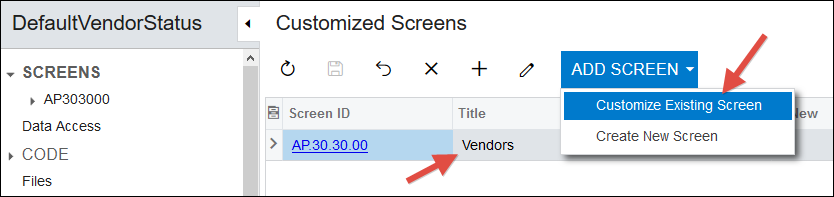


Here is the code that I used which I made no changes to, just let it default:
using System;
using System.Collections.Generic;
using System.Collections;
using System.Globalization;
using System.Linq;
using PX.Data;
using PX.Objects.CS;
using PX.Objects.CA;
using PX.Objects.CR;
using PX.Objects.CM;
using PX.Objects.Common;
using PX.Objects.GL;
using PX.Objects.PO;
using PX.Objects.TX;
using PX.SM;
using Branch = PX.SM.Branch;
using PX.Objects;
using PX.Objects.AP;

namespace PX.Objects.AP
{
public class VendorMaint_Extension : PXGraphExtension
{
#region Event Handlers


[PXDBString(1, IsFixed = true)]
[PXUIField(DisplayName = "Status", Required = true)]
[status.List()]
[PXDefault(status.Active)]
protected virtual void VendorR_Status_CacheAttached(PXCache cache)
{

}


#endregion
}
}
And this is the error that I get:
\App_RuntimeCode\VendorMaint.cs(29): error CS0246: The type or namespace name 'status' could not be found (are you missing a using directive or an assembly reference?)

\App_RuntimeCode\VendorMaint.cs(30): error CS0103: The name 'status' does not exist in the current context

\App_RuntimeCode\VendorMaint.cs(29): error CS0246: The type or namespace name 'status' could not be found (are you missing a using directive or an assembly reference?)

Ok, I think I figured it out with the help of this post on StackOverflow:
It can't find Status within the PX.Objects.AP namespace because it's actually in the PX.Objects.CR.BAccount namespace.
So the solution was to add PX.Objects.CR.BAccount in front of the two status field references in the code like this:
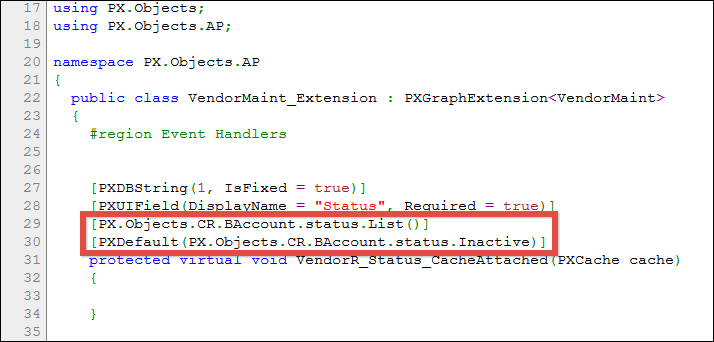
Here is the full code, cleaning up all the white space from the previous post:
using System;
using System.Collections.Generic;
using System.Collections;
using System.Globalization;
using System.Linq;
using PX.Data;
using PX.Objects.CS;
using PX.Objects.CA;
using PX.Objects.CR;
using PX.Objects.CM;
using PX.Objects.Common;
using PX.Objects.GL;
using PX.Objects.PO;
using PX.Objects.TX;
using PX.SM;
using Branch = PX.SM.Branch;
using PX.Objects;
using PX.Objects.AP;

namespace PX.Objects.AP
{
  public class VendorMaint_Extension : PXGraphExtension<VendorMaint>
  {
    #region Event Handlers
    [PXDBString(1, IsFixed = true)]
    [PXUIField(DisplayName = "Status", Required = true)]
    [PX.Objects.CR.BAccount.status.List()]
    [PXDefault(PX.Objects.CR.BAccount.status.Inactive)]
    protected virtual void VendorR_Status_CacheAttached(PXCache cache)
    {
    }
    #endregion
  }
}
I think this is a great example of where Customization Projects can become a slippery slope very quickly.
It's nice that Acumatica is moving more "easy" customization capabilities into Customization Projects (like adding reports to existing screens) because the old Automation Steps did not perform well and caused a lot of problems.
But, the downside of Customization Projects is that they have heavy duty industrial strength capabilities (full solutions like JAMS Acumatica Manufacturing are just a Customization Project) and you can quickly cross the line from doing something simple into doing something complicated that you need to be a developer to fully understand. That's where StackOverflow is helpful, for developers.
I like Customization Projects, but I'm not a developer so I'm still trying to feel out when I'm using a Customization Project and I've crossed the line into territory that would be better handled by a developer with full knowledge of .NET, C#, Visual Studio, etc.