— The Forums are now read-only —
— All new activity now takes place here: —

Some of my users have switched to the modern UI only to have it revert back to the old UI on them. Has anyone else experienced this with their users?

The New UI tends to be not very clear for users in terms of navigation. You don't know 'where you are' in the system per say.
When you are on a particular screen, in old UI it was clear what module you were in etc., In the new UI you can kind of reopen the menu to see what menu item is highlighted but it is still not as clear, ans even that does not work when you launched the screen via Favorites.
I think that is the biggest issue.
@royce-lithgo We have two, but no one works in my test environment except my VARs and myself. I can't figure out why it keeps swapping back. Maybe I need to ping my VARs, I was hoping to avoid that...
@ellie all the screen names are at the top aren't they? I have my users send me the screen name and the URL of where they're at when troubleshooting. With the search bar being user-friendly and the new favorites tab, everyone seems to love the new UI over here. I only have two hold-outs. The biggest drawback was the initial set up. Once they got all the reports and screens on their favorites, they were happy as could be. My only argument for the previous UI was from a development standpoint where it's nice to see where the report is nested. None of my users care that it's Inventory -> Reports -> Audit -> Inventory Qty by Bin. All they need to do is search "qty by bin" and poof it appears.

I don't like the Modern UI at all. It takes a lot longer to navigate than it did with Classic. I can get around the system much faster with the Classic UI.
Solution: My users had bookmarked their URLs. Unfortunately the URL for our ERP had changed and it no longer has .aspx in the string. If your users keep getting switched back, check their URL for ".aspx". Simply removing that from the URL immediately changed them back into the Modern UI. Of course, I had them re-make the bookmarks as well, but it all stemmed from that pesky string. Below is an example of where it was located:
~.acumatica.com/(W(1))/Main.aspx? (incorrect)
~.acumatica.com/(W(1))/Main? (correct)
Bookmarks should be base domain only. You shouldn't need anything after acumatica.com.
And on the Modern UI Topic, I found that for new Tenants, modern UI is defaulted on and can only be switched off by Partners (we're on MYOB Advanced).
Has anyone else encountered this? I accidentally found a simple work around for this - assigning a user Home Page turns on the "Show Classic UI by default" field and leaves it on when you remove the Home Page.

Nice fix Michael! You're right Royce, looks like the Modern UI is on by default now with no way for a user to turn it off.
I agree with you that it is slower than the Classic UI. I hope they find a way to speed it up.
You can turn it off for everyone like this:
https://www.augforums.com/augforums/everything-else/disabling-the-new-user-interface/
Actually you have to assign the Home Page on the User record, and save it. Then the Use Classic UI by default gets ticked. Then you can remove the Home Page and the field will remain ticked.
Sorry Royce, I missed that, was reading too quickly. Doesn't that seem like buggy behavior to you? Seems like something that might get "fixed" in future versions, but maybe it's intentional for some reason.
I suppose Modern UI doesn't support a Dashboard as a home page and so they default to classic. I am just glad to have found a solution to the issue that didn't require our partner to resolve.
Checking the 2019 R2 release notes, it looks like the Site Map tree structure has been replaced with a flat list, including the ability to assign a screen to multiple Workspaces.
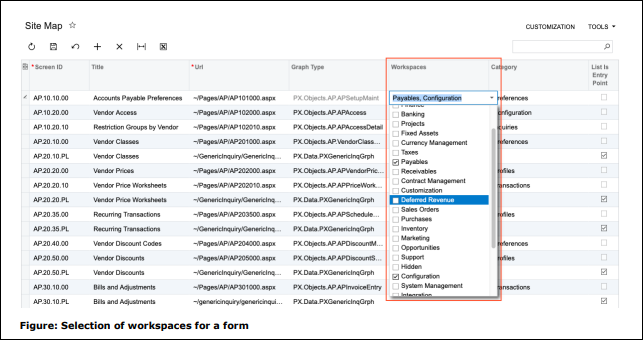
This will make security a lot easier for people using the Modern UI because now they don't have to understand the old tree structure under the hood. Like me, @shawn-slavin will be happy about this.
But, as far as I can tell, it looks like this means that the Classic UI is gone. I haven't installed 2019 R2 yet though to confirm.

Yes sir! The release notes mention the security screens specifically so it appears that the Site Map tree is gone from there as well. I agree, good riddence!

I will be so happy to have selectors for picking screens. Going to save so many clicks!

Haven't got the chance to tinker with 2019 R2 as I am getting to grips with 2019R1. Good if they maintain only ONE, i.e Modern UI.
Didn't find anything on Roadmap and Product Vision on future plans on their Menu 🙂
By using this website, you agree to our Terms of Use (click here)
