AugForums.com

An Acumatica User Group

  • Free
    • Start Here
    • In-Person Gatherings
    • Power BI Workshop
    • Podcast
    • Rolodex
    • Blog
    • Forums
  • Paid
    • AugSQL
    • GI Course
    • GI Library
    • Consulting
  • Register
Acumatica Forums

By using this website, you agree to our Terms of Use (click here)

Forums
AUG Forums
Everything Else
Making AUGForums.co...
 
Notifications
Clear all

Sticky [Sticky] Making AUGForums.com Better

 
Page 2 / 3 Prev Next
Everything Else
Last Post by Tim Rodman 5 years ago
41 Posts
8 Users
6 Reactions
12.6 K Views
RSS
Wyatt.ERP
Posts: 128
 Wyatt.ERP
July 23, 2019 10:38 am
(@wyatt-erp)
Estimable Member
Joined: 6 years ago

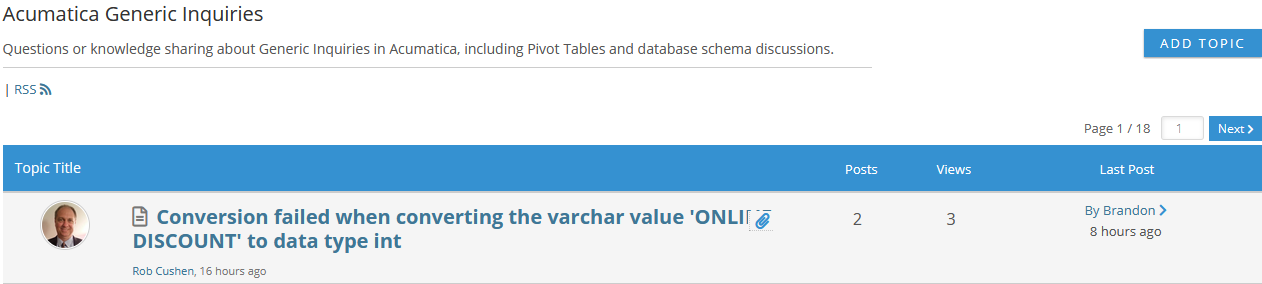
Tim,  it looks like posts that have both long titles and attachments have the attachment icon sit over a piece of the title. 

Reply
Tim Rodman
Posts: 3199
 Tim Rodman
Admin
Topic starter
September 7, 2019 9:51 pm
(@timrodman)
Famed Member
Joined: 10 years ago

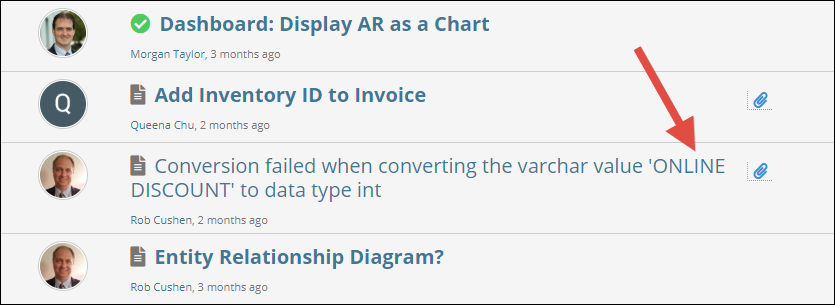
That's weird. I'll have to keep my eye out for this. It's not doing that for me, but it could be because I already "read" the post which makes it change from Bold font to Regular font:

Reply
Wyatt.ERP
Posts: 128
 Wyatt.ERP
January 21, 2020 10:55 am
(@wyatt-erp)
Estimable Member
Joined: 6 years ago

Tim,

Would you be able to make the "AUG Forums" logo at the top of the page a link go back to the top level forum?  I find myself clicking it often thinking it will take me back.


Reply
Tim Rodman
Posts: 3199
 Tim Rodman
Admin
Topic starter
January 21, 2020 12:15 pm
(@timrodman)
Famed Member
Joined: 10 years ago

Great idea. Done!


Reply
Wyatt.ERP
Posts: 128
 Wyatt.ERP
February 13, 2020 4:53 pm
(@wyatt-erp)
Estimable Member
Joined: 6 years ago
Posted by: @timrodman

Dear AUG Forums Users,

I have one simple question for you.

How can we make AUG better?

I'd love to hear your feedback.
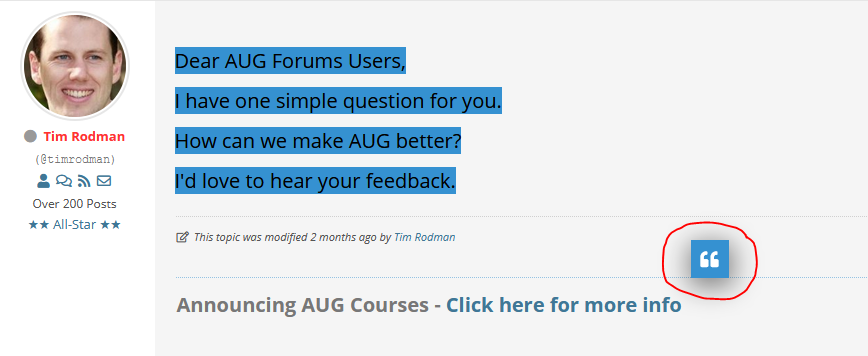
I never noticed this quoting before, where you highlight the post and then click the ["] box that pops out.  Is this new?  It is really slick, I like it!


Reply
Tim Rodman
Posts: 3199
 Tim Rodman
Admin
Topic starter
February 13, 2020 7:07 pm
(@timrodman)
Famed Member
Joined: 10 years ago
Posted by: @wyatt-erp

It is really slick, I like it!

Fairly new, but I can't remember exactly when it got introduced. Works on mobile too which I'm using right now to type this reply 🙂


Reply
ToonSix
Posts: 33
 ToonSix
February 18, 2020 12:13 pm
(@toonsix)
Trusted Member
Joined: 6 years ago

Hi Tim:

Your AUG Forums are fantastic. The only issue I had was that it was public. But now I guess it has become private since you need to login, and that you can monitor it so that competitors don't see our dirty laundry (problems, shortcomings, ...) . They could eat our lunch. 

Thanks, Tim for all your work. 


Reply
ToonSix
Posts: 33
 ToonSix
February 18, 2020 12:18 pm
(@toonsix)
Trusted Member
Joined: 6 years ago

Tim:

I am looking for a free screen anotator that lets me highlight/anotate the screen while demoing. Winsnap requires me to snap the screen, and then anotate it. I don't like that. The Google chrome paint is not good enough. 

You even have an anotator for your mobile phone! Which one? 

Thanks 

Toon Six


Reply
ToonSix
Posts: 33
 ToonSix
February 18, 2020 1:03 pm
(@toonsix)
Trusted Member
Joined: 6 years ago

Hi Tim:

I would not make basic courses. As long as they are free, nobody will pay for them. See AcuCademy. 

You maybe lucky with very advanced coursed that Acumatica will probably never offer free. 

I am thinking of:

  • Advanced Discrete Manufacturing course for plastics manufacturers (injection molding, blow molding, ...therma form,...) with Advanced Planning and Scheduling
  • Integrated Advanced Manufacturing where you take 2-3 business scenarios through opportunities, project accounting, CadTalk, AME (BOM, demand planning, MRP), Production Order Release, Critical Materials, WMS (NetStock, Savant, ..) to purchase and receive materials ( ISV app: ..), and put them away, Material Wizard and WMS to scan materials and to move them to production plant, actual production with capturing actual labor and materials used (WMS scanning),  moving finished goods to inventory, pick, pack and ship using a WMS, sending out invoice, payment processing (APS, EBizCharge, ..)
  • Demand Planning and what if scenarios
  • Advanced inventory management: integration of Eazystock (including demand planning and complex EOQ)  with Acumatica Distribution and AME. 

Such courses would really be a homerun with customers.

Thanks

Toon Six


Reply
Tim Rodman
Posts: 3199
 Tim Rodman
Admin
Topic starter
February 22, 2020 3:40 pm
(@timrodman)
Famed Member
Joined: 10 years ago
Posted by: @toon-six

I am looking for a free screen anotator that lets me highlight/anotate the screen while demoing. Winsnap requires me to snap the screen, and then anotate it. I don't like that. The Google chrome paint is not good enough. 

You even have an anotator for your mobile phone! Which one? 

I'm still using WinSnap and like it because it's simple. You don't have to make an annotation, you don't even have to have the window pop-up. If you like that idea, check Options -> Auto-Copy and Options... -> Preferences -> Saving -> Keep WinSnap minimized in auto-save and copy mode.


Reply
Tim Rodman
Posts: 3199
 Tim Rodman
Admin
Topic starter
February 22, 2020 3:43 pm
(@timrodman)
Famed Member
Joined: 10 years ago
Posted by: @toon-six

I would not make basic courses. As long as they are free, nobody will pay for them. See AcuCademy. 

You maybe lucky with very advanced coursed that Acumatica will probably never offer free.

You might be right. We'll see. I'm going to soldier on for now by focusing AUG Courses on reporting (Dashboards, Pivot Tables, Generic Inquiries, Report Designer, and Financial Report Writer). I think there is value to having video training courses broken into short digestible lessons, even though there is already material provided by Acumatica. I also think that I'll be able to cover a lot of scenarios that Acumatica hasn't even thought about yet. These aren't "static" courses, but "living and breathing" courses that will continually have new lessons added to them.


Reply
ToonSix
 ToonSix
(@toonsix)
Joined: 6 years ago

Trusted Member
Posts: 33
February 22, 2020 4:02 pm
Reply toTim RodmanTim Rodman

@timrodman

You could describe some scenarios, and present them to the forum members. Ask them which ones are most important, and whether they are willing to pay $300. Actually customers may like them the most since they will describe advanced business scenarios. You could also ask your members for scenarios.

One scenario I like to see covered in detail is purchase planning as mentioned in your topic of inventory replenishment. 

Thanks Tim, for all your great work.

Toon Six


Reply
Tim Rodman
Posts: 3199
 Tim Rodman
Admin
Topic starter
March 10, 2020 6:17 pm
(@timrodman)
Famed Member
Joined: 10 years ago
Posted by: @toon-six

One scenario I like to see covered in detail is purchase planning

Thanks Toon. I'll consider this for the future.


Reply
Tim Rodman
Posts: 3199
 Tim Rodman
Admin
Topic starter
July 13, 2020 4:06 am
(@timrodman)
Famed Member
Joined: 10 years ago

I'm trying out a new forum layout. Personally, I think it's more intuitive, but I'd like to get your feedback.


There are a bunch of Forums. Now, rather than having to sift through each Forum individually, you can see all Discussion Topics from all Forums. You can still go into a specific Forum by clicking the down arrow next to Forums in the upper left-hand corner, but Discussion Topics from all Forums will be displayed by default and you can hover over the icon in the Forum column to see which forum a particular Discussion Topic is in.

image


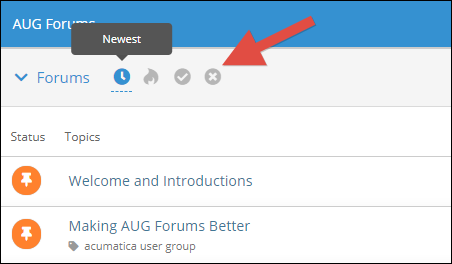
There are 4 icons on the top. The first icon is called Newest and it sorts the Discussion Topics with the most recent reply on top. The second icon is called Popular and it sorts the Discussion Topics by most popular on top according to number of replies. The third icon is called Resolved and it filters the Discussion Topics to only show those that been marked Solved. The fourth icon is called Unsolved and it filters the Discussion Topics to only show those that have not been marked Solved.
image


If you started a Discussion Topic, you can mark it Solved by going to the first post in the Discussion Topic and clicking this Solved icon. Then it will appear in the Resolved filter rather than the Unsolved filter.

image


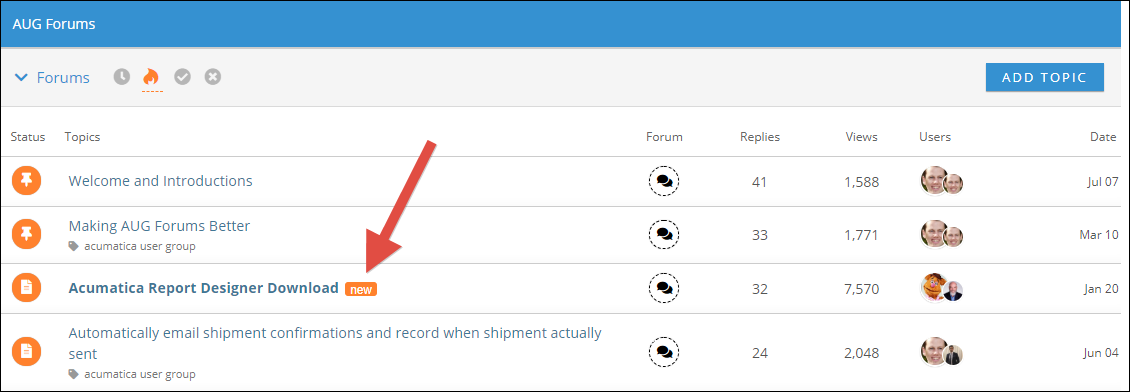
If there has been a new post since you last clicked on that Discussion Topic, you will see a new icon next to the Discussion Topic title:
image


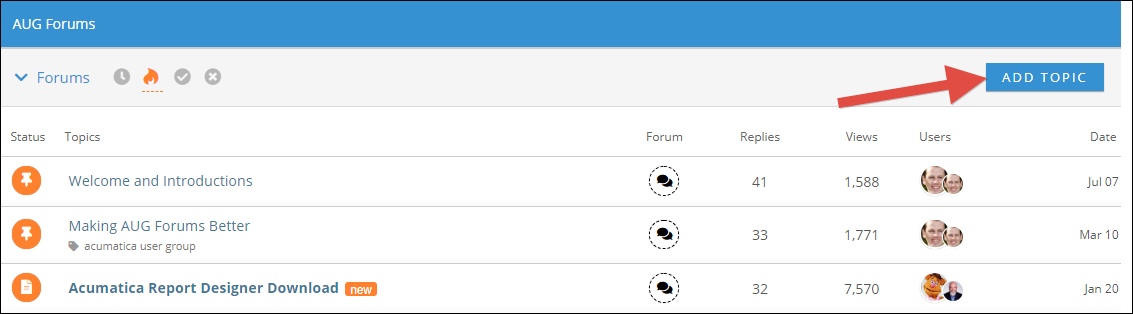
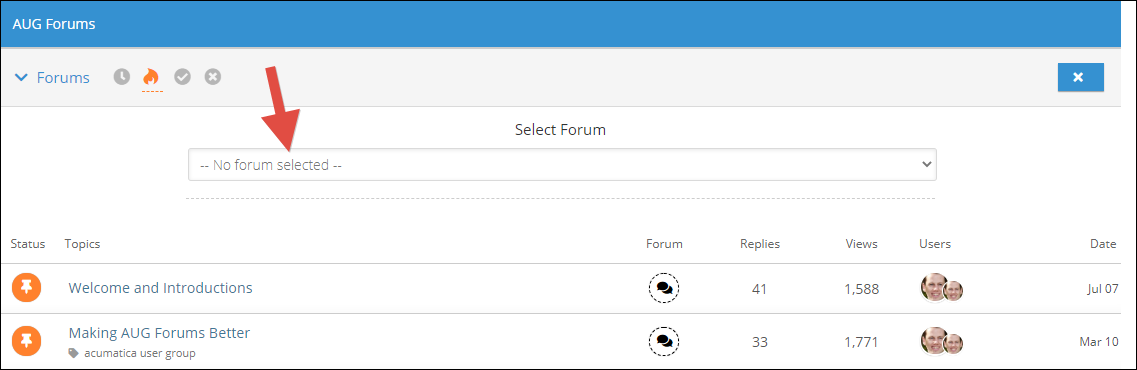
When you want to add a new Discussion Topic, you click ADD TOPIC first, then you select which Forum you want to add it to. I think this is more intuitive than the old way of selecting a Forum first, then creating a Discussion Topic. The separate Forums are still important because the Forum titles appear in the URL which is important for when Google indexes the content on the site. But there is still the Everything Else Forum for those Discussion Topics that don't seem to fit in any of the other Forums.
image
image


It's now easier to scroll through the content. 50 Discussion Topics are shown by default. Want to see the next 50? Just scroll to the bottom and click on Load More Topics:
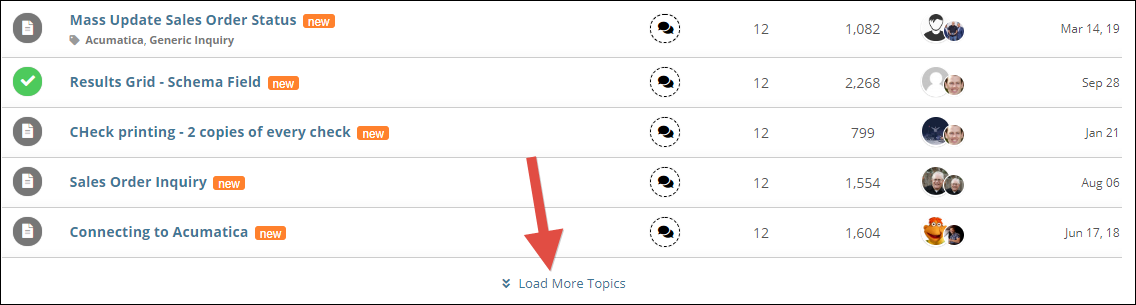
image


In the Users column, for each Discussion Topic, there are two icons. The larger icon is the user who created the Discussion Topic. The smaller icon is the last user to reply to the Discussion Topic:
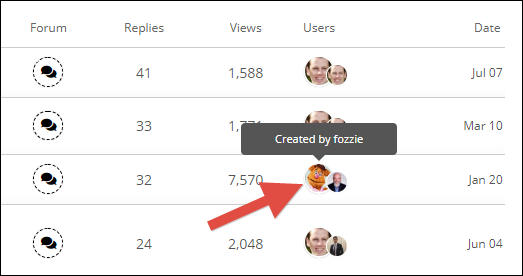
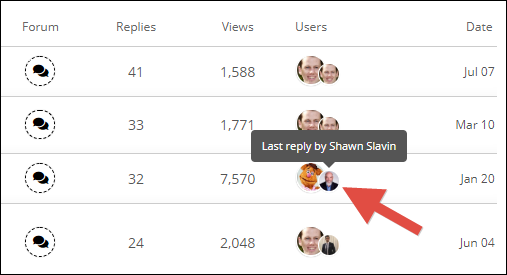
image
image


There are now threaded replies. When you go into a Discussion Topic, you can see a reply indented underneath the post that it's replying to. Click a Reply button to ensure that your post gets indented appropriately underneath the post that you are replying to.
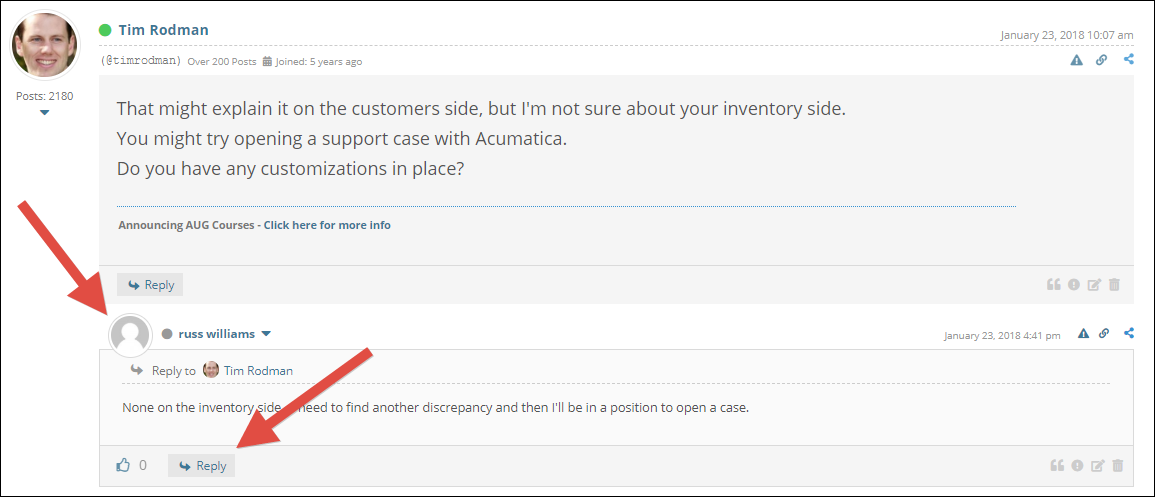
image


What do you think about this new forum layout?


Reply
Scott Dunstan, Gustavo Carrasquillo and Tony Lanza reacted
Gustavo Carrasquillo
 Gustavo Carrasquillo
(@gustavo-carrasquillo)
Joined: 6 years ago

Trusted Member
Posts: 37
July 13, 2020 9:09 am
Reply toTim RodmanTim Rodman
Posted by: @timrodman

I'm trying out a new forum layout. Personally, I think it's more intuitive, but I'd like to get your feedback.


There are a bunch of Forums. Now, rather than having to sift through each Forum individually, you can see all Discussion Topics from all Forums. You can still go into a specific Forum by clicking the down arrow next to Forums in the upper left-hand corner, but Discussion Topics from all Forums will be displayed by default and you can hover over the icon in the Forum column to see which forum a particular Discussion Topic is in.

image


There are 4 icons on the top. The first icon is called Newest and it sorts the Discussion Topics with the most recent reply on top. The second icon is called Popular and it sorts the Discussion Topics by most popular on top according to number of replies. The third icon is called Resolved and it filters the Discussion Topics to only show those that been marked Solved. The fourth icon is called Unsolved and it filters the Discussion Topics to only show those that have not been marked Solved.

image


If you started a Discussion Topic, you can mark it Solved by going to the first post in the Discussion Topic and clicking this Solved icon. Then it will appear in the Resolved filter rather than the Unsolved filter.

image


If there has been a new post since you last clicked on that Discussion Topic, you will see a new icon next to the Discussion Topic title:

image


When you want to add a new Discussion Topic, you click ADD TOPIC first, then you select which Forum you want to add it to. I think this is more intuitive than the old way of selecting a Forum first, then creating a Discussion Topic. The separate Forums are still important because the Forum titles appear in the URL which is important for when Google indexes the content on the site. But there is still the Everything Else Forum for those Discussion Topics that don't seem to fit in any of the other Forums.

image
image


It's now easier to scroll through the content. 50 Discussion Topics are shown by default. Want to see the next 50? Just scroll to the bottom and click on Load More Topics:

image


In the Users column, for each Discussion Topic, there are two icons. The larger icon is the user who created the Discussion Topic. The smaller icon is the last user to reply to the Discussion Topic:

image
image


There are now threaded replies. When you go into a Discussion Topic, you can see a reply indented underneath the post that it's replying to. Click a Reply button to ensure that your post gets indented appropriately underneath the post that you are replying to.

image


What do you think about this new forum layout?

I really like it Tim! Great job! 


Reply
Harsha Sarjapur
Posts: 55
 Harsha Sarjapur
July 15, 2020 8:49 pm
(@infosourcing)
Trusted Member
Joined: 6 years ago

Tim,

In using forums for a really long time, I can tell you users when they login they are limited by time, so it would be good to see posts that I responded, post that I care about, topics that I want to read and learn or respond, kind of skill matching.... 

If we are shown top 20 posts in last 1 week or time frame, sort by new topics, hot topics, On fire topics that will allow us to quickly click and see what's going on ... Also easy to identify topics based on icons for Questions, How-To, 2 Cents, Wishing will also catches attention... 

Being able to subscribe to category level so if anybody posts then send me an email, I know this exists at post level but not sure at category level ... Ohh an article showing how to use this forum, tips and tricks of copy/paste feature most people won't know what features already exists 🙂 

(Funny I didn't read the last page/msg on this thread and posted and I do see your last post with screenshots explaining all new icons and features)

Reply
Tim Rodman
 Tim Rodman
Admin
(@timrodman)
Joined: 10 years ago

Famed Member
Posts: 3199
July 15, 2020 9:28 pm
Reply toHarsha SarjapurHarsha Sarjapur

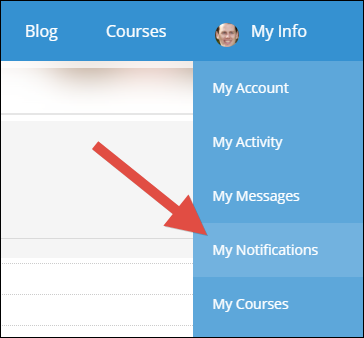
@infosourcing Regarding notifications, you can use My Info -> My Notifications to modify your notifications.

image


In there you can either update your individual Discussion Topic preferences on the bottom or you can subscribe to an entire Forum for new Topics or both new Topics and new Posts.

image


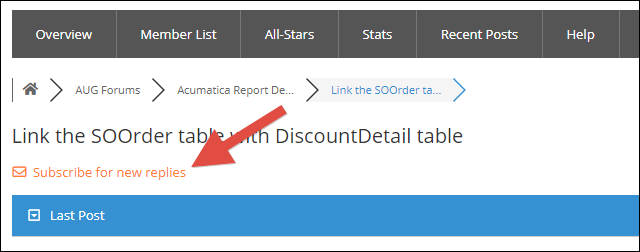
You can subscribe to an individual Discussion Topic with this button on the top:

image

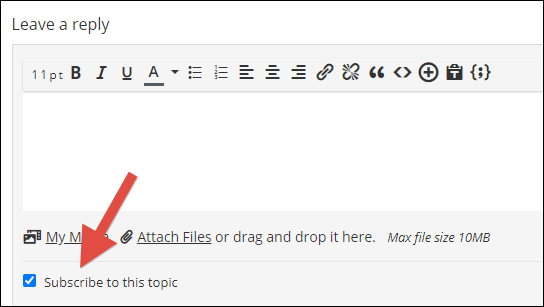
Or leave this box checked on the bottom when adding a reply:

image


Notifications are sent by email, but you can also see them by clicking the notification icon on the upper-right of the forums:

image

Reply
Scott Dunstan and Harsha Sarjapur reacted
Harsha Sarjapur
Posts: 55
 Harsha Sarjapur
July 18, 2020 8:02 am
(@infosourcing)
Trusted Member
Joined: 6 years ago

Tim, awesome I think new interface makes it easier to browse through topics. 

I think I like the unseen list feature a lot, perfect for somebody who logs back once a week and gets to catch up with the community, instead of clicking like button there should have been read button it would have been a better user experience. 

Keep up the good work my friend, btw I liked the woodwork garage location in your video,  its perfect location for ERP consultants 🙂 


Reply
Scott Dunstan reacted
Tim Rodman
 Tim Rodman
Admin
(@timrodman)
Joined: 10 years ago

Famed Member
Posts: 3199
July 18, 2020 12:00 pm
Reply toHarsha SarjapurHarsha Sarjapur

For those wondering what the Unseen List is and what the woodwork garage location is (actually it's a shop in the backyard), checkout the 30 minute AUG Live overview video here: https://www.augforums.com/live

I agree that a "read" button would be better, but I'm using the features currently available to me in the forum software for now and "like" was the closest thing available to what I was looking for.


Reply
Page 2 / 3 Prev Next
Forum Jump:
  Previous Topic
Next Topic  
Forum Information
Recent Posts
Unread Posts
Tags
  • 12 Forums
  • 2,528 Topics
  • 10.9 K Posts
  • 3 Online
  • 2,412 Members
Our newest member: Peter Paasch
Latest Post: Tax on Inventory Transfer
Forum Icons: Forum contains no unread posts Forum contains unread posts
Topic Icons: Not Replied Replied Active Hot Sticky Unapproved Solved Private Closed

Online Members

 No online members at the moment

Acumatica Forums

Terms of Use & Disclaimers :: Privacy Policy

Copyright © 2026 · AUG Forums, LLC. All rights reserved. This website is not owned, affiliated with, or endorsed by Acumatica, Inc.

‹›×

    ‹›×