AugForums.com

An Acumatica User Group

  • Free
    • Start Here
    • In-Person Gatherings
    • Power BI Workshop
    • Podcast
    • Rolodex
    • Blog
    • Forums
  • Paid
    • AugSQL
    • GI Course
    • GI Library
    • Consulting
  • Register
Acumatica Forums

By using this website, you agree to our Terms of Use (click here)

Forums
AUG Forums
Everything Else
Including file atta...
 
Notifications
Clear all

Questions Including file attachments when printing an invoice

 
Everything Else
Last Post by Adam Brunner 4 years ago
13 Posts
6 Users
10 Reactions
6,776 Views
RSS
KDYoung
Posts: 26
 KDYoung
Topic starter
September 24, 2019 9:13 am
(@kdyoung)
Eminent Member
Joined: 6 years ago

We have a client who really wants the ability when printing an invoice (to PDF)  to automatically include and print to to the same PDF any attached files on that invoice.  For example, they create an invoice, attach some backup and then print the invoice including the backup (scanned bills, other supporting documents,etc.)?

Actually they'd love to take it even a step further and when creating and printing a pro-forma invoice for T&M billing, grab and include in the PDF any files that were attached to the transactions (AP bills with attached image of invoice) that make up the pro-form invoice.

Anyone know of a way to accomplish this or a 3rd party product that may do this??


KimM reacted
12 Replies
Harsha Sarjapur
Posts: 55
 Harsha Sarjapur
September 26, 2019 9:05 am
(@infosourcing)
Trusted Member
Joined: 6 years ago

Kevin, If you attach scanned images to file system on those documents (invoice) then you can modify the Sales invoice report and show those images attached as page 2, 3. Pls note it will print any images attached on each page as long as people are attaching the right scanned images. 

We do this in our plugin Printshop where the sales order approval has the image of the art attached to the order so they can see how art looks and approve, so this solution shld work for your client too.

- Harsha


Reply
KimM reacted
KDYoung
Posts: 26
 KDYoung
Topic starter
September 26, 2019 2:17 pm
(@kdyoung)
Eminent Member
Joined: 6 years ago

Harsha, thanks for the response.  Do you have any examples, documentation or can you point me in the right direction as to how I would go about doing that?  I've looked through the documents I have and done some further web searches but not coming up with anything.  Is it just as simple as adding an Embedded Image to the report that points to the attached files, the path to which are stored in some table we can link to from for example the Invoice header table, etc.?


Reply
KDYoung
Posts: 26
 KDYoung
Topic starter
September 26, 2019 2:38 pm
(@kdyoung)
Eminent Member
Joined: 6 years ago

One point I just caught as i re-read your comments, the file must be stored in a file system and I can't use the file stored in the database - is that correct?


Reply
Harsha Sarjapur
 Harsha Sarjapur
(@infosourcing)
Joined: 6 years ago

Trusted Member
Posts: 55
September 26, 2019 3:00 pm
Reply toKDYoungKDYoung

@kevin-young

When you upload a file, by default it gets stored in file system which also stored in the database in most cases, unless your storing the files on AWS.

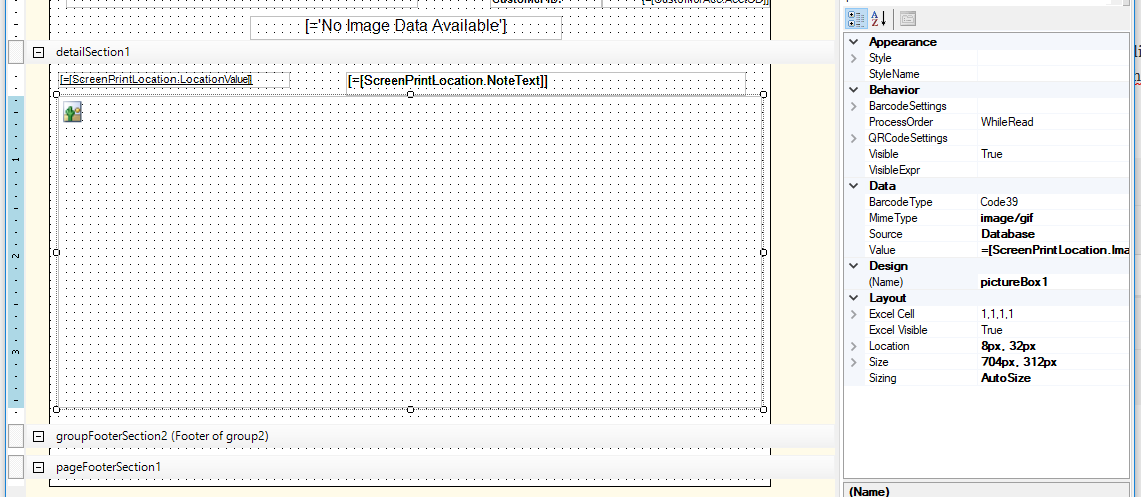
In the report designer you modify/add new sub report such that you can access the attached files, if you upload a image/file to Sales order document you need to link few tables NoteDoc, UploadFile and in the report set the image MIME Type to "image/gif" and source as "Database" and the field name assigned in the value, this shld bring the image for that SO, hope this helps.


Reply
KimM reacted
kalumw
 kalumw
(@kalumw)
Joined: 5 years ago

Active Member
Posts: 7
June 30, 2021 7:41 pm
Reply toHarsha SarjapurHarsha Sarjapur
KDYoung

@infosourcing 

Hi Harsha, 

Would you be able to attach an example of what the document looks like. I've got a client that wants to attach a 5 page pdf of Terms and conditions to the end of every purchase order. Do you think this would be possible?

Cheers, 


Reply
Tim Rodman reacted
KDYoung
Posts: 26
 KDYoung
Topic starter
September 27, 2019 9:21 am
(@kdyoung)
Eminent Member
Joined: 6 years ago

Thanks Harsha!!  I will give this a try.


Reply
Tim Rodman reacted
Adam Brunner
Posts: 14
 Adam Brunner
December 16, 2021 9:43 am
(@abrunner)
Eminent Member
Joined: 6 years ago

Does anyone have a working example or has tested this?

Along the same lines, we want to attach return labels to the SH document which would then be attached (printed) onto a report and emailed to the customer. 


Reply
Adam Brunner
Posts: 14
 Adam Brunner
December 17, 2021 3:01 pm
(@abrunner)
Eminent Member
Joined: 6 years ago

With a bit of digging I found the following:

Join the following tables
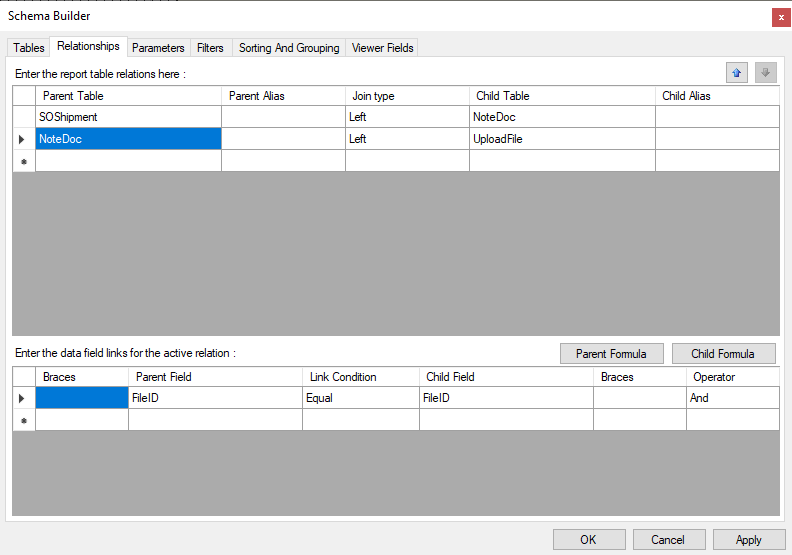
image

Then you can add a Picture box using the following parameters in the Data section:

Mime Type: image/png
Source: Database
Value: ='Shipments (SH140730)\\Sample Return Label.png'

:light_bulb_on: the Value is pulled from the File box within the File Maintenance screen. Then, it is modified with single quotes with a double backslash.

What I don't know is what to use to make the image dynamic rather than static.

Does anyone have any insight?


Reply
Tim Rodman reacted
Jeffrey Patch
 Jeffrey Patch
(@jeffrey-patch)
Joined: 6 years ago

Trusted Member
Posts: 38
December 19, 2021 4:15 pm
Reply toAdam BrunnerAdam Brunner

@abrunner Whatdo you mean by "dynamic rather than static"?


Reply
Tim Rodman reacted
Adam Brunner
 Adam Brunner
(@abrunner)
Joined: 6 years ago

Eminent Member
Posts: 14
December 20, 2021 7:45 am
Reply toJeffrey PatchJeffrey Patch
Adam Brunner

@jeffrey-patch Dynamic = the report looks at the file attached to the shipment number. 

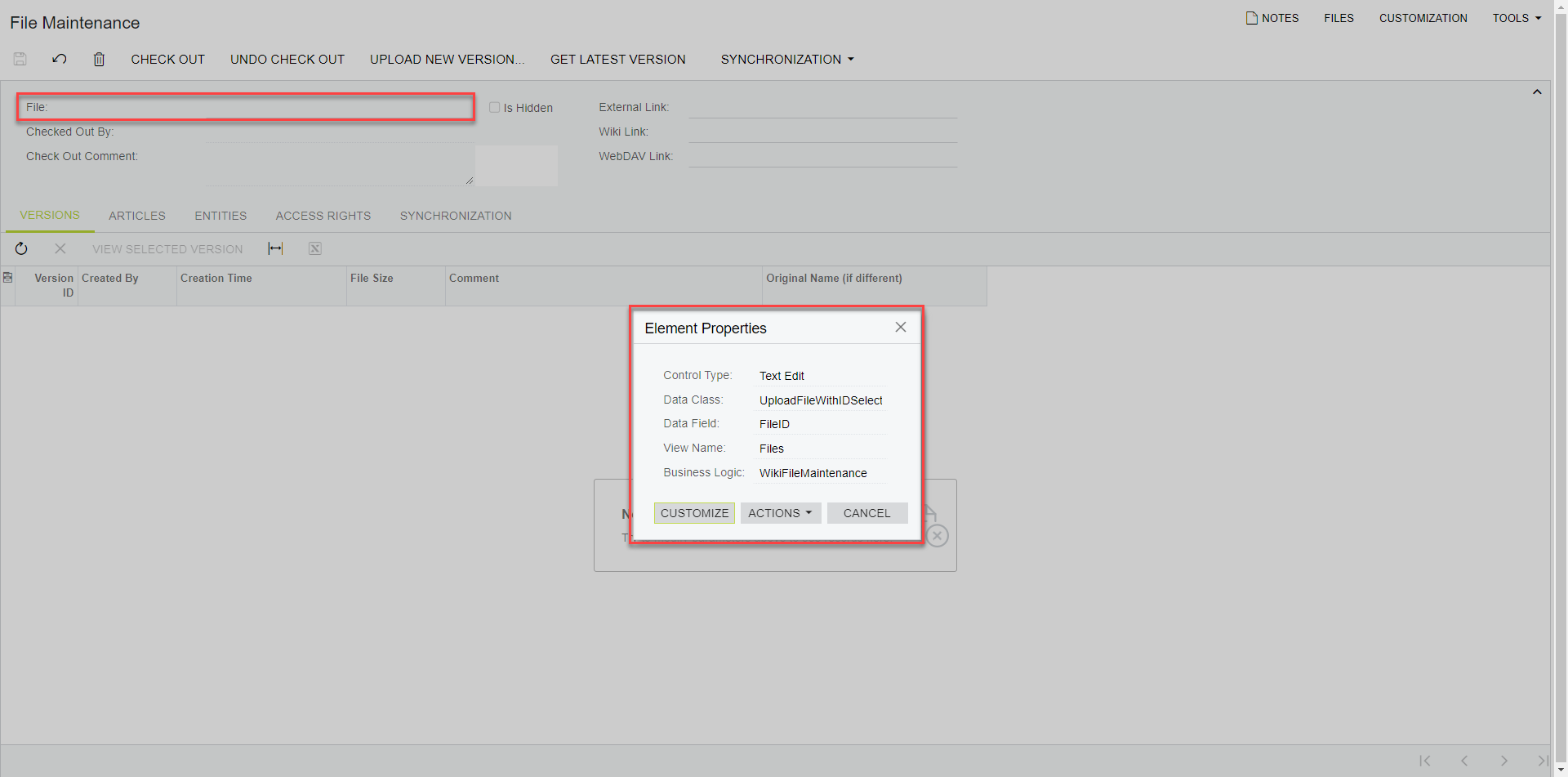
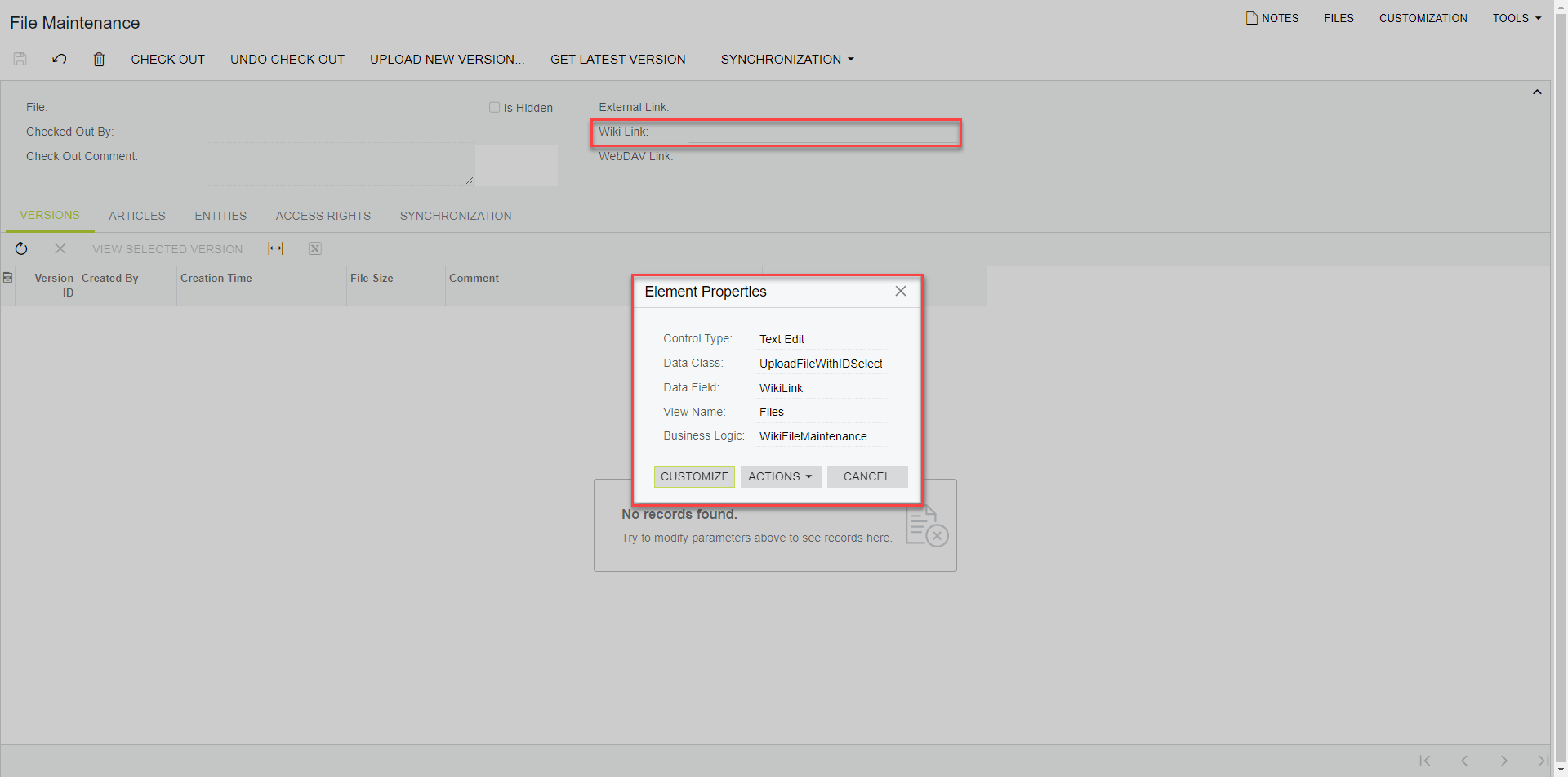
If you look at what I have above, the report is mapped to a specific file name, e.g., ='Shipments (SH140730)\\Sample Return Label.png'. To be dynamic, it should be mapped to data field from the File Maintenance screen that will pull into the report. I have found and tested that the File name (some modification required, see previous post) or the Wiki Link can be used successfully. But neither have data fields/DACs that are straightforward to join.  

image
image

I hope that clears up what I'm trying to do. 


Reply
Wyatt.ERP
Posts: 128
 Wyatt.ERP
December 21, 2021 10:51 am
(@wyatt-erp)
Estimable Member
Joined: 6 years ago

Hi @abrunner, try using =[UploadFile.Name] in the Value filed of the image. 

If it's possible for there to be multiple files on your shipments, I suggest moving the part that has NoteDoc and UploadFile schema into a sub report, expecting a NoteID as a parameter.  Add that subreport to your reports, passing in the NoteID you want.  You may start doubling/tripling+ up information unintentionally with each additional file if you are joining NoteDoc in to the primary query. 

The Subreport also breaks the attachment from SOShipment, so you can add images to any report you want.  It just needs to be NoteDoc DAC joined to UploadFile DAC with NoteDoc.NoteID = @NoteID parameter in the Filter.


Reply
Adam Brunner reacted
Adam Brunner
 Adam Brunner
(@abrunner)
Joined: 6 years ago

Eminent Member
Posts: 14
December 21, 2021 11:40 am
Reply toWyatt.ERPWyatt.ERP

@wyatt-erp Funny timing as I just found the =[UploadeFile.Name] in the Acumatica S150 class and was going to share later on today.

You other two points are appreciated too. While there should only be one file (return label) attached to the SH, but we all know what "should" really means. Furthermore, building this into a sub will make it a far more versatile report. 

Thanks for chiming in. 


Reply
Tim Rodman and Wyatt.ERP reacted
Forum Jump:
  Previous Topic
Next Topic  
Forum Information
Recent Posts
Unread Posts
Tags
  • 12 Forums
  • 2,528 Topics
  • 10.9 K Posts
  • 16 Online
  • 2,413 Members
Our newest member: psteichen
Latest Post: Credit Reference Report Needed
Forum Icons: Forum contains no unread posts Forum contains unread posts
Topic Icons: Not Replied Replied Active Hot Sticky Unapproved Solved Private Closed

Online Members

 No online members at the moment

Acumatica Forums

Terms of Use & Disclaimers :: Privacy Policy

Copyright © 2026 · AUG Forums, LLC. All rights reserved. This website is not owned, affiliated with, or endorsed by Acumatica, Inc.

‹›×

    ‹›×