AugForums.com

An Acumatica User Group

  • Free
    • Start Here
    • In-Person Gatherings
    • Power BI Workshop
    • Podcast
    • Rolodex
    • Blog
    • Forums
  • Paid
    • AugSQL
    • GI Course
    • GI Library
    • Consulting
  • Register
Acumatica Forums

By using this website, you agree to our Terms of Use (click here)

Forums
AUG Forums
Everything Else
Import Scenario for...
 
Notifications
Clear all

Questions Import Scenario for Shipment (with shipped qty)

 
Everything Else
Last Post by Tim Rodman 6 years ago
2 Posts
2 Users
0 Reactions
2,505 Views
RSS
Posts: 1
 Paulo Christian Sanjose
Topic starter
February 13, 2020 1:01 am
(@paulo-christian-sanjose)
Member
Joined: 6 years ago

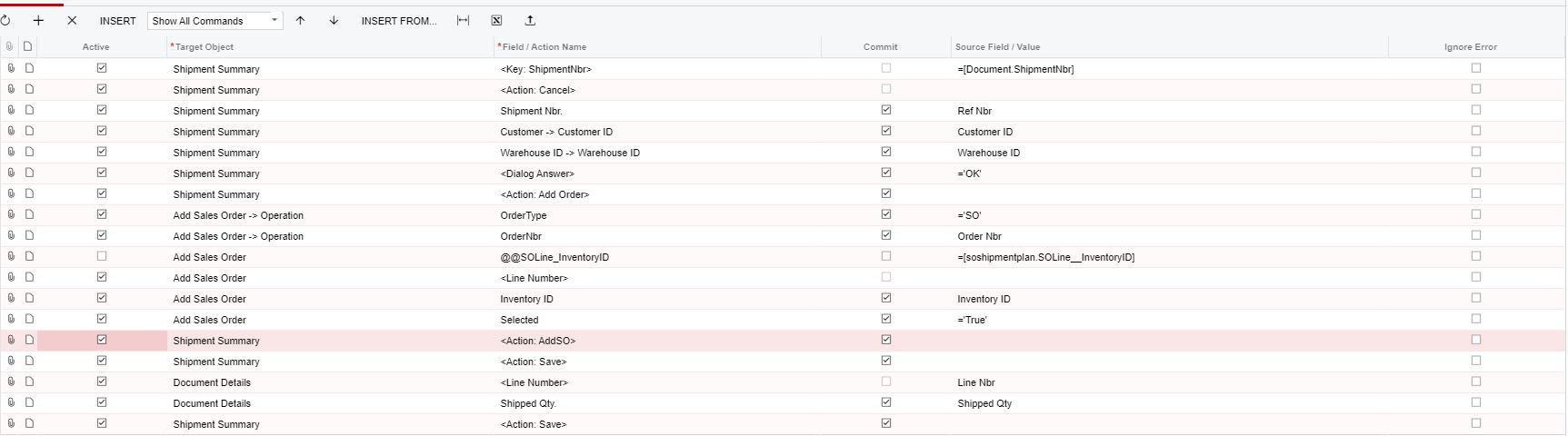
I am trying to create an import scenario which creates shipment for orders. I am able to successfully do this but I can't edit the shipped qty because the qty in the 'Add Sales Order' pop-up is disabled. I tried to reference the shipped qty to the line nbr but it doesn't work.


1 Reply
Tim Rodman
Posts: 3199
 Tim Rodman
Admin
March 5, 2020 10:59 pm
(@timrodman)
Famed Member
Joined: 10 years ago

What if you try moving your Shipped Qty. line before the Add Sales Order lines? I know it's counter-intuitive, but sometimes when you move the stuff that you want to happen AFTER a pop-up window BEFORE the pop-up window it works. Not sure if it will work here, but maybe...


Reply
Forum Jump:
  Previous Topic
Next Topic  
Forum Information
Recent Posts
Unread Posts
Tags
  • 12 Forums
  • 2,528 Topics
  • 10.9 K Posts
  • 6 Online
  • 2,412 Members
Our newest member: Peter Paasch
Latest Post: Tax on Inventory Transfer
Forum Icons: Forum contains no unread posts Forum contains unread posts
Topic Icons: Not Replied Replied Active Hot Sticky Unapproved Solved Private Closed

Online Members

 No online members at the moment

Acumatica Forums

Terms of Use & Disclaimers :: Privacy Policy

Copyright © 2026 · AUG Forums, LLC. All rights reserved. This website is not owned, affiliated with, or endorsed by Acumatica, Inc.

‹›×

    ‹›×