AugForums.com

An Acumatica User Group

  • Free
    • Start Here
    • In-Person Gatherings
    • Power BI Workshop
    • Podcast
    • Rolodex
    • Blog
    • Forums
  • Paid
    • AugSQL
    • GI Course
    • GI Library
    • Consulting
  • Register

— The Forums are now read-only —

— All new activity now takes place here: —

AugForums.com Discord Server
Forums
AUG Forums
Everything Else
Dynamic fields on a...
 
Notifications
Clear all

Questions Dynamic fields on a Sales Order Summary Report Email Settings

 
Everything Else
Last Post by Tim Rodman 6 years ago
8 Posts
2 Users
1 Reactions
2,954 Views
RSS
Lisandro Quiñones
Posts: 17
 Lisandro Quiñones
Topic starter
February 13, 2020 1:23 pm
(@lisandro-quinones)
Eminent Member
Joined: 6 years ago

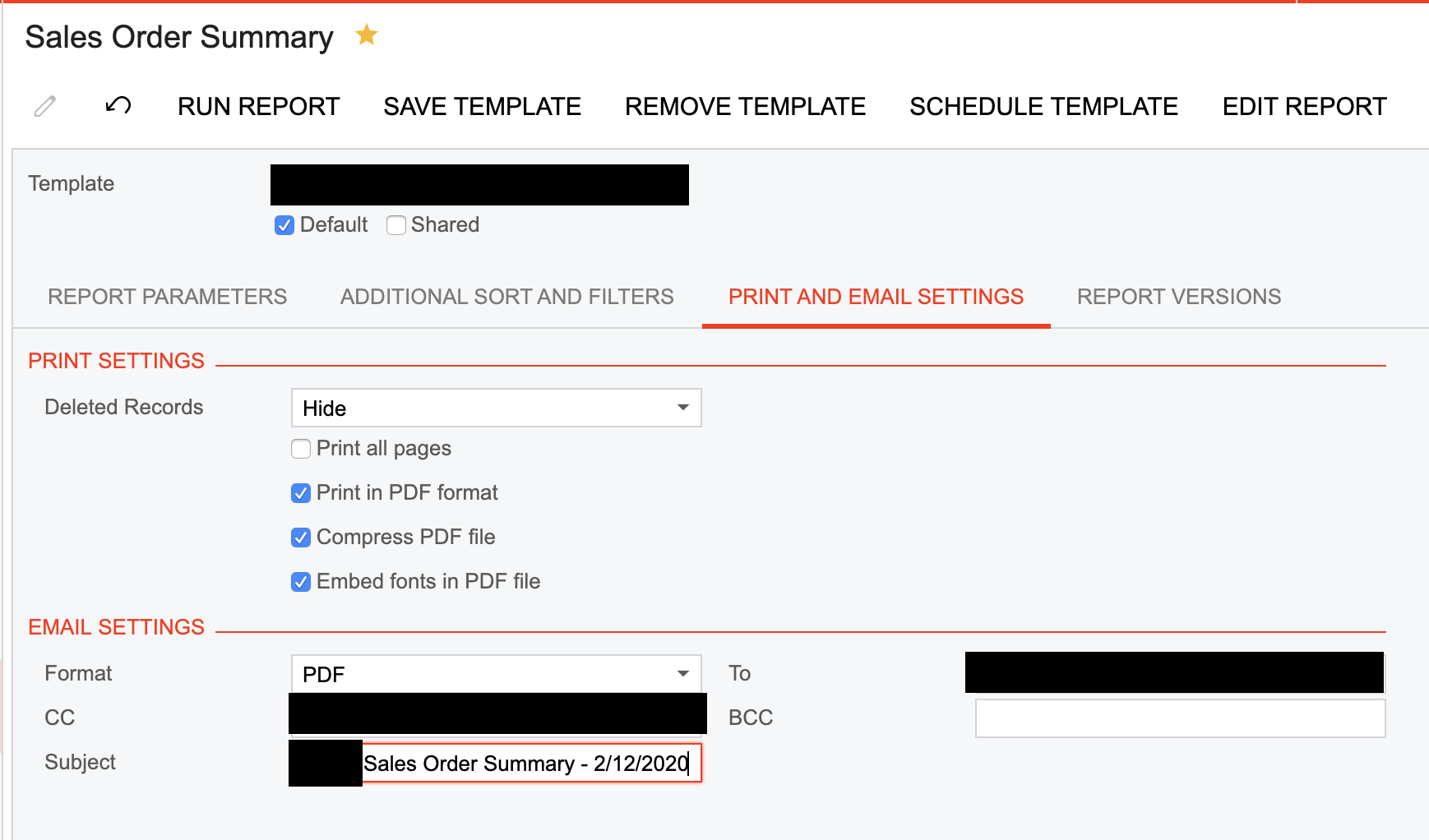
Can I use dynamic fields in the reports' email settings? I would like to pull the date field automatically instead of having to enter it every time I send the report by email.


7 Replies
Tim Rodman
Posts: 3204
 Tim Rodman
Admin
March 7, 2020 9:52 pm
(@timrodman)
Famed Member
Joined: 11 years ago

Hi Lisandro,

Does leaving the dates blank as suggested in this post work?

https://www.augforums.com/forums/acumatica-report-designer/schedule-sales-order-details-by-inventory-item-report-to-run-monthly/


Reply
Lisandro Quiñones
 Lisandro Quiñones
(@lisandro-quinones)
Joined: 6 years ago

Eminent Member
Posts: 17
March 11, 2020 4:49 pm
Reply toTim RodmanTim Rodman

@timrodman the issue is not with the scheduling itself, but rather with inserting a dynamic date field on the email subject so that when the schedule triggers the email, the recipient can see the date on the email subject.


Reply
Tim Rodman
Posts: 3204
 Tim Rodman
Admin
March 24, 2020 8:43 pm
(@timrodman)
Famed Member
Joined: 11 years ago

Ah, I see. I haven't tried this, but maybe you can leave Subject empty on the screen and modify the Subject in the report definition?


Reply
Lisandro Quiñones
 Lisandro Quiñones
(@lisandro-quinones)
Joined: 6 years ago

Eminent Member
Posts: 17
March 25, 2020 11:10 am
Reply toTim RodmanTim Rodman

@timrodman right that's what I do manually, I want to be able to automate it!


Reply
Tim Rodman
Posts: 3204
 Tim Rodman
Admin
May 15, 2020 8:38 pm
(@timrodman)
Famed Member
Joined: 11 years ago

Sorry, by "Subject in the report definition", I meant in Report Designer, not when you run the report on the screen.

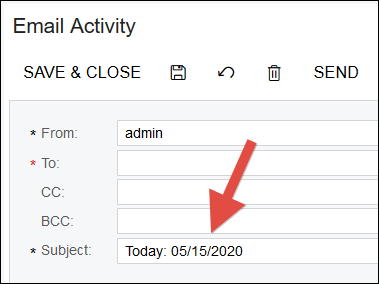
If you open the report in Report Designer, you can go to the report properties and populate a formula in the MailSettings -> Subject field like this:

=Format('Today: {0:MM/dd/yyyy}',Today())
image

When you do that, then run the report in the screen and press the SEND button, you should see that the formula works:
image

I'm not sure though if scheduling a report will respect the formula. I'd love to hear if it works for you in a schedule.


Reply
Lisandro Quiñones reacted
Lisandro Quiñones
 Lisandro Quiñones
(@lisandro-quinones)
Joined: 6 years ago

Eminent Member
Posts: 17
May 21, 2020 6:37 pm
Reply toTim RodmanTim Rodman

@timrodman and how can I edit the report parameters on Report Designer, specifically the Start Date and End Date, see attached

Screenshot 2020 05 21 18.36.10

Reply
Tim Rodman
Posts: 3204
 Tim Rodman
Admin
July 25, 2020 4:54 am
(@timrodman)
Famed Member
Joined: 11 years ago

Use can use a formula in the Default Value field on the Parameters tab of File -> Build schema...

See AgeDate parameter in the AR Aging (AR631000) report for an example:

image

Reply
Forum Jump:
  Previous Topic
Next Topic  
Forum Information
Recent Posts
Unread Posts
Tags
  • 12 Forums
  • 2,533 Topics
  • 11 K Posts
  • 41 Online
  • 2,438 Members
Our newest member: Ralph Torres
Latest Post: Nested SubReport Issue
Forum Icons: Forum contains no unread posts Forum contains unread posts
Topic Icons: Not Replied Replied Active Hot Sticky Unapproved Solved Private Closed

By using this website, you agree to our Terms of Use (click here)

Acumatica Forums

Terms of Use & Disclaimers :: Privacy Policy

Copyright © · AUG Forums, LLC. All rights reserved. This website is not owned, affiliated with, or endorsed by Acumatica, Inc.

‹›×

    ‹›×