AugForums.com

An Acumatica User Group

  • Free
    • Start Here
    • In-Person Gatherings
    • Power BI Workshop
    • Podcast
    • Rolodex
    • Blog
    • Forums
  • Paid
    • AugSQL
    • GI Course
    • GI Library
    • Consulting
  • Register
Acumatica Forums

By using this website, you agree to our Terms of Use (click here)

Forums
AUG Forums
Everything Else
Dynamic fields on a...
 
Notifications
Clear all

Questions Dynamic fields on a Sales Order Summary Report Email Settings

 
Everything Else
Last Post by Tim Rodman 6 years ago
8 Posts
2 Users
1 Reactions
2,580 Views
RSS
Lisandro Quiñones
Posts: 17
 Lisandro Quiñones
Topic starter
February 13, 2020 12:23 pm
(@lisandro-quinones)
Eminent Member
Joined: 6 years ago

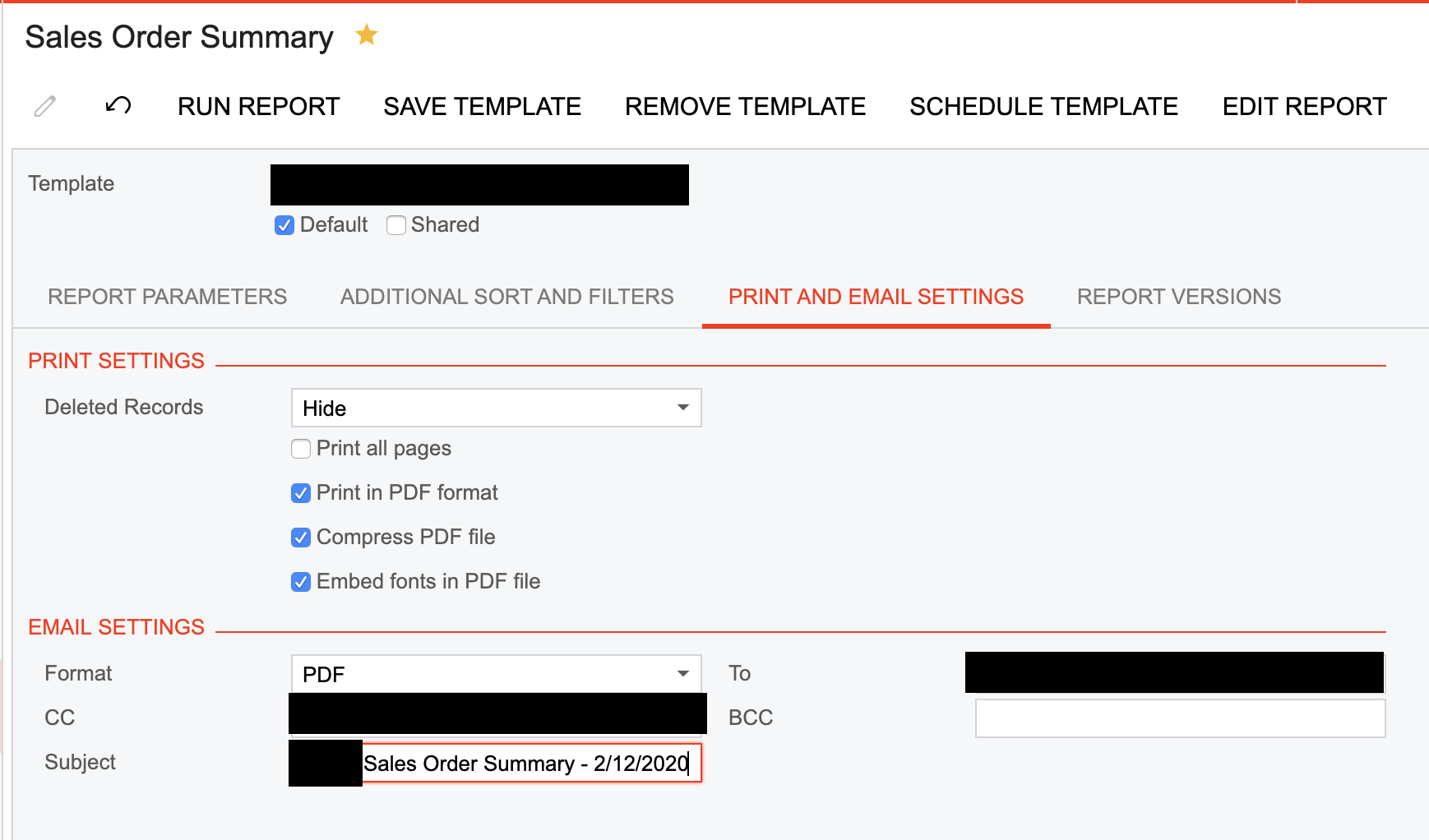
Can I use dynamic fields in the reports' email settings? I would like to pull the date field automatically instead of having to enter it every time I send the report by email.


7 Replies
Tim Rodman
Posts: 3199
 Tim Rodman
Admin
March 7, 2020 8:52 pm
(@timrodman)
Famed Member
Joined: 10 years ago

Hi Lisandro,

Does leaving the dates blank as suggested in this post work?

https://www.augforums.com/forums/acumatica-report-designer/schedule-sales-order-details-by-inventory-item-report-to-run-monthly/


Reply
Lisandro Quiñones
 Lisandro Quiñones
(@lisandro-quinones)
Joined: 6 years ago

Eminent Member
Posts: 17
March 11, 2020 3:49 pm
Reply toTim RodmanTim Rodman

@timrodman the issue is not with the scheduling itself, but rather with inserting a dynamic date field on the email subject so that when the schedule triggers the email, the recipient can see the date on the email subject.


Reply
Tim Rodman
Posts: 3199
 Tim Rodman
Admin
March 24, 2020 7:43 pm
(@timrodman)
Famed Member
Joined: 10 years ago

Ah, I see. I haven't tried this, but maybe you can leave Subject empty on the screen and modify the Subject in the report definition?


Reply
Lisandro Quiñones
 Lisandro Quiñones
(@lisandro-quinones)
Joined: 6 years ago

Eminent Member
Posts: 17
March 25, 2020 10:10 am
Reply toTim RodmanTim Rodman

@timrodman right that's what I do manually, I want to be able to automate it!


Reply
Tim Rodman
Posts: 3199
 Tim Rodman
Admin
May 15, 2020 7:38 pm
(@timrodman)
Famed Member
Joined: 10 years ago

Sorry, by "Subject in the report definition", I meant in Report Designer, not when you run the report on the screen.

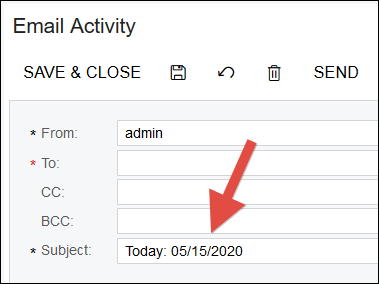
If you open the report in Report Designer, you can go to the report properties and populate a formula in the MailSettings -> Subject field like this:

=Format('Today: {0:MM/dd/yyyy}',Today())
image

When you do that, then run the report in the screen and press the SEND button, you should see that the formula works:
image

I'm not sure though if scheduling a report will respect the formula. I'd love to hear if it works for you in a schedule.


Reply
Lisandro Quiñones reacted
Lisandro Quiñones
 Lisandro Quiñones
(@lisandro-quinones)
Joined: 6 years ago

Eminent Member
Posts: 17
May 21, 2020 5:37 pm
Reply toTim RodmanTim Rodman

@timrodman and how can I edit the report parameters on Report Designer, specifically the Start Date and End Date, see attached

Screenshot 2020 05 21 18.36.10

Reply
Tim Rodman
Posts: 3199
 Tim Rodman
Admin
July 25, 2020 3:54 am
(@timrodman)
Famed Member
Joined: 10 years ago

Use can use a formula in the Default Value field on the Parameters tab of File -> Build schema...

See AgeDate parameter in the AR Aging (AR631000) report for an example:

image

Reply
Forum Jump:
  Previous Topic
Next Topic  
Forum Information
Recent Posts
Unread Posts
Tags
  • 12 Forums
  • 2,528 Topics
  • 10.9 K Posts
  • 14 Online
  • 2,412 Members
Our newest member: Peter Paasch
Latest Post: Tax on Inventory Transfer
Forum Icons: Forum contains no unread posts Forum contains unread posts
Topic Icons: Not Replied Replied Active Hot Sticky Unapproved Solved Private Closed

Online Members

 No online members at the moment

Acumatica Forums

Terms of Use & Disclaimers :: Privacy Policy

Copyright © 2026 · AUG Forums, LLC. All rights reserved. This website is not owned, affiliated with, or endorsed by Acumatica, Inc.

‹›×

    ‹›×