AugForums.com

An Acumatica User Group

  • Free
    • Start Here
    • In-Person Gatherings
    • Power BI Workshop
    • Podcast
    • Rolodex
    • Blog
    • Forums
  • Paid
    • AugSQL
    • GI Course
    • GI Library
    • Consulting
  • Register

— The Forums are now read-only —

— All new activity now takes place here: —

AugForums.com Discord Server
Forums
AUG Forums
Everything Else
Creating several Pa...
 
Notifications
Clear all

Questions Creating several Payroll Employees from Employees

 
Everything Else
Last Post by Carlos Zarinan 6 years ago
4 Posts
3 Users
1 Reactions
1,568 Views
RSS
Carlos Zarinan
Posts: 9
 Carlos Zarinan
Topic starter
July 2, 2020 6:39 pm
(@czarinan)
Active Member
Joined: 6 years ago

Is there a way to convert several Employees to Payroll Employees?

I tried a import scenario but there is a pop window to select the Employee ID and I don't know How I should manage the Pop-up window.

Also I tried to use the Action "Create a payroll Employee" but I don't know how to process the new window.

Any help will be much appreciated.

Thank You

Carlos


Topic Tags
Payroll employee
3 Replies
Tim Rodman
Posts: 3204
 Tim Rodman
Admin
August 23, 2020 10:00 pm
(@timrodman)
Famed Member
Joined: 11 years ago

The order is reversed from what you'd think it would be. See this post for a similar situation of how to handle a pop-up window in an Import Scenario:

https://www.augforums.com/forums/acumatica-import-scenarios/using-an-import-scenario-to-change-the-item-class-on-a-stock-item


Reply
JustPaul
Posts: 33
 JustPaul
August 24, 2020 9:04 am
(@justpaul)
Trusted Member
Joined: 6 years ago

Carlos @czarinan,

please repost your import scenario or let us know if it still isn't working.  I will be working on this same topic this week..and happy to share what I learn.

Paul


Reply
Carlos Zarinan
Posts: 9
 Carlos Zarinan
Topic starter
August 24, 2020 1:19 pm
(@czarinan)
Active Member
Joined: 6 years ago

Thank you, Paul @paulfoster and Tim @timrodman, for your replies. Acumatica provided me with PR's Import Scenarios Project, and the scenario that moves employees to payroll employees was there. I learned as Tim said the questions on Pop-up Windows are in reverse order, so the "OK" (CREATE) is first then three fields required to create a payroll employee then <Action: Insert> and <action:Save>. Check Image below. I'm running Build 20.107.0026
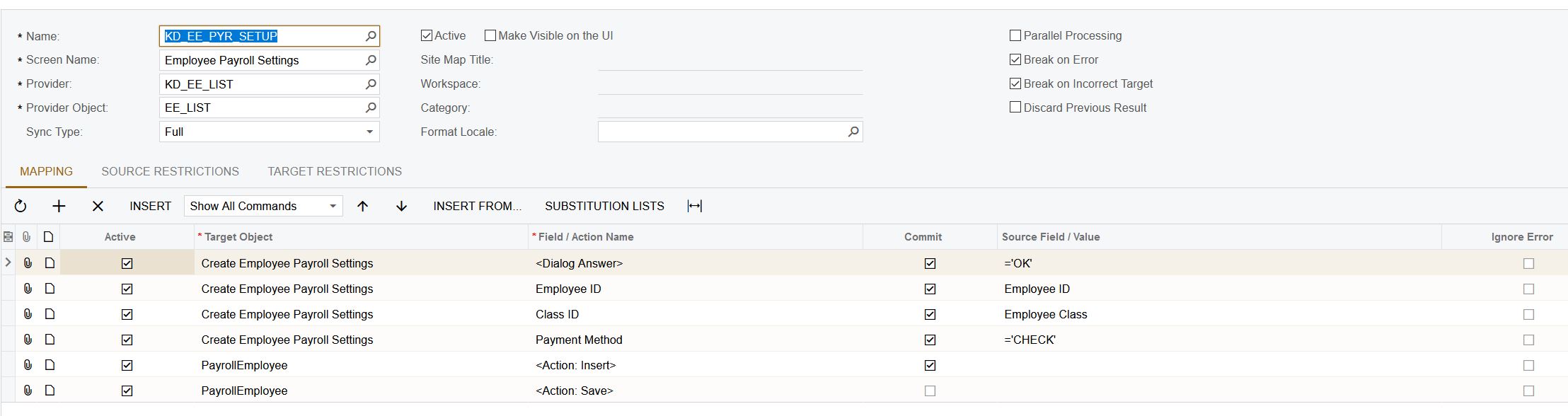
ACU EE PYRL ImpSce Example

I apologize for the delayed response, but we are very new to Acumatica, and we are learning a little slow.

Thank You both of you, again. 


Reply
Tim Rodman reacted
Forum Jump:
  Previous Topic
Next Topic  
Topic Tags:  Payroll (2) , employee (1) ,
Forum Information
Recent Posts
Unread Posts
Tags
  • 12 Forums
  • 2,533 Topics
  • 11 K Posts
  • 107 Online
  • 2,438 Members
Our newest member: Ralph Torres
Latest Post: Nested SubReport Issue
Forum Icons: Forum contains no unread posts Forum contains unread posts
Topic Icons: Not Replied Replied Active Hot Sticky Unapproved Solved Private Closed

By using this website, you agree to our Terms of Use (click here)

Acumatica Forums

Terms of Use & Disclaimers :: Privacy Policy

Copyright © · AUG Forums, LLC. All rights reserved. This website is not owned, affiliated with, or endorsed by Acumatica, Inc.

‹›×

    ‹›×