
By using this website, you agree to our Terms of Use (click here)

I'm preparing for a large conversion of Stock Items. Mostly to save on transaction count, I'm looking to do many things all during the initial import, such as adding Cross Reference records for the Vendor Part Number. Unfortunately, not every Stock Item to be created has a Vendor Part Number and, when this is the case, the import will error saying 'Alternate ID is required' and the whole record will fail. I'd prefer to avoid multiple different import scenarios.
What I would like is to have a <Line Number> statement to conditionally delete the cross-reference record if the Alternate ID is empty, but I don't know of a way to recreate the Delete Row action (usually <Line Number> =-2) when there is a formula involved. If anyone knows how to accomplish this, I'd appreciate your sharing.
What I don't like is the solution I discovered:
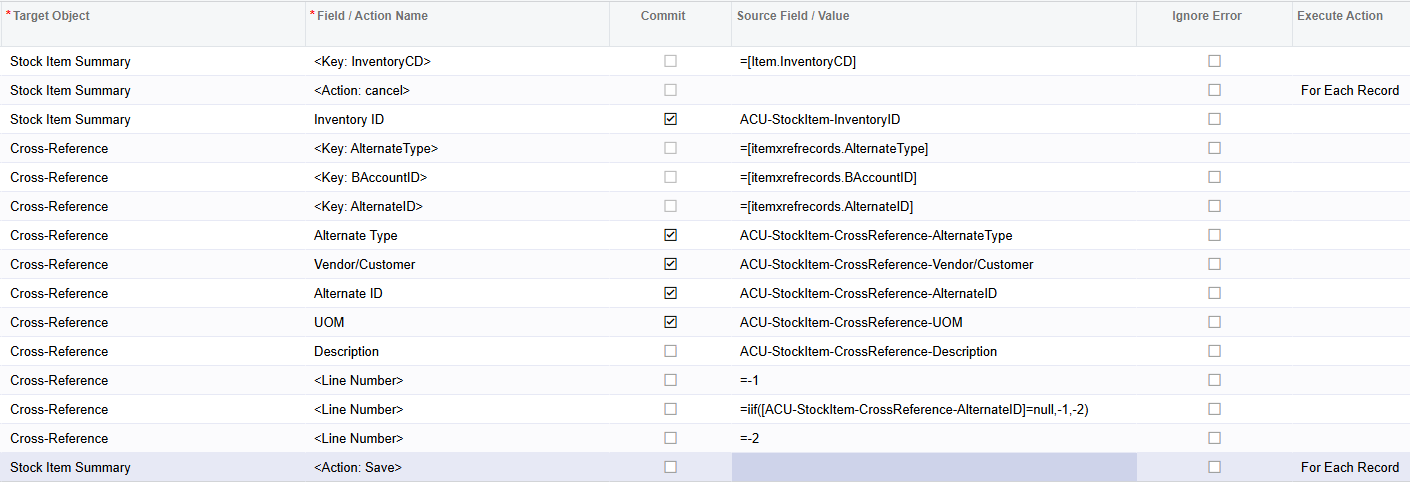
My initial idea was to add another blank record after adding the potentially erroneous record. Then it would selectively delete either that blank record if the original record won't cause an error, or the original if it would result in an error. Blank records seem to delete themselves if they aren't committed, so I'd either end up with nothing or a valid Vendor Part Number record. Now, the above import scenario works, but not how I expected and only when there aren't any existing cross-reference records.
<Line Number> | =iif([...AlternateID]=null, -1, -2)
This line will either select the last record or second to last record based on if there's an Alternate ID. I thought that I would need the condition reversed, expecting the blank record to be after the populated one. But since I never actually made an initial record, I don't know what order these records are being sorted into. That initial record seems to be existing in a weird state where I never explicitly added a new record, but populated something.
Can anyone explain this eldritch import scenario situation that I have stumbled upon? I'd like to be able to generalize this so that it can be used when there are existing records to conditionally add on more. The main issue is that if there is an existing record, say, a UPC, then that UPC gets overwritten.

Hi Paul,
I have been struggling to find a solution to this as well for a while now. Have you ever solved this.
Anytime you are loading to a grid you run the risk of the source data not having a value but you would have already added the line.
I haven't found a way to conditionally delete the line either.
Sadly, no. My above 'solution' didn't end up being consistent either so I must have just gotten lucky during testing that I thought it was working.
For my situation I ended up splitting the import into multiple scenarios to avoid when there are different numbers of cross references, vendor, related items, etc. It's a pain to have to do about 6 different import scenarios to set up a stock item; I have a pin on my to-dos for setting up chaining of import scenarios. But I have not looked into a conditional import any further.
Online Members
