AugForums.com

An Acumatica User Group

  • Free
    • Start Here
    • In-Person Gatherings
    • Power BI Workshop
    • Podcast
    • Rolodex
    • Blog
    • Forums
  • Paid
    • AugSQL
    • GI Course
    • GI Library
    • Consulting
  • Register
Acumatica Forums

By using this website, you agree to our Terms of Use (click here)

Forums
AUG Forums
Everything Else
Adding Custom Pictu...
 
Notifications
Clear all

#AcumaticaTnT Adding Custom Pictures to Acumatica Login Screen - Picture Size

 
Everything Else
Last Post by daniel 5 years ago
6 Posts
6 Users
4 Reactions
6,127 Views
RSS
Tim Rodman
Posts: 3199
 Tim Rodman
Admin
Topic starter
April 30, 2020 1:15 pm
(@timrodman)
Famed Member
Joined: 10 years ago

You can replace the pictures / images that appear on the Acumatica login screen by replacing the files on the IIS web server.

The default location is:
C:\Program Files\Acumatica ERP\Icons

But your location might be different depending on where Acumatica was installed. Also, for Acumatica SaaS customers (most Acumatica customers are SaaS), I think you have to open a support case with Acumatica because they control the IIS web server (but I haven't done that personally).

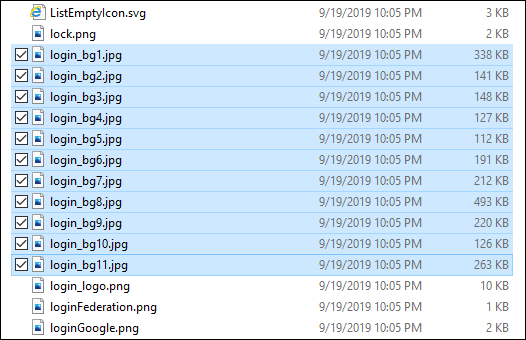
The number of files seems to grow with each new Acumatica version. There are multiple files and the login screen cycles through them, that's how you get a different image each time you login to Acumatica. If you only want one image, just replace each file with the same image. I haven't tried this personally, but I believe you can also delete some of the default image files (since there are so many) to reduce the number images that the login screen cycles through.

The image files all start with login_bg (login_bg1.jpg, login_bg2.jpg, etc.):
image

If you open any one of those files, you can see that the dimensions are 1500x1000

image

So just replace those files with your own custom pictures and make sure each picture has the dimensions 1500x1000.


5 Replies
Carl Brooks
Posts: 121
 Carl Brooks
May 3, 2020 7:43 pm
(@kingcarlos)
Estimable Member
Joined: 6 years ago

For Acumatica SAAS customers (and I think on premise as well) this is a neat way to do it by yourself. 

http://myobexo.custhelp.com/app/answers/detail/a_id/38243/kw/38243/session/L3RpbWUvMTU4ODU1Mjk2My9zaWQvKjVSMUMtSG8%3D

Enjoy


Reply
daniel reacted
daniel
 daniel
(@daniel)
Joined: 6 years ago

Estimable Member
Posts: 92
January 13, 2021 9:28 pm
Reply toCarl BrooksCarl Brooks

@kingcarlos this is great thanks 👍

there is just one part that I'm lost on - "To change the background image for the MYOB Advanced login screen requires you to create a customisation, once the customisation is created open it and choose the option [File \ Edit Project XML] as shown below."

The text in the image that you show here of the XML looks nothing like what I get.

All that the XML says for me is "<Customization level="" description="" product-version="20.108" />"

Am I missing a step?


Reply
Tim Rodman reacted
Sergey
Posts: 4
 Sergey
May 4, 2020 3:39 am
(@sergey)
Active Member
Joined: 6 years ago

Or can follow the guide from the blog here


Reply
Wyatt.ERP
Posts: 128
 Wyatt.ERP
May 7, 2020 12:52 pm
(@wyatt-erp)
Estimable Member
Joined: 6 years ago
Posted by: @timrodman

If you only want one image, just replace each file with the same image. I haven't tried this personally, but I believe you can also delete some of the default image files

I have played around with this.  The login screen will look at as many or as few pictures with "login_bg#.jpg" as their name in the folder.  I haven't stressed the system to find the limit, but I have had over 30 before just to test with no problems.  Just add more files and it will happily cycle through them all.  The same idea, if you delete everything but bg1 and bg2, it will only cycle between these two. 


Reply
Tim Rodman reacted
Arline Welty
Posts: 27
 Arline Welty
December 29, 2020 10:33 am
(@arline-welty)
Eminent Member
Joined: 7 years ago

We replaced those images locally & then couched it in a customization project for portability to a customer's SaaS instance. Really fun to do and makes such a difference at the client site! https://dquest.com/personalize-your-acumatica-login-page/


Reply
Tim Rodman reacted
Forum Jump:
  Previous Topic
Next Topic  
Forum Information
Recent Posts
Unread Posts
Tags
  • 12 Forums
  • 2,528 Topics
  • 10.9 K Posts
  • 31 Online
  • 2,414 Members
Our newest member: Megan Pawlowski
Latest Post: Credit Reference Report Needed
Forum Icons: Forum contains no unread posts Forum contains unread posts
Topic Icons: Not Replied Replied Active Hot Sticky Unapproved Solved Private Closed

Online Members

  • Tim Rodman russ Terry Payne
Acumatica Forums

Terms of Use & Disclaimers :: Privacy Policy

Copyright © 2026 · AUG Forums, LLC. All rights reserved. This website is not owned, affiliated with, or endorsed by Acumatica, Inc.

‹›×

    ‹›×