
By using this website, you agree to our Terms of Use (click here)

I'm curious to see if anyone else is experiencing issues with printing rendered documents from Acumatica. I'm currently experiencing an issue where the form doesn't render properly when I try to print through certain browsers, but it displays fine otherwise. If I print through a PDF plugin (like Acrobat), things seem to work fine, but everything is scaled down and it messes with fonts. I've included some screenshots below:
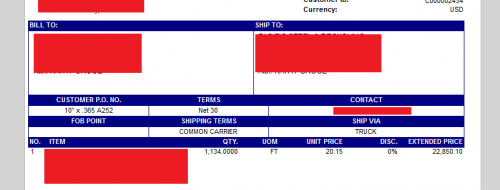
This is the default SO Quote form (SO641000), with minor edits. I've also added the red boxes to protect the innocent.
This is how the document renders in my browser's PDF plugin, and in Acumatica's built-in document viewer in all the browsers I've tested. It will print correctly (for all browsers) from the PDF viewer, and through the document viewer in Firefox. When I print from Chrome, Edge, or IE, though, I see this:
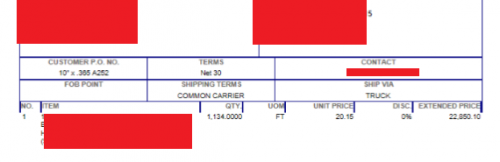
Note that the header fields aren't properly shaded.
I'm trying to avoid printing through the PDF viewer, since it screws with the document (shrinking, changing fonts, poor image rendering quality, etc).
Has anyone else encountered this? I couldn't find much on the subject elsewhere online.

Hi Garrett,
There is a lot of inconsistency between the PDF and HTML versions of reports. In general, if you want better control, go with PDF.
The problem with HTML is that it gets treated differently by different browsers. This has been a problem for decades. The problem is that HTML isn't a strict standard. Things have improved with HTML5, but there are still problems, especially when it comes to things like reports where you need exact placement.
I come from an HTML5 and CSS3 background, so I'm familiar with the many ways and woes of web browsers. A lot of those issues can be solved (or at least alleviated) by using particular instructions like moz and webkit in CSS3. The Acumatica site itself doesn't render much - if at all - differently across browsers, is Responsive and mobile-ready (both of which essentially require use of moz and webkit, etc.), and with the capabilities and detail of the monumental tool that is Acumatica Framework, I feel like the developers there have the aptitude to solve for this.
Using a PDF viewer essentially means I'm using a third-party tool to utilize basic functionality in Acumatica. It also means that my formatting in the Report Designer doesn't directly translate to said PDF viewer - fonts change, embedded image quality takes a nosedive, etc. I strongly feel that this is not what Acumatica is aiming for. After all, the default report rendering tool is their built-in tool, not whatever PDF viewer is installed in the browser.
What I glean from your response is that this is indeed a known issue but people are content to deal with it, so I suppose all I can really do is bring it up with Acumatica.
Thanks for the reply, here's to better-quality report rendering in the future!
You might be able to get Acumatica to fix it, but my impression of watching Report Designer the past few years is that Acumatica views it as "good enough" and they don't seem to want to invest much in the way of development resources. That's my impression at least.
It's worth a shot though. The way would be to open an Acumatica support case. Then lobby to get your issue marked as a bug. The key would be to show them how to easily reproduce the specific issue which is often easier said than done.