AugForums.com

An Acumatica User Group

  • Free
    • Start Here
    • In-Person Gatherings
    • Power BI Workshop
    • Podcast
    • Rolodex
    • Blog
    • Forums
  • Paid
    • AugSQL
    • GI Course
    • GI Library
    • Consulting
  • Register

— The Forums are now read-only —

— All new activity now takes place here: —

AugForums.com Discord Server
Forums
AUG Forums
Everything Else
Line Break data in ...
 
Notifications
Clear all

Questions Line Break data in Import Scenario

 
Everything Else
Last Post by Ryan Brown @xByte Hosting 7 years ago
10 Posts
6 Users
2 Reactions
7,321 Views
RSS
nickheuer
Posts: 36
 nickheuer
Topic starter
May 18, 2018 7:33 pm
(@nickheuer)
Trusted Member
Joined: 6 years ago

Is it possible to add a line break to a formula used in an import scenario:

Need to format an address display for the large summary area of the task screen and want the address to look like an actual address

John Smith

1 Fake Street

Fakeville, CA 90210


9 Replies
MikeLupro
 MikeLupro
(@mikelupro)
Joined: 9 years ago

Eminent Member
Posts: 28
May 19, 2018 12:21 am
Reply tonickheuernickheuer

A non-programmer "wonder if this would work" response:

In Excel you can do an Alt-Enter and get the cell to break 

ABC alt-enter
DEF

Wondering if you could enter Jack B Quick alt[enter] One Jack Place alt[Enter]characters "Jackson, MS 13456"

and get

Jack B Quick
One Jack Place
Jackson, MS 13456 in the cell.

Don't have time to test/fuss with this - just a thought.   A post I found suggested this :

=A1 & CHAR(10) & A2 & CHAR(10) & A3

The CHAR(10) inserts a line feed character, which is the same as is done by Excel when you press Alt+Enter.


Reply
nickheuer
Posts: 36
 nickheuer
Topic starter
May 21, 2018 2:23 pm
(@nickheuer)
Trusted Member
Joined: 6 years ago

Tried both of those and it did not work, may not be possible in an import scenario


Reply
MikeLupro
 MikeLupro
(@mikelupro)
Joined: 9 years ago

Eminent Member
Posts: 28
May 23, 2018 11:19 am
Reply tonickheuernickheuer

I tried with a formula in Excel and didn't have any luck getting the line-breaks to function as desired either.

Might be a good post for the more technical forums.  I'm sure there has to be a way.  Maybe even create a case with Acumatica?


Reply
Tim Rodman
Posts: 3204
 Tim Rodman
Admin
May 22, 2018 8:20 am
(@timrodman)
Famed Member
Joined: 11 years ago

What specific screen and field are you trying to import this into?


Reply
nickheuer
Posts: 36
 nickheuer
Topic starter
May 22, 2018 9:07 am
(@nickheuer)
Trusted Member
Joined: 6 years ago

The tasks screen, I am using the new Business Events feature of 2018 to automate the creation of tasks via an import script.


Reply
Tim Rodman
Posts: 3204
 Tim Rodman
Admin
May 22, 2018 11:55 pm
(@timrodman)
Famed Member
Joined: 11 years ago

I tried this:


But I also didn't have any luck. It imported like this:


Reply
AhmedBahar
Posts: 29
 AhmedBahar
June 7, 2018 11:36 am
(@ahmedbahar)
Eminent Member
Joined: 6 years ago

I'm guessing you already tried <br> ?

Because in reports that's what you have to use for line breaks.


Reply
Tim Rodman reacted
Ryan Brown @xByte Hosting
 Ryan Brown @xByte Hosting
(@ryanxbyte)
Joined: 6 years ago

Estimable Member
Posts: 84
June 28, 2019 10:31 am
Reply toAhmedBaharAhmedBahar
Posted by: Ahmed

I'm guessing you already tried <br> ?

Because in reports that's what you have to use for line breaks.

We've also seen success using a <br > inside automation steps to prefill tasks with required data on multiple lines.


Reply
Tim Rodman reacted
Christiaan Raubenheimer
Posts: 5
 Christiaan Raubenheimer
June 27, 2019 2:06 am
(@chris-raubs)
Active Member
Joined: 6 years ago

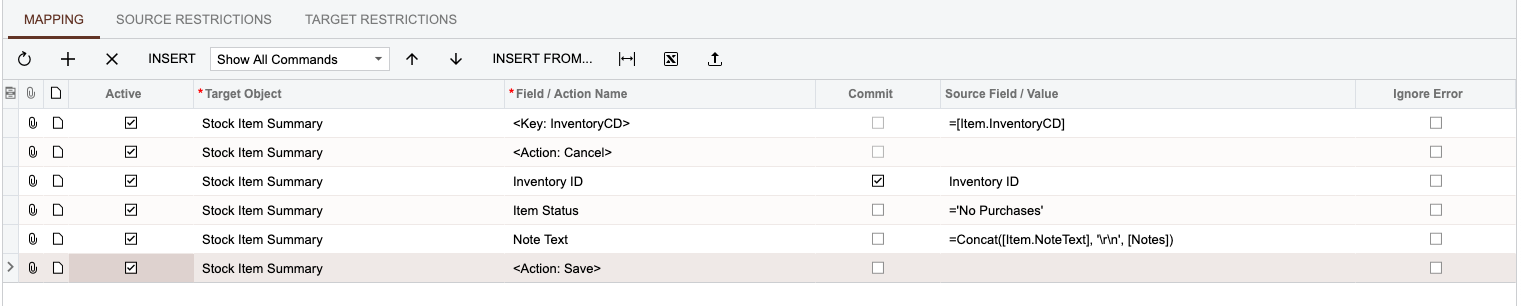
I think it could potentially have something to do with the specific input field that data is being imported into. I had to add an additional note to the Stock Item's Note field and managed to get the text to be added onto a new line. My mission was to add additional text to any existing text that was already present in the note field but as a new line.

I used the concat & '\r\n' approach.

Import Scenario:
Sample Result:
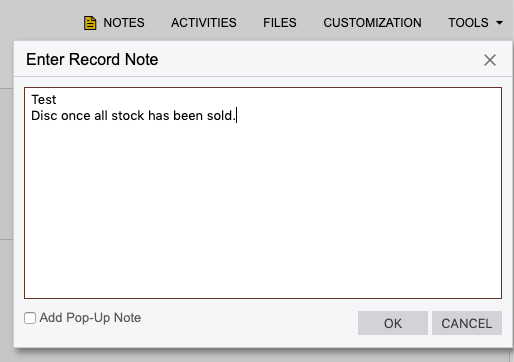
PS. Tested this on 2019R1 so a fix could have been added as well?


Reply
Forum Jump:
  Previous Topic
Next Topic  
Forum Information
Recent Posts
Unread Posts
Tags
  • 12 Forums
  • 2,533 Topics
  • 11 K Posts
  • 7 Online
  • 2,437 Members
Our newest member: Matt Butler
Latest Post: Nested SubReport Issue
Forum Icons: Forum contains no unread posts Forum contains unread posts
Topic Icons: Not Replied Replied Active Hot Sticky Unapproved Solved Private Closed

By using this website, you agree to our Terms of Use (click here)

Acumatica Forums

Terms of Use & Disclaimers :: Privacy Policy

Copyright © · AUG Forums, LLC. All rights reserved. This website is not owned, affiliated with, or endorsed by Acumatica, Inc.

‹›×

    ‹›×