
By using this website, you agree to our Terms of Use (click here)

Can an existing notification template be set as the mailing settings for the embedded email in the report designer?

Did you try manually typing the ID from the Notification Templates screen in the MailSettings -> TemplateID field? Something like this:

Just be careful if you try to combine options from the MailSettings section in Report Designer with the options on the Notification Templates screen. It's been a while since I looked at it, but, if I remember correctly, it gets complicated, especially when things like the Mailing Settings tab of the Customers screen gets involved.

Hi.
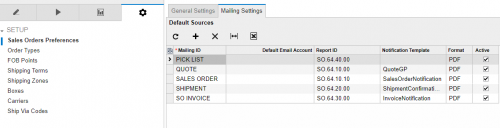
I have tried doing the mentioned steps above (typed the template in the field) and it worked for one report but I cannot get it to work for a different report. Do I need to do anything else for Acumatica to see it? I have also changed the setting in Acumatica under Sales Order Preferences > Mailing Settings. I am telling it to use QuoteGP but it isn't.
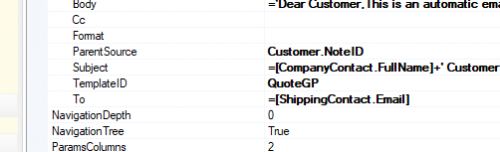
When you populate the TemplateID field in Report Designer, you have to clear out the other fields (Body, Subject, To, etc.) otherwise they override the TemplateID.
Regarding Sales Order Preferences -> Mailing Settings, I think that only gets used when you do ACTIONS -> Email Sales Order/Quote on the Sales Orders (SO301000) screen. When you click the SEND button after opening the report on the screen, it should use what you have defined in Report Designer. Kind of confusing huh?
You are correct Tim the way I usually explain how it works is that the actions send email from the so screen is the automatic way and uses the default email settings in the system and customer plus the system notification templates as the email. Opposed to sending it thru the sales order report screen and the send button which uses the users email settings and the settings defined in the report but allows for changes to be made to the email template and email addresses before sending because it pops up the email and requires tonto press send again at the email that pops up, kinda like a manual way to send the email.
Thank you both so much. I'll test it out today and let you know how it worked out.

Hi all, does anyone know how to specify a default Workgroup so that outgoing mail is automatically assigned a workgroup? New mail coming in is assigned the default workgroup as per the system email setup, but mail going out via the same system email is not assigned a workgroup. Subsequently, any reply to that email also is not assigned a workgroup, which is causing major confusion with our team collaborating across a system email like sales@ because when someone replies to our Order Confirmation email sent form the sales order, it does not appear in the Sales workgroup.
Thanks in advance.