AugForums.com

An Acumatica User Group

  • Free
    • Start Here
    • In-Person Gatherings
    • Power BI Workshop
    • Podcast
    • Rolodex
    • Blog
    • Forums
  • Paid
    • AugSQL
    • GI Course
    • GI Library
    • Consulting
  • Register
Acumatica Forums

By using this website, you agree to our Terms of Use (click here)

Forums
AUG Forums
Acumatica Report De...
Stock items lines o...
 
Notifications
Clear all

Questions Stock items lines on invoice sometimes double up randomly when there is more than one batch number

 
Acumatica Report Designer
Last Post by Tim Rodman 5 years ago
15 Posts
6 Users
1 Reactions
4,901 Views
RSS
daniel
Posts: 92
 daniel
Topic starter
March 14, 2019 5:53 pm
(@daniel)
Estimable Member
Joined: 6 years ago

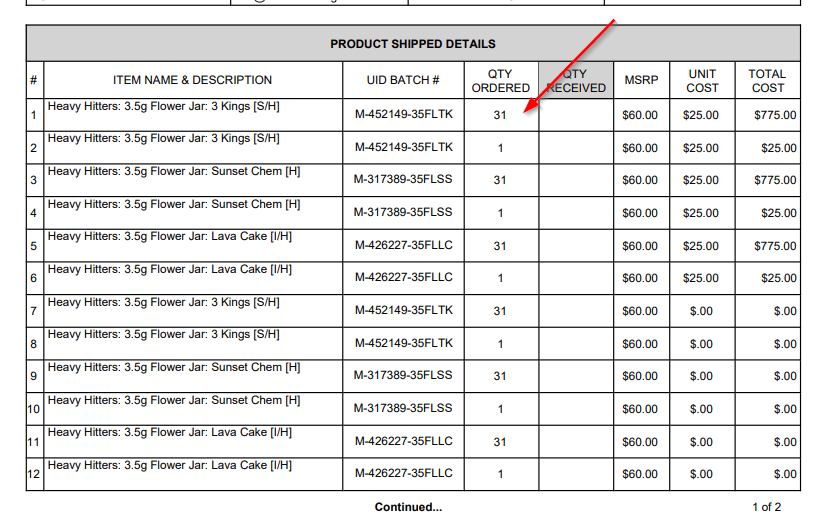
Would really love some help as to this. On our invoices, sometimes individual stock item lines double up randomly.

So for example, if a customer orders 8 x Product A, there are two lines on the invoice for 8 x Product A.

This seems to occur when more than one different batch number of the stock item is sent. However, it doesn't occur every time more than one batch number is sent.

Why does this occur? I deleted the batch number fields from the report designer, but the doubling up still occurred...


14 Replies
Nwood
Posts: 33
 Nwood
March 14, 2019 9:19 pm
(@nwood)
Trusted Member
Joined: 6 years ago

Hi Daniel,

Would you like to share the RPX file and I'd be happy to take a quick look at the joins. I've had similar issues before and typically resolved due to some minor intricacy in the joins/conditions.

Thanks

Nic 


Reply
daniel
Posts: 92
 daniel
Topic starter
March 15, 2019 12:34 am
(@daniel)
Estimable Member
Joined: 6 years ago

Hello Nic,

Thanks for the offer - the RPX file is attached.

AR641000.rpx


Reply
Nwood
Posts: 33
 Nwood
March 15, 2019 7:08 am
(@nwood)
Trusted Member
Joined: 6 years ago

Hi Daniel,

It doesn't look like your using the SOShipLineSplit anywhere on your report so I'd suggest that you remove this from your relationships and tables, it is this table that I expect is causing line duplication.

The attached form may be of interest to you and is something I've just completed earlier this week. The issue with serial numbers is displaying multiple serials for the same line. The attached is a shipment confirmation but the same concept could be easily adapted to the invoice.

Are you by any chance coming to Noosa for conference next week? It would be good to meet if you are.

Thanks

Nic 

so642000.rpx


Reply
Tim Rodman reacted
daniel
 daniel
(@daniel)
Joined: 6 years ago

Estimable Member
Posts: 92
October 6, 2019 6:39 pm
Reply toNwoodNwood

@nic thanks for this and sorry for the late reply. Your attachment makes sense, thanks for this. I have been able to replicate this on our form.

However we would like to have one invoice line per product, rather than one invoice line per batch number. The batch number doesn't even have to show at all.

So is there a way to make multiple split ship line into one invoice line?


Reply
daniel
Posts: 92
 daniel
Topic starter
October 13, 2019 9:51 pm
(@daniel)
Estimable Member
Joined: 6 years ago

Would anyone else be able to add invoice RPX to here that I can check out?

It's happening as the invoice is going by the line numbers of the shipment, not the line numbers of the invoice....


Reply
Tim Rodman
Posts: 3199
 Tim Rodman
Admin
December 2, 2019 4:12 pm
(@timrodman)
Famed Member
Joined: 10 years ago

Hey Daniel,

Chiming in a little late on this. Some questions:

1. Looking at your RPX file, it looks like your document (pictured here) is called Shipment Confirmation. Is this an Invoice or a Shipment Confirmation?
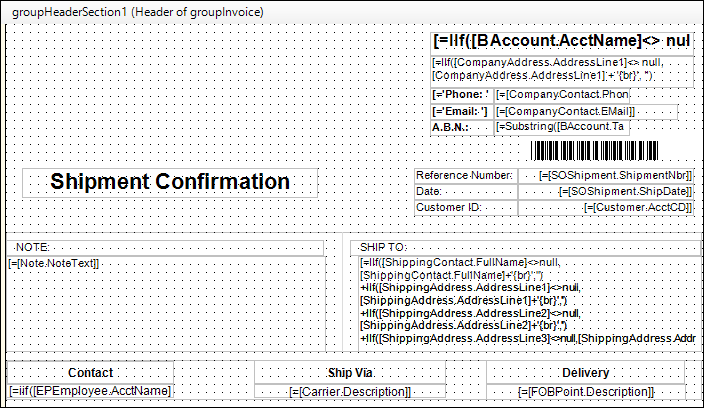
2. When is this document getting generated? Immediately after the Shipment goes out? After the Invoice is generated?

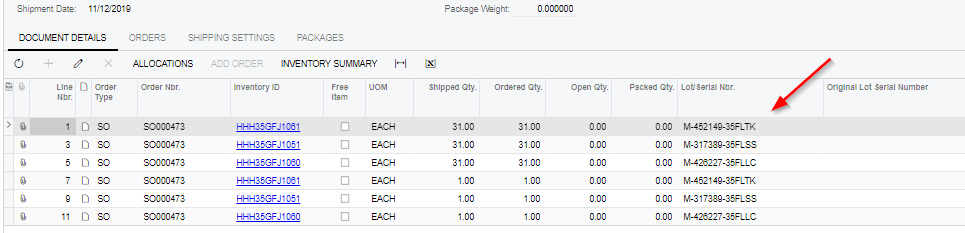
3. Are you intending to print Serial Number information? I agree with Nic, if this doesn't need to be printed, then I would remove the SOShipLineSplit table which is likely the reason for your duplicate lines.


Reply
daniel
 daniel
(@daniel)
Joined: 6 years ago

Estimable Member
Posts: 92
December 3, 2019 12:28 am
Reply toTim RodmanTim Rodman

Thanks for this.

I have got it fixed today.  This was by removing the SOShipLineSplit from not just the page, but also deleting it from the relationships table in the Schema.


Reply
Jeff Beck
 Jeff Beck
(@jbeck)
Joined: 5 years ago

Eminent Member
Posts: 21
December 4, 2019 11:30 am
Reply toTim RodmanTim Rodman

@timrodman

Can I add another wrinkle to this?

I am reporting the Lot Serial Nbrs, so using the SOShipLineSplit table for that. This works great except when the order has the same line item in a sales order. This is due to the same line item receiving a different discount for variable quantities. My report is using information from the sales order line [SOLine] and the shipment [SOShipLineSplit], so this is causing duplication.

Is there a way to consolidate the line items by line number or something along those lines (pardon the pun) with the quantities summed by Item / Lot Serial Nbr? I need to maintain the ability to show multiple lot serial numbers, without duplicating lines due to pricing variances from discounts.

SO641505.rpx


Reply
Tim Rodman
Posts: 3199
 Tim Rodman
Admin
December 26, 2019 2:35 am
(@timrodman)
Famed Member
Joined: 10 years ago

I see, so not only is the same Item listed multiple times on your Sales Order, but the same Item and Lot Number are listed multiple times on the Sales Order because the same Lot Number is fulfilling multiple Sales Order lines.

You could add a group to the report on Item, then sum up the quantities, costs, etc. I wonder though what the end game is and whether multiple lines are truly causing a business problem.


Reply
Posts: 1
 Deonie Barber
February 19, 2020 11:34 am
(@deonie-barber)
Member
Joined: 6 years ago

Hi,

I am relatively new to Acumatica and Report Designer, so if someone has come accross this, please can you guide me.

It relates to the section above on the same item on multiple lines, each with their own serial but when the shipment confirmation (in South Africa a delivery note) is printed, the items are printed with all the serial numbers under each item, duplicating the serial number. 

How do I get the report to print one line for the same items and all serials under the one line?

Thank you

Deonie


Reply
Tim Rodman
Posts: 3199
 Tim Rodman
Admin
March 9, 2020 7:41 pm
(@timrodman)
Famed Member
Joined: 10 years ago

Hi Deonie,

Can you attach your .rpx file?


Reply
joeyjay.guinto
Posts: 28
 joeyjay.guinto
May 3, 2021 2:35 am
(@joeyjay-guinto)
Trusted Member
Joined: 5 years ago

hi, Tim.


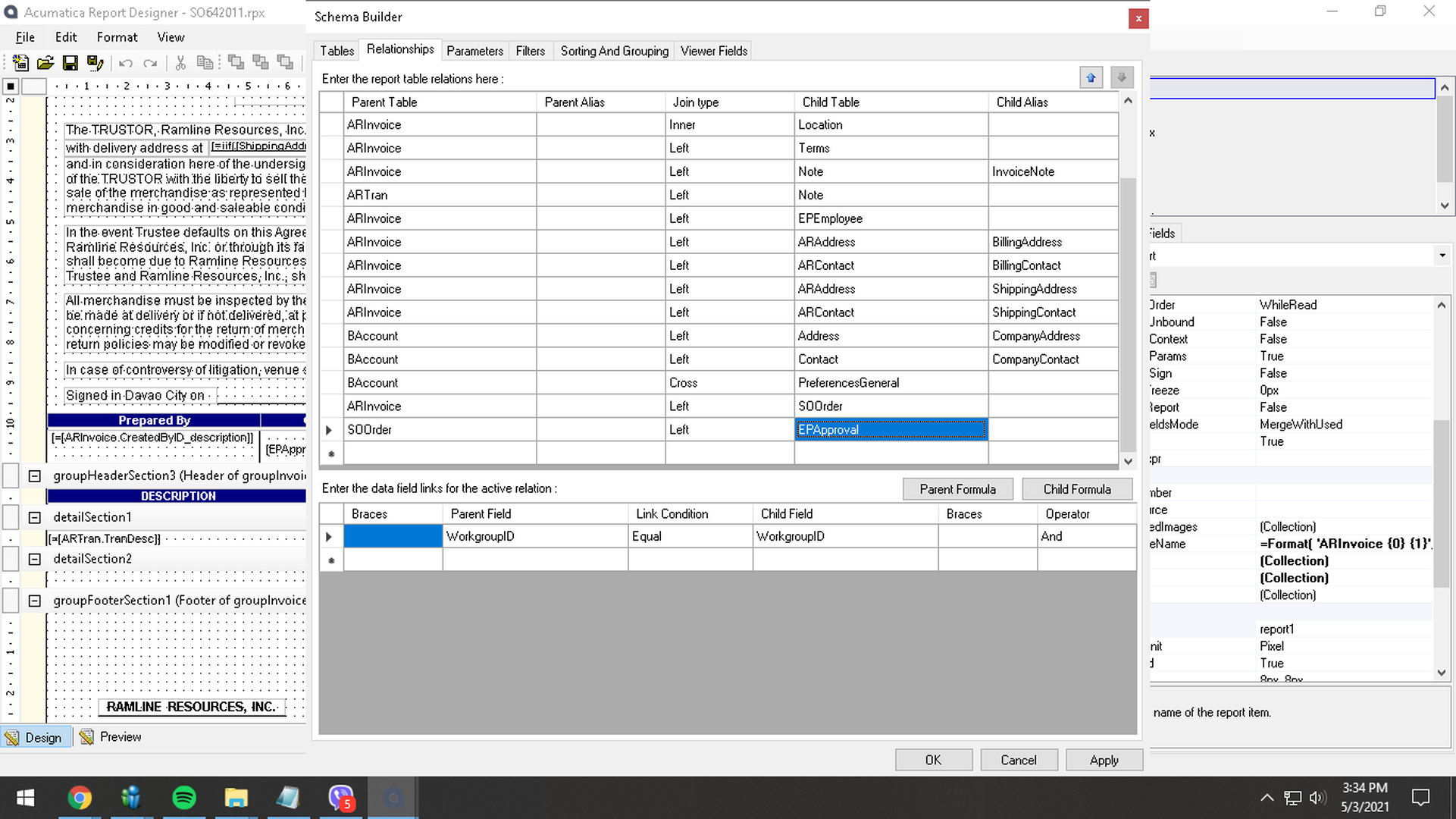
I have the same problem with random item lines doubling to the invoice. Newbie here also. Can you pls help and guide me. I have attached screenshot of the .rpx table since i cannot attach .rpx file.


Thank you,

Jay
 

image

Reply
joeyjay.guinto
Posts: 28
 joeyjay.guinto
May 3, 2021 2:57 am
(@joeyjay-guinto)
Trusted Member
Joined: 5 years ago

heres the gdrive file of my .rpx tim. thank you


https://drive.google.com/file/d/10jdTaQaclxIfU2WBXuw7Ad72yPGpWhxf/view?usp=sharing


Reply
Tim Rodman
Posts: 3199
 Tim Rodman
Admin
May 28, 2021 10:32 pm
(@timrodman)
Famed Member
Joined: 10 years ago

You should be able to attach an .rpx file (not an .rps file). Like this:

SO610500.rpx

Reply
Forum Jump:
  Previous Topic
Next Topic  
Forum Information
Recent Posts
Unread Posts
Tags
  • 12 Forums
  • 2,528 Topics
  • 10.9 K Posts
  • 13 Online
  • 2,412 Members
Our newest member: Peter Paasch
Latest Post: Tax on Inventory Transfer
Forum Icons: Forum contains no unread posts Forum contains unread posts
Topic Icons: Not Replied Replied Active Hot Sticky Unapproved Solved Private Closed

Online Members

 No online members at the moment

Acumatica Forums

Terms of Use & Disclaimers :: Privacy Policy

Copyright © 2026 · AUG Forums, LLC. All rights reserved. This website is not owned, affiliated with, or endorsed by Acumatica, Inc.

‹›×

    ‹›×