AugForums.com

An Acumatica User Group

  • Free
    • Start Here
    • In-Person Gatherings
    • Power BI Workshop
    • Podcast
    • Rolodex
    • Blog
    • Forums
  • Paid
    • AugSQL
    • GI Course
    • GI Library
    • Consulting
  • Register
Acumatica Forums

By using this website, you agree to our Terms of Use (click here)

Forums
AUG Forums
Acumatica Report De...
Shipping attention ...
 
Notifications
Clear all

Questions Shipping attention field override not reflecting on invoice form.

 
Acumatica Report Designer
Last Post by MichaelHansen 5 years ago
7 Posts
5 Users
3 Reactions
3,546 Views
RSS
alk12340
Posts: 1
 alk12340
Topic starter
March 27, 2020 11:11 am
(@alk12340)
New Member
Joined: 6 years ago

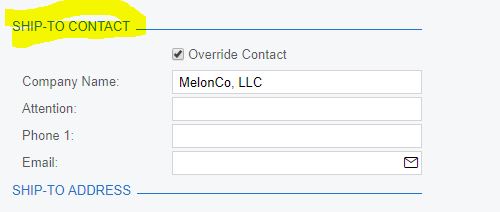
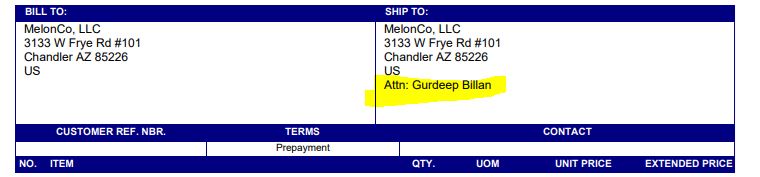
This client I have has a customer who has multiple locations on the customer - when creating the invoice they select the correct location and the default attention name comes into the invoice then they select override to place a new name in the attention. When they go to print the invoice it is not showing the overridden attention field name - I have checked the form in the report designer the ship to the area of the invoice is stock acumatica no changes have been made they were just upgraded to 2019R2 I am unsure what to check next.

any guidance would be much appreciated

this is fields from the report I see the attention field, i dont see any were where it has a override clause. 

=IIf([ShippingContact.FullName]<>null, [ShippingContact.FullName]+'{br}','')
+IIf([ShippingAddress.AddressLine1]<>null,[ShippingAddress.AddressLine1]+'{br}','')
+IIf([ShippingAddress.AddressLine2]<>null,[ShippingAddress.AddressLine2]+'{br}','')
+IIf([ShippingAddress.AddressLine3]<>null,[ShippingAddress.AddressLine3]+'{br}','')
+IIf([ShippingAddress.City]<>null, [ShippingAddress.City]+' ','')
+IIf([ShippingAddress.State]<>null, [ShippingAddress.State]+' ','')
+IIf([ShippingAddress.PostalCode]<>null, [ShippingAddress.PostalCode],'')
+IIf([ShippingAddress.City]<>null OR [ShippingAddress.State]<>null OR [ShippingAddress.PostalCode]<>null,'{br}','')
+IIf([ShippingAddress.CountryID]<>null, [ShippingAddress.CountryID_Country_Description]+'{br}','')
+IIf([ShippingContact.Attention]<>null, 'Attn: ' + [ShippingContact.Attention],'')
tslseed1.jfif

tslseed2.jfif


6 Replies
Tim Rodman
Posts: 3199
 Tim Rodman
Admin
May 15, 2020 7:48 pm
(@timrodman)
Famed Member
Joined: 10 years ago

Maybe it's a bug in the build that you are using?

I just tried this in Acumatica 2020 R1 (20.100.0095) and it seemed to work.

1. Overrode the ADDRESS DETAILS -> SHIP-TO CONTACT -> Attention field on the Invoices (SO303000) screen:
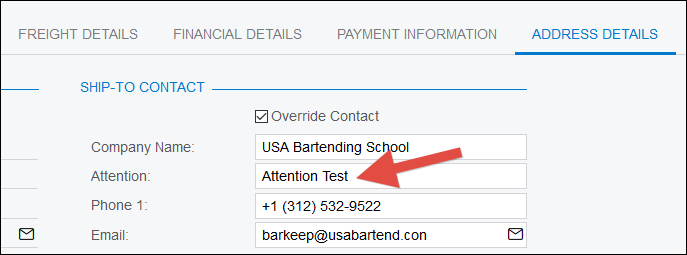
image

2. Clicked REPORTS -> Print Invoice and it seemed to work:

image

Reply
Ryan Brown @xByte Hosting
Posts: 84
 Ryan Brown @xByte Hosting
May 16, 2020 7:40 pm
(@ryanxbyte)
Estimable Member
Joined: 6 years ago

The override is handled by the objects in Acumatica. That’s one of the benefits of using them versus SQL. 

Check your ShippingContact object on your report. Make sure it points to ARContact. There was a change where shipping used to come from the SO and you may still be pointing to the SO Contact. 


Reply
Wyatt.ERP and Tim Rodman reacted
Richard
 Richard
(@richard)
Joined: 6 years ago

Trusted Member
Posts: 44
November 13, 2020 4:39 pm
Reply toRyan Brown @xByte HostingRyan Brown @xByte Hosting

@ryanxbyte How do I check that? is that from the Schema builder?

SO order

Reply
MichaelHansen
 MichaelHansen
(@michaelhansen)
Joined: 6 years ago

Estimable Member
Posts: 149
November 20, 2020 1:18 pm
Reply toRichardRichard
Ryan Brown @xByte Hosting

@richard Absolutely. The Schema Builder is where you should start.

Your code is referencing ShippingContact, which is shown as an alias in the schema builder for SOContact. If @ryanxbyte is correct and the table is incorrect, you need to swap SOContact for ARContact. Of course you'll need to jump down to your relations below too and set whatever links are necessary to bring in the ARContact module instead of the SOContact module.

I HIGHLY SUGGEST you save a copy or a revision before trying to swap tables in and out, it can get dirty really fast (speaking from my own poor decisions).


Reply
Richard
 Richard
(@richard)
Joined: 6 years ago

Trusted Member
Posts: 44
November 20, 2020 1:31 pm
Reply toMichaelHansenMichaelHansen
Richard
Ryan Brown @xByte Hosting

@michaelhansen thank you. I ended up just using the new report and making the changes from the old report. It was easier that way.


Reply
MichaelHansen
 MichaelHansen
(@michaelhansen)
Joined: 6 years ago

Estimable Member
Posts: 149
November 20, 2020 1:32 pm
Reply toRichardRichard
MichaelHansen
Richard
Ryan Brown @xByte Hosting

@richard Fair enough my friend, it's almost like our employers want it now or something right? I find it hard to troubleshoot sometimes because of the short deadlines I am given.


Reply
Tim Rodman reacted
Forum Jump:
  Previous Topic
Next Topic  
Forum Information
Recent Posts
Unread Posts
Tags
  • 12 Forums
  • 2,528 Topics
  • 10.9 K Posts
  • 29 Online
  • 2,412 Members
Our newest member: Peter Paasch
Latest Post: Credit Reference Report Needed
Forum Icons: Forum contains no unread posts Forum contains unread posts
Topic Icons: Not Replied Replied Active Hot Sticky Unapproved Solved Private Closed

Online Members

 No online members at the moment

Acumatica Forums

Terms of Use & Disclaimers :: Privacy Policy

Copyright © 2026 · AUG Forums, LLC. All rights reserved. This website is not owned, affiliated with, or endorsed by Acumatica, Inc.

‹›×

    ‹›×