
By using this website, you agree to our Terms of Use (click here)

Hello.
I'm trying to automate this report to run monthly. From what I have read the Automatic Schedule needs a screen ID of a Process and not the Report. Do I want to use Process Orders (Under the Process tree) as the screen ID?
Thanks.

Hey Geremy,
You have to click the SAVE TEMPLATE button to save your preferred settings as a template (make sure you set the PRINT AND EMAIL SETTINGS -> To field so Acumatica knows who to send the email to):

Then you can click the SCHEDULE TEMPLATE button:

If you don't have a schedule yet, just leave the option set to <Set up a schedule first.> and click OK.

This will take you to the Automation Schedules (SM205020) screen where you can setup your monthly schedule. Note that the schedule is actually getting assigned to the Send Reports (SM205060) screen.

After you do this, your report should get emailed automatically according to the schedule that you defined.
I have been trying to figure this out for a while. I was all hung up on not being to create a schedu;le for a reprt I could only find directions to set one up for a Process.
Thank you so much!
Will I need to change the Date Parameters manually every month?
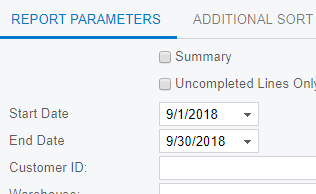
Hmmm, good question, not sure. Maybe try clearing them out before saving the template to see if they get populated dynamically?

Has anyone figured our how to add a dynamic date filter ( @ monthsstart for example )?
i left the date parameters blank and it populates the default dates
What about setting the Report Parameter defaults in the Report Designer report definition itself?
