AugForums.com

An Acumatica User Group

  • Free
    • Start Here
    • Rolodex
    • Podcast
    • Blog
    • Forums
  • Paid
    • AugSQL
    • GI Course
    • GI Library
    • Consulting
  • Register
Acumatica Forums

By using this website, you agree to our Terms of Use (click here)

Forums
AUG Forums
Acumatica Report De...
Formatting differen...
 
Notifications
Clear all

Questions Formatting differences between HTML and PDF

 
Acumatica Report Designer
Last Post by Jeff Beck 8 years ago
4 Posts
2 Users
1 Reactions
4,982 Views
RSS
Jeff Beck
Posts: 21
 Jeff Beck
Topic starter
February 2, 2018 4:32 pm
(@jbeck)
Eminent Member
Joined: 5 years ago

Regarding Report Designer and the formatting alterations between HTML and PDF.

After designing all the reports while using the HTML view, I changed to PDF view to print. In PDF view, all formatting is either stripped or completely different.

How can I retain the original HTML Formatting
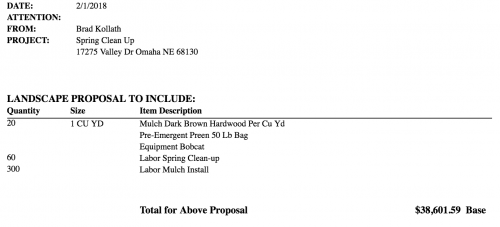
while viewing and printing to PDF?

If not, how do I alter the formatting specifically for PDF reports? Seems to only reflect the changes in HTML view.


3 Replies
Tim Rodman
Posts: 3195
 Tim Rodman
Admin
February 2, 2018 9:18 pm
(@timrodman)
Famed Member
Joined: 10 years ago

That's strange. Normally the formatting is messed up in the HTML, but it works in the PDF. Here it's the other way around.

Is your report using any custom Data Access Classes? If not, can you upload the .rpx Report Designer file? I'd like to try it on my local Acumatica SalesDemo instance.


Reply
Tim Rodman
Posts: 3195
 Tim Rodman
Admin
February 6, 2018 9:48 pm
(@timrodman)
Famed Member
Joined: 10 years ago

Thanks for sending me the file Jeff. I removed the proprietary stuff and am attaching it here in case someone else can figure this out.

so641025.rpx

Mine looks even more weird than yours.

This is what it looks like for me in the HTML version using Firefox:


And this is what it looks like for me in the PDF version using Firefox, complete garbage:


I run the PDF in Chrome and it's even worse, completely empty:


It does appear to be something related to your Century Gothic font though because if I change the font on the fields to Arial, everything is ok in the PDF version for both Firefox and Chrome:


Now this is strange because you do have the PdfFontEmbedded option set to True, but maybe there is something special about that Century Gothic font which prevents it from getting embedded.


This seems like one of those buggy things that you should probably open an Acumatica support case for.


Reply
Jeff Beck
 Jeff Beck
(@jbeck)
Joined: 5 years ago

Eminent Member
Posts: 21
February 6, 2018 9:52 pm
Reply toTim RodmanTim Rodman

Tim, 


Thank you for the quick response.

The Font format was chosen by the customer, so if that is the cause, it will be easier to just suggest a new font. I will send it to Acumatica as possible bug for them to look into.


Jeff


Reply
Tim Rodman reacted
Forum Jump:
  Previous Topic
Next Topic  
Forum Information
Recent Posts
Unread Posts
Tags
  • 12 Forums
  • 2,526 Topics
  • 10.9 K Posts
  • 21 Online
  • 2,411 Members
Our newest member: thollings
Latest Post: Generic inquiry with information from Audit history(CT301000)
Forum Icons: Forum contains no unread posts Forum contains unread posts
Topic Icons: Not Replied Replied Active Hot Sticky Unapproved Solved Private Closed

Online Members

 No online members at the moment

Acumatica Forums

Terms of Use & Disclaimers :: Privacy Policy

Copyright © 2025 · AUG Forums, LLC. All rights reserved. This website is not owned, affiliated with, or endorsed by Acumatica, Inc.

‹›×

    ‹›×