AugForums.com

An Acumatica User Group

  • Free
    • Start Here
    • Rolodex
    • Podcast
    • Blog
    • Forums
  • Paid
    • AugSQL
    • GI Course
    • GI Library
    • Consulting
  • Register
Acumatica Forums

By using this website, you agree to our Terms of Use (click here)

Forums
AUG Forums
Acumatica Report De...
Add a Hyperlink wit...
 
Notifications
Clear all

Questions Add a Hyperlink within a body of text

 
Acumatica Report Designer
Last Post by Tim Rodman 7 years ago
11 Posts
3 Users
0 Reactions
8,744 Views
RSS
Nwood
Posts: 33
 Nwood
Topic starter
July 18, 2017 3:51 am
(@nwood)
Trusted Member
Joined: 6 years ago

I am currently trying to accommodate a client's request to include text on their invoice form along the lines of:

'For full terms and conditions click HERE." Where 'HERE' links to an external website URL on the PDF print.

Thanks in advance for feedback.

Nicholas Wood
Momentum Software


10 Replies
Kurt Bauer
 Kurt Bauer
(@kurtybauer)
Joined: 6 years ago

Trusted Member
Posts: 45
October 12, 2017 4:40 pm
Reply toNwoodNwood

Nicholas,

Did you ever figure out how to get the URL to work in the PDF?  It works fine when previewing as HTML, but once the file is converted to PDF there is no link.

If the full URL is on a single line it seems to work, but it is not satisfactory.

Thanks,

Kurt


Reply
Nwood
 Nwood
(@nwood)
Joined: 6 years ago

Trusted Member
Posts: 33
October 12, 2017 5:54 pm
Reply toKurt BauerKurt Bauer
Nwood

Hi Kurt,

Unfortunately I was unable to find a solution for an imbedded link. In my situation the link was not dynamic so a redirect url was created (to shorten www.company.com/folder/files/termsandconditions.pdf to www.company.com/terms)

This was an acceptable solution for our client however I would like to see a solution that would allow for hyperlinks without requiring the full url.


Thanks


Nic


Reply
Tim Rodman
Posts: 3195
 Tim Rodman
Admin
July 18, 2017 11:34 am
(@timrodman)
Famed Member
Joined: 10 years ago

Hi Nic,

There is a property called ConvertHtmlToText on the fields. I've always thought that changing it to False should cause any HTML to display, but I haven't been able to get it to work.

What should work though is setting the NavigateUrl field. That turns the whole field into a hyperlink, but you could split your text into two separate fields to only make a portion of the text turn into a hyperlink.


Reply
Tim Rodman
Posts: 3195
 Tim Rodman
Admin
October 12, 2017 7:48 pm
(@timrodman)
Famed Member
Joined: 10 years ago

I wonder if this is just a bug. It looks like someone else has already discovered it and created in Idea on the Ideas Website (click here). Might be a good "idea" to go out there and vote on it.


Reply
Nwood
 Nwood
(@nwood)
Joined: 6 years ago

Trusted Member
Posts: 33
October 12, 2017 8:28 pm
Reply toTim RodmanTim Rodman

Voted 


Reply
Kurt Bauer
Posts: 45
 Kurt Bauer
June 22, 2018 1:12 pm
(@kurtybauer)
Trusted Member
Joined: 6 years ago

I thought I'd add my work around for another client since I saw this reference somewhere else.

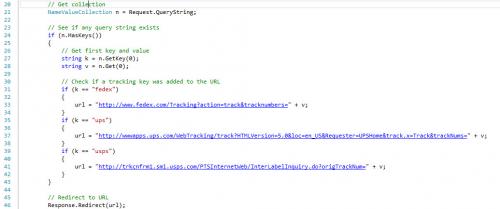
As noted by Nic and my previous post, you need a full URL for the PDF to recognize it as a valid link.  The problem in my post is the URL to the carrier sites is too long and does not look good on a form.  As a result, I updated the default.aspx page in the root of the client's web server that looked for two parameters, the carrier and the tracking number.  If they exist then the web server redirects to the actual carrier URL.  Below is a screenshot of a portion of the PDF form with the tracking number and URL, as well as the code from the ASPX page to parse out the parameters.  The PDF form isn't perfect, but it works for now.

 

-Kurt


Reply
Tim Rodman
Posts: 3195
 Tim Rodman
Admin
June 26, 2018 10:18 pm
(@timrodman)
Famed Member
Joined: 10 years ago

Nice Kurt! So a full URL will show up in the PDF. Very good to know.

Just curious, did you edit default.aspx directly or did you go through a Customization Project?


Reply
Kurt Bauer
 Kurt Bauer
(@kurtybauer)
Joined: 6 years ago

Trusted Member
Posts: 45
July 2, 2018 3:01 pm
Reply toTim RodmanTim Rodman

Tim,

We had to manually edit default.aspx since the file is not located in the same virtual directory as their Acumatica instance.  

Thanks,

Kurt


Reply
Tim Rodman
Posts: 3195
 Tim Rodman
Admin
June 27, 2018 11:40 am
(@timrodman)
Famed Member
Joined: 10 years ago

Apparently this feature got added in 2018 R2! https://feedback.acumatica.com/ideas/ACU-I-1344


Reply
Tim Rodman
Posts: 3195
 Tim Rodman
Admin
July 4, 2018 2:56 pm
(@timrodman)
Famed Member
Joined: 10 years ago

I see. So it seems like it's a workaround for On-Prem or 3rd-party hosted environments only.


Reply
Forum Jump:
  Previous Topic
Next Topic  
Forum Information
Recent Posts
Unread Posts
Tags
  • 12 Forums
  • 2,526 Topics
  • 10.9 K Posts
  • 30 Online
  • 2,411 Members
Our newest member: thollings
Latest Post: Generic inquiry with information from Audit history(CT301000)
Forum Icons: Forum contains no unread posts Forum contains unread posts
Topic Icons: Not Replied Replied Active Hot Sticky Unapproved Solved Private Closed

Online Members

 No online members at the moment

Acumatica Forums

Terms of Use & Disclaimers :: Privacy Policy

Copyright © 2025 · AUG Forums, LLC. All rights reserved. This website is not owned, affiliated with, or endorsed by Acumatica, Inc.

‹›×

    ‹›×