AugForums.com

An Acumatica User Group

  • Free
    • Start Here
    • In-Person Gatherings
    • Power BI Workshop
    • Podcast
    • Rolodex
    • Blog
    • Forums
  • Paid
    • AugSQL
    • GI Course
    • GI Library
    • Consulting
  • Register
Acumatica Forums

By using this website, you agree to our Terms of Use (click here)

Forums
AUG Forums
Acumatica Generic I...
@MonthStart & @Mont...
 
Notifications
Clear all

Questions @MonthStart & @MonthEnd not working under 2019.1

 
Acumatica Generic Inquiries & Pivot Tables
Last Post by Brian McMillin 5 years ago
7 Posts
5 Users
1 Reactions
2,937 Views
RSS
Royce Lithgo
Posts: 557
 Royce Lithgo
Topic starter
October 21, 2019 6:37 pm
(@roycelithgo)
Honorable Member
Joined: 6 years ago

I have these parameters defined in the GI:

In our current live system (2018.1) the defaults work as expected:

(our dates are dd/mm/yyyy for those Americans reading this)

In our 2019.1 sandbox, the GI displays as below:

Any ideas?


6 Replies
Wyatt.ERP
Posts: 128
 Wyatt.ERP
October 24, 2019 2:14 pm
(@wyatt-erp)
Estimable Member
Joined: 6 years ago

I tested using System Management -> Localization -> System Locals (SM200550)
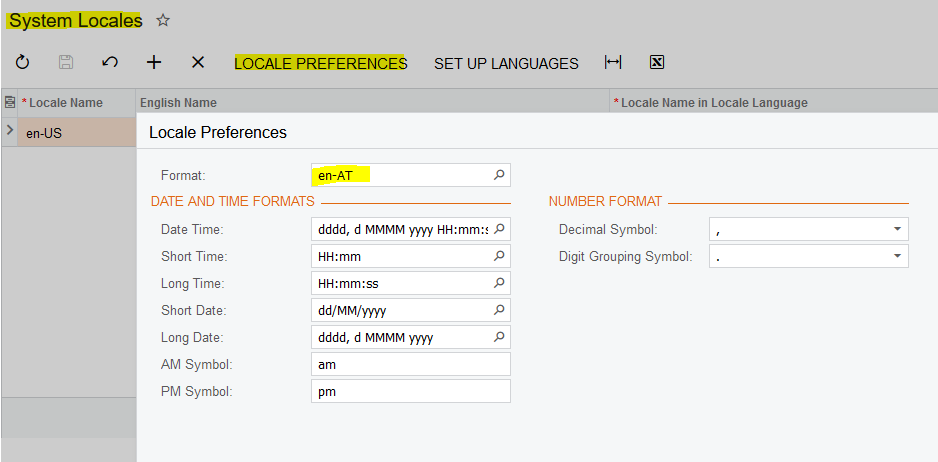
Look how funny that makes my date look now!


Reply
Royce Lithgo
Posts: 557
 Royce Lithgo
Topic starter
October 24, 2019 7:51 pm
(@roycelithgo)
Honorable Member
Joined: 6 years ago

It seems to be a MYOB related issue - not sure what they did wrong but somehow they managed to break these variables and also @Today. 

Our Locale settings are correct. 


Reply
Carl Brooks
 Carl Brooks
(@kingcarlos)
Joined: 6 years ago

Estimable Member
Posts: 121
October 30, 2019 2:04 am
Reply toRoyce LithgoRoyce Lithgo

@royce-lithgo

I have tested this also and have the same result in MYOB Advanced, exporting the GI and importing into a local Acumatica instance running on 2019 returns the correct data, ie Sept 1 - October 31.

Could you advise your business partner and they can log it with us and we will add it to our known issues list, I am sure we will get a few more of these queries. 

I have raised this internally but the severity will increase as more repeated requests from affected clients are raised.

Thanks

Carl


Reply
Royce Lithgo
 Royce Lithgo
(@roycelithgo)
Joined: 6 years ago

Honorable Member
Posts: 557
October 30, 2019 5:07 pm
Reply toCarl BrooksCarl Brooks
Royce Lithgo
Posted by: @carl-brooks

@royce-lithgo

I have tested this also and have the same result in MYOB Advanced, exporting the GI and importing into a local Acumatica instance running on 2019 returns the correct data, ie Sept 1 - October 31.

Could you advise your business partner and they can log it with us and we will add it to our known issues list, I am sure we will get a few more of these queries. 

I have raised this internally but the severity will increase as more repeated requests from affected clients are raised.

Thanks

Carl

Hi Carl,

It was logged last week and has been escalated to MYOB. The scary thing is we have 2 weeks to go before we are upgraded and no news as to whether this will be resolved before then.


Reply
Tim Rodman
Posts: 3204
 Tim Rodman
Admin
December 7, 2019 8:39 pm
(@timrodman)
Famed Member
Joined: 11 years ago
Posted by: @royce-lithgo

our dates are dd/mm/yyyy for those Americans reading this

Royce,

I chuckled reading this part. Thanks for clarifying for us Americans. We really are pretty clueless about non-American dates. Although the way you Australians (and many others) do it makes a lot more sense.


Reply
Brian McMillin
Posts: 5
 Brian McMillin
June 3, 2021 4:50 pm
(@brianmcmillin)
Active Member
Joined: 6 years ago

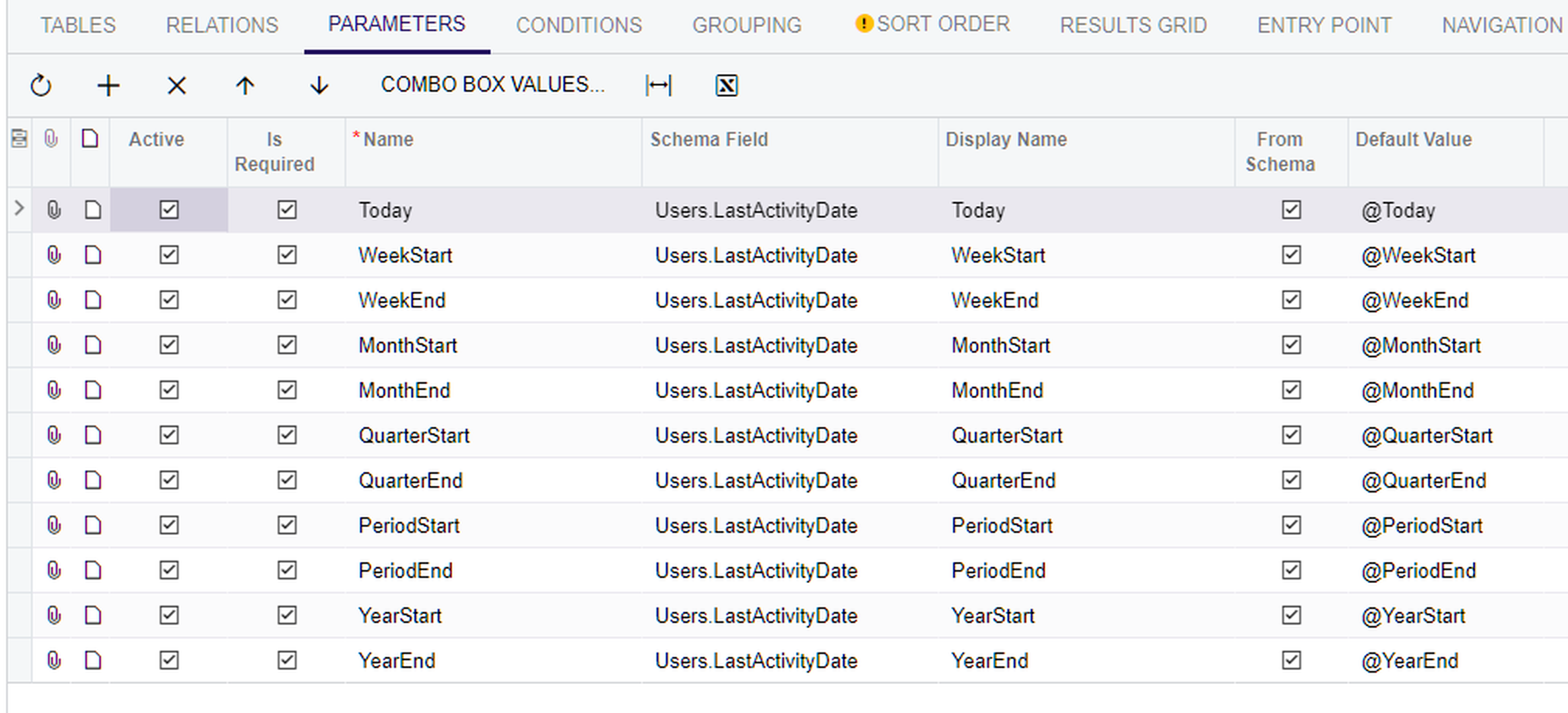
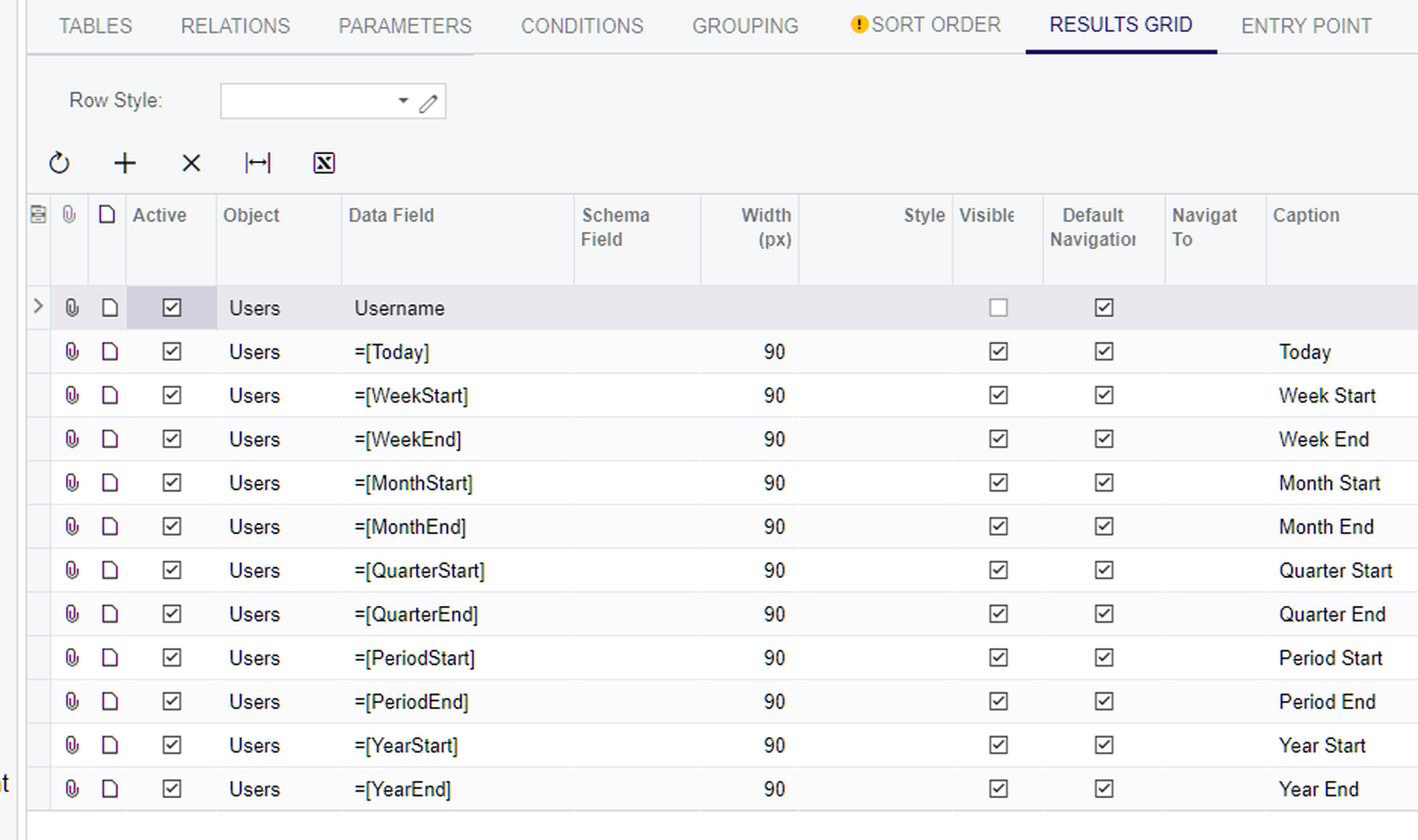
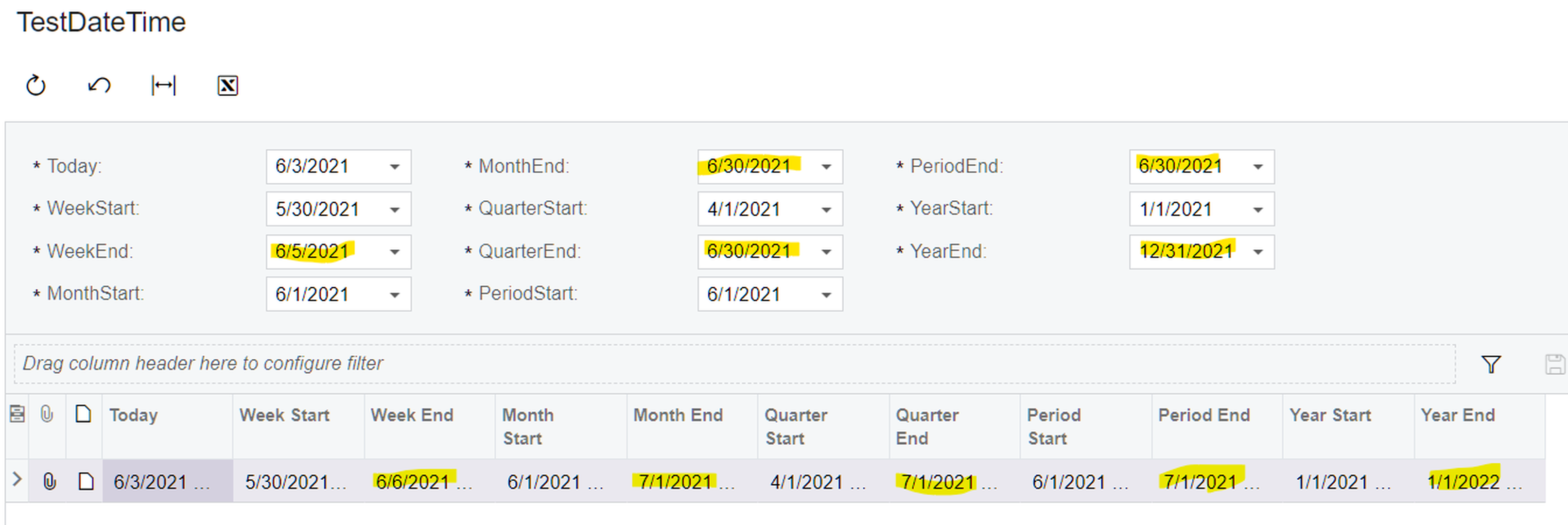
I have found similar, but worse as it is not using the date advertised, in Acumatica 202R2 Build 20.207.0012.  While the correct/expected dates show in the header/parameters, outputting those fields to the grid shows the next day.  This is happening with all of the @____End values.  Not shown here, but I have verified that the next day (incorrect) value is also being used in any filters utilizing the parameters.

GI Output
image

GI Parameters

image

GI Results Grid

image

P.S  I used PX.SM.Users Where Usename = 'admin' to get my single row output for lack of better solution.


Reply
Tim Rodman reacted
Forum Jump:
  Previous Topic
Next Topic  
Forum Information
Recent Posts
Unread Posts
Tags
  • 12 Forums
  • 2,532 Topics
  • 11 K Posts
  • 57 Online
  • 2,418 Members
Our newest member: Chad Treadwell
Latest Post: Limited or no support from Acumatica?
Forum Icons: Forum contains no unread posts Forum contains unread posts
Topic Icons: Not Replied Replied Active Hot Sticky Unapproved Solved Private Closed

Online Members

 No online members at the moment

Acumatica Forums

Terms of Use & Disclaimers :: Privacy Policy

Copyright © 2026 · AUG Forums, LLC. All rights reserved. This website is not owned, affiliated with, or endorsed by Acumatica, Inc.

‹›×

    ‹›×