
Part of the month-end close process that Accountants go through is making sure that the submodules balance to the General Ledger in Acumatica.
It’s a fairly simple process, as long as everything balances. You simply run the AP Balance by GL Account (AP632000) report and compare the total to the Trial Balance Summary (GL632000) report. If the totals match, then everything is great.
However, if the totals don’t match, then you have to resolve the discrepancy and you might not make it home for dinner. Even if you’re working from home during COVID, your physical presence isn’t worth much if you’re working on your computer into the evening (just ask your kids).
Wouldn’t it be nice if you didn’t have to wait until month-end to find out if there is a discrepancy between the AP and GL modules?
There are a couple of reasons why finding out sooner is beneficial:
First, it’s one less thing to do at month-end. It’s easier to resolve discrepancies during the month when there isn’t as much deadline pressure.
Second, knowing sooner is better. If you knew that the modules were in balance in the morning, then you know the problem happened sometime today. It’s SO much easier to resolve discrepancies when you can tell people that the problem happened “today” or “yesterday” rather than “sometime last month”.
Of course, you could run the reports and compare the totals manually every morning when you first get into the office, but Accounts Payable isn’t the only submodule that needs to be reconciled to the General Ledger. There are other modules too.
Even if it only took you 15 minutes to run all of the reports for all of the modules, that’s still 15 minutes that you’d need to spend EVERY morning. And it’s always a last priority since there are so many other things competing for your time.
STSNH Dashboards
I like creating STSNH (Stuff That Should Never Happen) Dashboards as a way to help catch stuff that shouldn’t happen in Acumatica.
One of those things that should never happen is a discrepancy between the Accounts Payable and General Ledger modules.
If that discrepancy is displayed on an STSNH Dashboard, you can make that Dashboard your homepage and have the discrepancy highlighted as soon as you login to Acumatica.
In addition to a Widget that catches an AP/GL Discrepancy, the Dashboard can include as many other Widgets as you want to catch stuff that should never happen in Acumatica.
A Personal Story
I discovered the “Stuff That Should Never Happen” concept while working for a manufacturing company in Cleveland, Ohio.
I created an email alert using SQL that caught bad data in a particular scenario in the ERP database. It was popular so I created another email alert, then another. Eventually there were over 200 email alerts running on a daily basis.
But there was a problem. With too many alerts, they started to get ignored. Or they started going to SPAM.
In the Sage 500 (MAS 500) ERP application that I was working with, SQL was my only option. I didn’t have a Dashboard Engine like we have in Acumatica.
Sample STSNH Dashboard
Let’s take this sample STSNH Dashboard.
The idea with a STSNH Dashboard is that all of the Widgets should be either Red or Green. That makes it easy to spot any problems at a quick glance. Just look for Red Widgets. If everything is Green, then you know there aren’t any problems to deal with:

I’m not going to cover how to build all of the Widgets in the screenshot above.
My focus in this post is the GL DIFF PAYABLES Widget:

Building the Widget Generic Inquiry
How do we build the GL DIFF PAYABLES Widget?
Since every Dashboard Widget sits on top of a Generic Inquiry, we need to build the Generic Inquiry first.
Building the Generic Inquiry is the trickiest part of Dashboards in Acumatica. The Dashboard just makes the information look nice. Without the correct Generic Inquiry, the data displayed on the Dashboard will be wrong.
Building the Generic Inquiry for the GL DIFF PAYABLES Widget is tricky because we have to check two independent things: the balance in the Accounts Payable module and the balance in the General Ledger module.
Luckily we have the Wyatt.ERP Technique that we used previously in this post:
Forecasting Future Acumatica Project Revenue in Monthly Buckets (click here)
Using the Wyatt.ERP technique, we can create a Generic Inquiry that will work for the GL DIFF PAYABLES Widget.
First, we need to create the Generic Inquiry:

Next, we add TABLES to our Generic Inquiry. Note that PX.Objects.GL.Account has been added twice with different Aliases:

Next, we add RELATIONS to our Generic Inquiry. This is always tough to screenshot, but here it goes:


I kind of cheated in the third screenshot above where CSAttributeDetail is joined to GLHistory. I hardcoded 16 for the ACTUAL ledger and 1173 / 1162 for the Accounts Payable GL Accounts. The values for your environment will likely be different.
Also, I couldn’t come up with a good way to dynamically grab the latest period, so I hardcoded 202112 for December 2021 which is the latest period in my demo environment. The problem is that this only works if there is activity in December 2021 so I created a journal entry in December 2021 that debited and credited both of the Accounts Payable GL Accounts. The debit and credit is the same in each account so the net effect is zero. There just has to be at least one journal entry to each of those GL Accounts in the December 2021 period. Not the prettiest solution, but it works. You’d have to update this Generic Inquiry whenever you add new financial periods and make the “dummy” journal entry in the last period.
Next, we add CONDITIONS to our Generic Inquiry:

Now is a good time to point out that the Wyatt.ERP we are using requires a “dummy” Attribute to be created. You can see in the previous screenshot that I called this Attribute SPLITTER in my demo environment. If you use a different name for your Attribute, make sure to change SPLITTER in the previous screenshot to your name.
Here is a screenshot of my SPLITTER Attribute:

Next, we add GROUPING to our Generic Inquiry. Don’t worry about the yellow warning icon, it still works. To enter the formula, double-click into the field and click the pencil icon highlighted in the second screenshot below. Here is the formula in case you don’t want to type it:
=IsNull([APRegister.APAccountID],[GLHistory.AccountID])

Finally, we add RESULTS GRID to our Generic Inquiry. The formulas don’t all fit in the screenshot so I’m reproducing them here:
GL Account
=IsNull([AccountAP.AccountCD],[AccountGL.AccountCD])
AP
=Switch([APRegister.DocType]='ADR',-[APRegister.DocBal],[APRegister.DocType]='CHK',-[APRegister.DocBal],[APRegister.DocBal])GL
FinYtdBalanceDiscrepancy
=IsNull(Switch([APRegister.DocType]='ADR',-[APRegister.DocBal],[APRegister.DocType]='CHK',-[APRegister.DocBal],[APRegister.DocBal]),0)-IsNull([GLHistory.FinYtdBalance],0)
Phew, if you made it this far, you survived the difficult part.
It’s fairly common with Dashboards that the difficult part is building the Generic Inquiry to get the data that you want. The Dashboard is just the nice looking part that sits on top.
Here’s a great image that illustrates this principle. Acumatica Dashboards are above the waterline and Acumatica Generic Inquiries are below the waterline:

Adding the Widget to the Dashboard
Now for the easy part, adding the Widget to the STSNH Dashboard.
DESIGN -> add a new widget -> Scorecard KPI
Then fill out the Widget Properties, starting with selecting the Generic Inquiry that we created above:


A couple of notes:
1. I wish that Normal Color defaulted to Green and Alarm Color defaulted to Red, but they don’t. You have to set them manually.
2. <br/> is HTML for “carriage return”. I used <br/> to force “Payables” to flow onto the next line.
Testing It Out
Not bad huh?
You should now have a Dashboard Widget that looks like this:
Let’s test things out to see if it’s working.
Let’s create a journal entry to one of the Accounts Payable GL Accounts. This should throw the AP and GL modules out of balance.

After releasing the journal entry, if we go back to the Dashboard and refresh the page, we should now see that our GL DIFF PAYABLES Widget has changed from Green to Red:

Isn’t that cool?
Now we can make the Dashboard our homepage in Acumatica and see any Red Widgets “jump out” at us every time we login to Acumatica.
Drilling Down
You can click on a Widget in a Dashboard to be taken to the Generic Inquiry that is “underneath” the Widget.
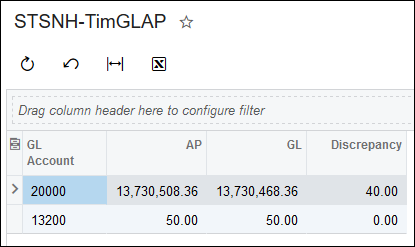
Clicking the GL DIFF PAYABLES Widget takes us into the Generic Inquiry where we can see that the discrepancy of 40 is in the 20000 GL Account:
A Problem
I wish I could end this post on a more positive note, but I have to point out a problem with the above solution.
The GL DIFF PAYABLES Widget only turns Red in one direction.
It worked in my example because I debited the 20000 – Accounts Payable GL Account for 40. If I had credited the 20000 – Accounts Payable GL Account for 40, then the GL DIFF PAYABLES Widget would have remained Green.
I haven’t come up with a solution to this problem yet unfortunately.
The source of the problem, in my opinion, is that you can’t use the result of an aggregation in a formula.
The Discrepancy of 40 in the previous screenshot looks like it’s calculated as 13,730,508.36 minus 13,730,468.36, but that isn’t the actual math. The actual math takes the individual transactions and sums them up.
If the actual math was 13,730,508.36 minus 13,730,468.36 then we could take the absolute value and the problem would be solved. But we can’t. And I can’t think of a way to make the Widget turn Red when the Discrepancy value is negative.
If you have any thoughts on how to solve this problem or any thoughts in general about this post, please continue the discussion here:
Click here to discuss or ask questions about this Blog post in the Forums