
By using this website, you agree to our Terms of Use (click here)

I have had a couple of wholesale/distribution clients ask for reporting at an item level for budget vs actual
This is a sample format prepared in excel from data extracted from their current ERP
Product-Sales-Budget-v-Actual.xlsx
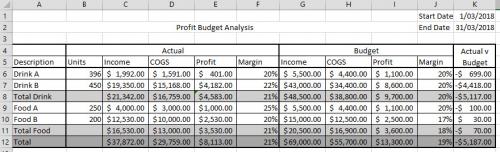
Any suggestions as to how this might be best achieved in Acumatica?

Are you tracking annual or monthly budgets?
If annual, set up 6 attributes at the class level and track by item. CY budget sales, cogs, and profit / PY budget sales, cogs, and profit.
If monthly, I would consider create a custom table with multiple columns; item_key, warehouse_key, year, month, sales, cogs, profit, units. I would then add a new tab to the item maintenance screen to allow maintenance of the budget information at the item level.

Great ideas @shawn-slavin. Regarding your monthly idea, it might be better to create a new grid screen with the Load Records from File icon enabled so you could easily load the data from Excel without needing an Import Scenario.

Online Members
