AugForums.com

An Acumatica User Group

  • Free
    • Start Here
    • In-Person Gatherings
    • Power BI Workshop
    • Podcast
    • Rolodex
    • Blog
    • Forums
  • Paid
    • AugSQL
    • GI Course
    • GI Library
    • Consulting
  • Register

— The Forums are now read-only —

— All new activity now takes place here: —

AugForums.com Discord Server
Forums
AUG Forums
Everything Else
Using an import sce...
 
Notifications
Clear all

Questions Using an import scenario to change the item class on a stock item

 
Everything Else
Last Post by Casey Lawrence 6 years ago
8 Posts
5 Users
3 Reactions
9,229 Views
RSS
Rick Taylor
Posts: 6
 Rick Taylor
Topic starter
August 21, 2018 3:07 pm
(@ricktaylor)
Active Member
Joined: 6 years ago

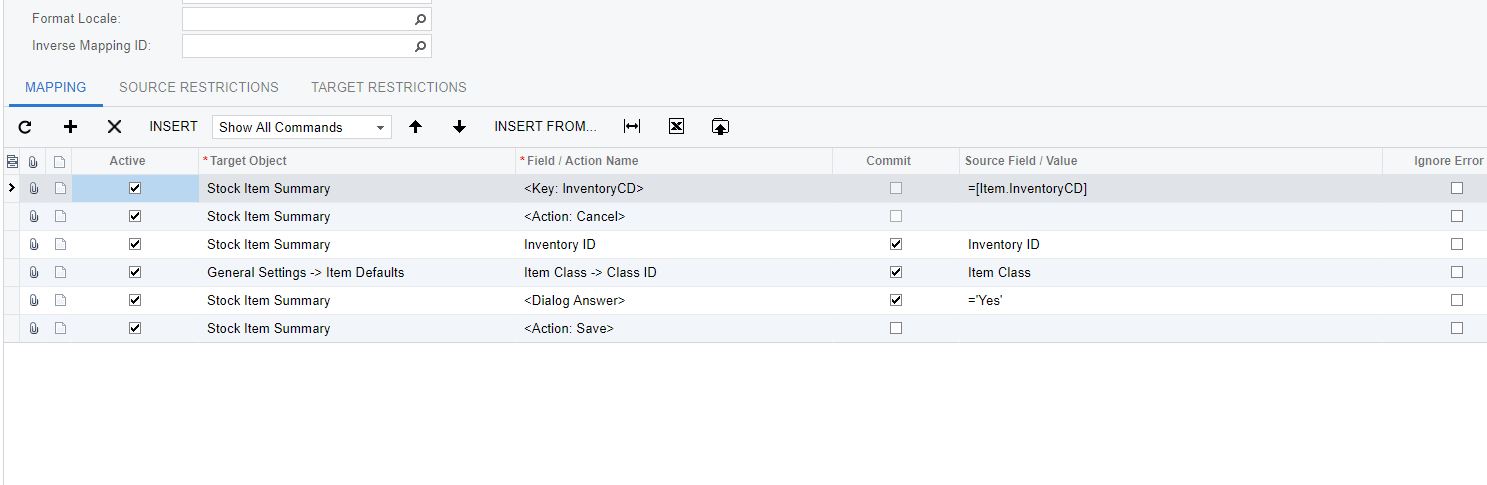
I have not been able to make an import scenario work that is trying to change a stock item's item class.  When attempting to do this in the screen a dialog box pop-up for confirmation.  I have attempted to simulate this dialog answer in the scenario but it still does not work.

Any suggestions?


7 Replies
Royce Lithgo
Posts: 557
 Royce Lithgo
August 21, 2018 5:50 pm
(@roycelithgo)
Honorable Member
Joined: 6 years ago

You need to include the <Dialog Answer> prior to the step that triggers it. Here's an example for reversing a journal. This also triggers a confirmation.


Reply
Scott Dunstan reacted
Rick Taylor
Posts: 6
 Rick Taylor
Topic starter
August 21, 2018 5:53 pm
(@ricktaylor)
Active Member
Joined: 6 years ago

Thanks for the response.  I had the dialog answer in the scenario but realize it need to be on the Summary target object and I had it on the detail.

Reply
Peter Farrell
 Peter Farrell
(@peter-farrell)
Joined: 7 years ago

Member
Posts: 1
January 22, 2019 2:32 pm
Reply toRick TaylorRick Taylor

Rick/Royce - do you mind uploading a screenshot of your completed import scenario? I am struggling with a similar issue on the scenario I made to perform the same task (change Item Class for a stock item).


Even with these settings, I am still receiving the "Please confirm..." error message when trying to import.


Reply
Royce Lithgo
 Royce Lithgo
(@roycelithgo)
Joined: 6 years ago

Honorable Member
Posts: 557
January 30, 2019 10:28 pm
Reply toPeter FarrellPeter Farrell
Rick Taylor

Because you put the <Dialog Answer> AFTER the line that triggers the confirmation message. As per my example, it needs to be BEFORE.


Reply
Scott Dunstan reacted
Tim Rodman
Posts: 3204
 Tim Rodman
Admin
August 23, 2018 7:07 am
(@timrodman)
Famed Member
Joined: 11 years ago

Nice work Royce!


Reply
Tim Rodman
Posts: 3204
 Tim Rodman
Admin
February 8, 2019 11:54 pm
(@timrodman)
Famed Member
Joined: 11 years ago

Weird huh? Apparently it makes sense to programmers why the order is reversed, but not to me. Just the way it is.


Reply
Casey Lawrence
Posts: 4
 Casey Lawrence
April 26, 2020 1:54 pm
(@caseylawrence)
Active Member
Joined: 6 years ago

I had to do the same, and it worked great for me. I would have never guessed. Thanks Royce. 


Reply
Tim Rodman reacted
Forum Jump:
  Previous Topic
Next Topic  
Forum Information
Recent Posts
Unread Posts
Tags
  • 12 Forums
  • 2,533 Topics
  • 11 K Posts
  • 56 Online
  • 2,438 Members
Our newest member: Ralph Torres
Latest Post: Nested SubReport Issue
Forum Icons: Forum contains no unread posts Forum contains unread posts
Topic Icons: Not Replied Replied Active Hot Sticky Unapproved Solved Private Closed

By using this website, you agree to our Terms of Use (click here)

Acumatica Forums

Terms of Use & Disclaimers :: Privacy Policy

Copyright © · AUG Forums, LLC. All rights reserved. This website is not owned, affiliated with, or endorsed by Acumatica, Inc.

‹›×

    ‹›×