AugForums.com

An Acumatica User Group

  • Free
    • Start Here
    • In-Person Gatherings
    • Power BI Workshop
    • Podcast
    • Rolodex
    • Blog
    • Forums
  • Paid
    • AugSQL
    • GI Course
    • GI Library
    • Consulting
  • Register
Acumatica Forums

By using this website, you agree to our Terms of Use (click here)

Forums
AUG Forums
Everything Else
Update multiple lin...
 
Notifications
Clear all

Questions Update multiple line with one Import Scenario

 
Everything Else
Last Post by NickSM 5 years ago
7 Posts
3 Users
2 Reactions
5,612 Views
RSS
Posts: 1
 Josemar Garcia, MBA
Topic starter
November 18, 2019 4:40 pm
(@josemar-garcia-mba)
Member
Joined: 6 years ago
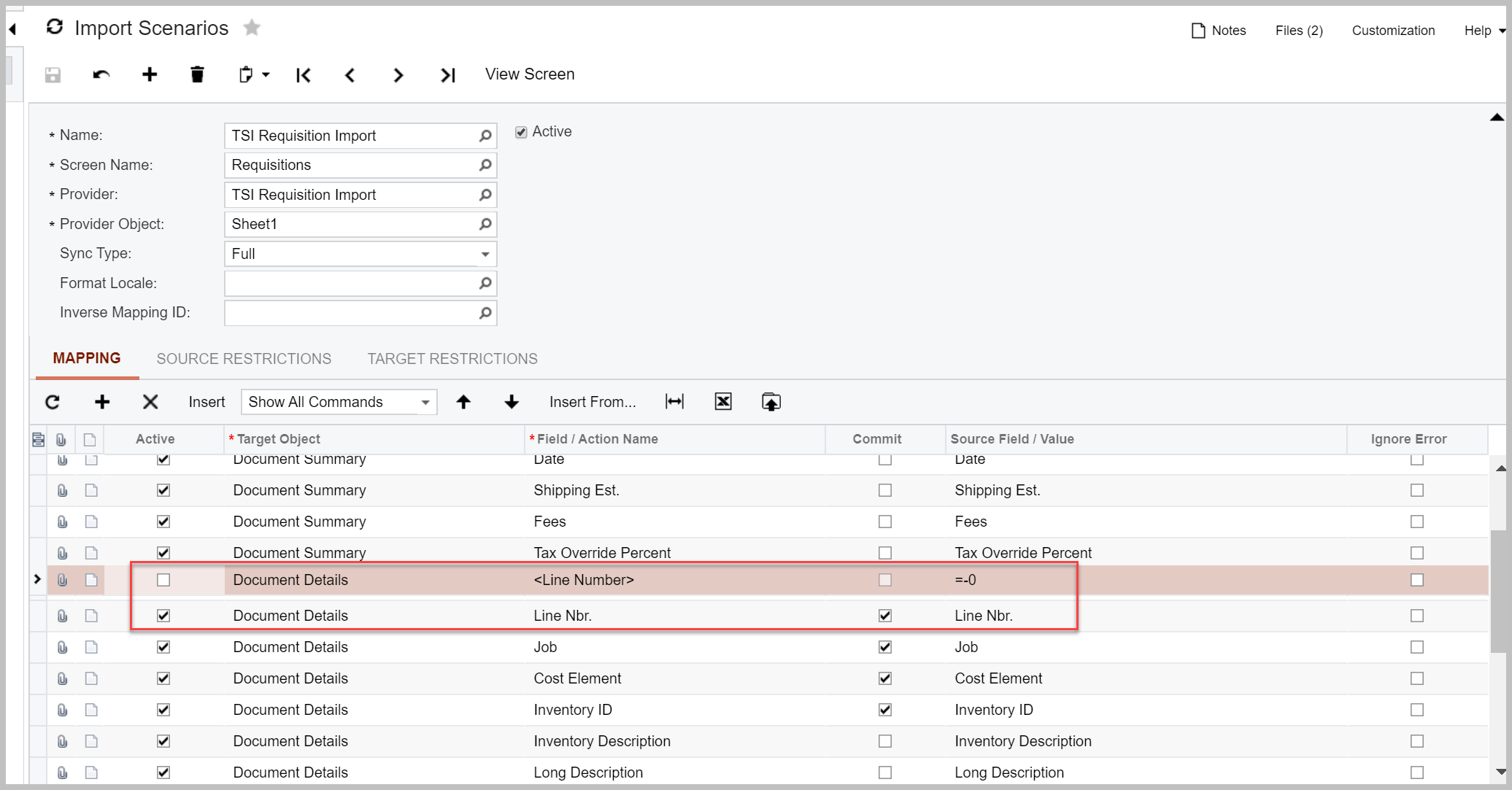
I am trying to build an import to update specific rows in an already created Requisition. Its either adding new rows or just updating the first row. The line number row has been deactivated and now the scenario is pointing directly to the line nbr. field. Please help.
 

6 Replies
Tim Rodman
Posts: 3204
 Tim Rodman
Admin
December 14, 2019 6:31 pm
(@timrodman)
Famed Member
Joined: 11 years ago

For your line that is Active, have you tried using <Line Number> in the Field / Action Name column instead of Line Nbr.?


Reply
NickSM
 NickSM
(@nicksm)
Joined: 6 years ago

Trusted Member
Posts: 46
June 24, 2021 12:49 am
Reply toTim RodmanTim Rodman

Hi @timrodman,

Did @josemar-garcia-mba ever come back to you saying they had fixed the Import? I'm struggling with the same problem and tried what you suggested, but there isn't a line number for the screen I'm using.

Regards

Nick Savage-Mady


Reply
Tim Rodman
 Tim Rodman
Admin
(@timrodman)
Joined: 11 years ago

Famed Member
Posts: 3204
June 24, 2021 2:40 pm
Reply toNickSMNickSM
Tim Rodman

@nicksm I haven't seen anything unfortunately.


Reply
NickSM
 NickSM
(@nicksm)
Joined: 6 years ago

Trusted Member
Posts: 46
June 24, 2021 5:04 pm
Reply toTim RodmanTim Rodman
NickSM
Tim Rodman

@timrodman That's a bugger. I will have to look through Acumatica Training guides and videos to hope that I find a something. I will not be defeated 😝 


Reply
Tim Rodman
 Tim Rodman
Admin
(@timrodman)
Joined: 11 years ago

Famed Member
Posts: 3204
June 24, 2021 5:53 pm
Reply toNickSMNickSM
Tim Rodman
NickSM
Tim Rodman

@nicksm Don't give up!


Reply
NickSM
 NickSM
(@nicksm)
Joined: 6 years ago

Trusted Member
Posts: 46
June 24, 2021 6:28 pm
Reply toTim RodmanTim Rodman
NickSM
Tim Rodman
NickSM
Tim Rodman

@timrodman

I have figured it out, so I had to post this for syntax purposes and for future head-banging.

The trick to this screen, as mentioned before, is the ID (CABankTrans.TransID) field. This is the Primary for the table, but a few rules on how to use it for updates.

  • It is has to be included as the first field for Details
  • Untick Commit

I found this whilst re-reading Troubleshooting Performance in Import and Export Scenarios in the help. There is a section about what commit is used for and how to speed up scenarios. In short because it is a field that can't be updated, it doesn't need to be committed, only used for a look-up when updating. By default it is ticked, so I trusted the system on that front. Once unticked, hey presto!!

image

Glad I stayed committed to the finding the answer Smiley Wink


Reply
FamousMortimer and Tim Rodman reacted
Forum Jump:
  Previous Topic
Next Topic  
Forum Information
Recent Posts
Unread Posts
Tags
  • 12 Forums
  • 2,532 Topics
  • 11 K Posts
  • 22 Online
  • 2,418 Members
Our newest member: Chad Treadwell
Latest Post: Limited or no support from Acumatica?
Forum Icons: Forum contains no unread posts Forum contains unread posts
Topic Icons: Not Replied Replied Active Hot Sticky Unapproved Solved Private Closed

Online Members

 No online members at the moment

Acumatica Forums

Terms of Use & Disclaimers :: Privacy Policy

Copyright © 2026 · AUG Forums, LLC. All rights reserved. This website is not owned, affiliated with, or endorsed by Acumatica, Inc.

‹›×

    ‹›×