AugForums.com

An Acumatica User Group

  • Free
    • Start Here
    • Rolodex
    • Podcast
    • Blog
    • Forums
  • Paid
    • AugSQL
    • GI Course
    • GI Library
    • Consulting
  • Register
Acumatica Forums

By using this website, you agree to our Terms of Use (click here)

Forums
AUG Forums
Everything Else
Tax-Exempt Customer...
 
Notifications
Clear all

Questions Tax-Exempt Customers without Avalara

 
Everything Else
Last Post by Tami 6 years ago
6 Posts
3 Users
1 Reactions
2,676 Views
RSS
MimiB
Posts: 3
 MimiB
Topic starter
July 24, 2019 4:13 pm
(@mimib)
Active Member
Joined: 6 years ago

Is there any way to set up a customer as tax-exempt without the Avalara integration? The Tax Zones are not sufficient to segregate exempt customers and still report gross sales/exempt sales correctly, unless I'm missing something. Any help is appreciated.


5 Replies
Tami
 Tami
(@tlynn)
Joined: 6 years ago

Trusted Member
Posts: 36
August 16, 2019 3:34 pm
Reply toMimiBMimiB

Hello!

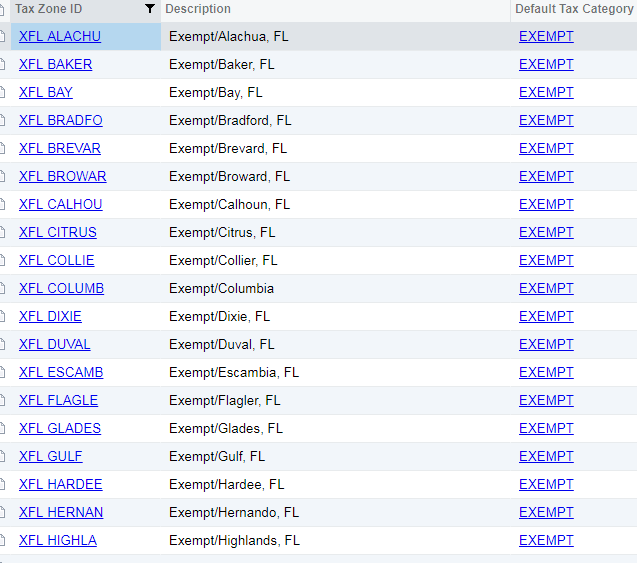
Yes, you can set them up the exact same way as your taxable customers. In my example below, I set up my exempt customers in Florida with their own tax zone, and I just use 0.00 for the tax rate. I use a zone with an "X" in front, so that I know they are the exempt zones.

I hope this helps!!

Tami Hoyt

Contoller,

Tri-Energy Solutions


Reply
MimiB
 MimiB
(@mimib)
Joined: 6 years ago

Active Member
Posts: 3
August 27, 2019 8:46 am
Reply toTamiTami
MimiB

Hi Tami,

Thanks for the response and help!  What I've seen is that setting up an exempt customer with a unique tax zone (at 0% and in a Tax Category defined as Non-taxable) results in the tax reports excluding any lines on an invoice where the item is taxable. It only includes items in the non-taxable category on the reports.  Is that something you've seen?


Mimi


Reply
Tami
 Tami
(@tlynn)
Joined: 6 years ago

Trusted Member
Posts: 36
August 27, 2019 9:44 am
Reply toMimiBMimiB
Tami
MimiB

@mimi-bertram

Hello Mimi,

Happy to help!! Which report are you referring to? I only use the prepare tax reports and compare that to my GL. If it matches my GL, then I know it has captured everything. 

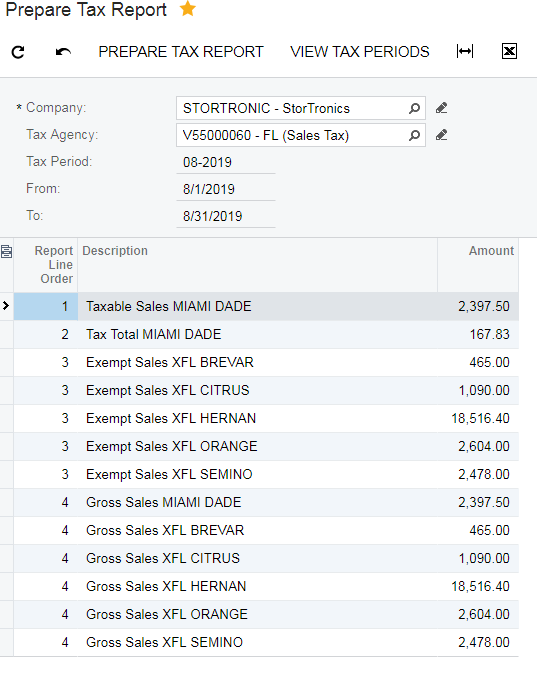
When I run the prepare tax report, it will show all sales in the tax zones I've set up. That way I can report the non-taxable sales as well as the taxable sales.

I hope this is helpful (See screenshot below):


Reply
Tim Rodman
Posts: 3195
 Tim Rodman
Admin
September 28, 2019 7:10 am
(@timrodman)
Famed Member
Joined: 10 years ago

Thanks for the screenshots Tami!

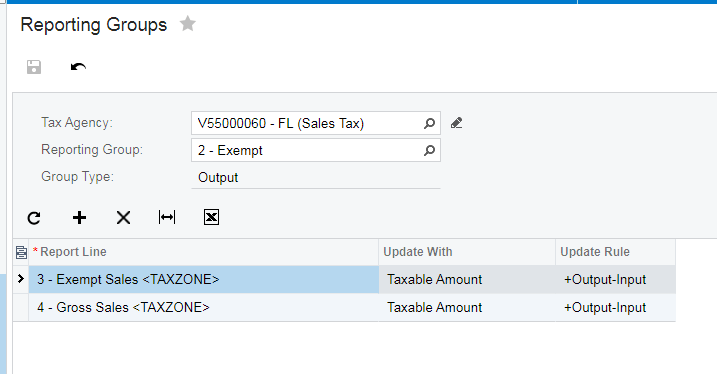
On the Reporting Groups (TX205200) screen do you then have a Reporting Group for Exempt Sales? That might be what Mimi is missing.

Reply
Tami
 Tami
(@tlynn)
Joined: 6 years ago

Trusted Member
Posts: 36
September 30, 2019 1:23 pm
Reply toTim RodmanTim Rodman

@timrodman

Hi Tim,

I do indeed! I use separate reporting groups for taxable vs. exempt.

I hope this helps!


Reply
Tim Rodman reacted
Forum Jump:
  Previous Topic
Next Topic  
Forum Information
Recent Posts
Unread Posts
Tags
  • 12 Forums
  • 2,526 Topics
  • 10.9 K Posts
  • 18 Online
  • 2,411 Members
Our newest member: thollings
Latest Post: Generic inquiry with information from Audit history(CT301000)
Forum Icons: Forum contains no unread posts Forum contains unread posts
Topic Icons: Not Replied Replied Active Hot Sticky Unapproved Solved Private Closed

Online Members

 No online members at the moment

Acumatica Forums

Terms of Use & Disclaimers :: Privacy Policy

Copyright © 2025 · AUG Forums, LLC. All rights reserved. This website is not owned, affiliated with, or endorsed by Acumatica, Inc.

‹›×

    ‹›×