
By using this website, you agree to our Terms of Use (click here)

We use Office 365 for email and Acumatica for ERP. It's a great combination.
I noticed that Acumatica has the ability to send email directly from Acumatica if you setup the email accounts in the System Email Accounts (SM204002) screen, but I can't figure out how to get it to work with my Office 365 email account.

Hi Piggy,
I was able to get Acumatica to work with my Office 365 email.
See below for the settings that I used. Note the green check in the upper-right which was the successful result of clicking the TEST button.
Note that these settings work both for sending email out and bringing email in. If you want to activate inbound email, you just have to check the Activate Incoming Processing checkbox on the Incoming Mail Processing tab. In addition to the automatic processing options on the Incoming Mail Processing tab, you could also just have the email get read into a queue which you can view in the Incoming (CO409000) screen, then you can do things with the email by clicking the CREATE button on that screen. You could even customize that CREATE drop-down to add additional actions.


Just tried those settings and they worked for me too. Thank you!
Exchange integration is needed if you want to sync emails, contacts, calendar events, etc. back-and-forth between Acumatica and Exchange. But not needed for what is mentioned above.
But access to the System Email Accounts (SM204002) screen is available in every Acumatica SKU as far as I'm aware. Setting up emails in this screen allows you to use the SEND button on reports to send the report as an email directly from Acumatica. It can also read inbound email as mentioned about.

So if we have 10 different users, and set up each person's email, would each one see the emails they sent from outlook in their own sent file? My users are kind of stubborn on that fact.
Thanks for the post.

Wondering the same as DanMiller. We have between 30-50 Users setup in Acumatica, and we would like to start using the email capability and the CRM capabilities. But we also use Office 365 for email, and we aren't trying to take people out of outlook or their mobile mail apps either. I know that Acumatica has the system email accounts, but we aren't as excited about the idea of sending out emails from role based email addresses. Has anyone tried setting up and integrating dozens of office 365 email accounts for their users, and would you recommend this as a viable option?
Additionally, i know there are outlook plugins that will allow a user to tag an item to get it into the ERP, but does anyone know if there is support (even if 3rd party) to allow a user to bcc an email address that will allow for the outgoing email to end up in Acumatica associated with the correct contact? I know many other crm SAAS services have such a feature, so wondering if this is exists.
Any insights would be greatly appreciated.
Cory,
On your bcc question, I can't see how that would work in Acumatica unfortunately. I've used the feature where Acumatica reads incoming email and it would see it coming from you, not from the cc'd email address which I think is what you're trying to accomplish.
Do you need the inbound email processing at all? You can turn off the inbound and leave the outbound running.
Yes, we only wanted the outbound processing. I think we've got it working, i sent a note to our IT team to figure out what they did to solve it.

We really only want Inbound processing for those emails that are responses to the messages sent from Acumatica so that the email is automatically attached and filed against the associated document or vendor/customer that received the original email. For example, if an invoice is emailed to a customer and that customer responds to that particular email, we want the response to automatically be attached to the activities for that invoice and be filed under the activities for the customer record. Unfortunately, if we turn on inbound processing, ALL inbound emails are reviewed and processed as read since the setup is using IMAP for my current mail settings in Acumatica.
Since Office 365 Business Essentials is actually an Exchange environment, do you know if I would have the same issues if I linked the system accounts using an Exchange setup instead of the standard IMAP settings that are native to Acumatica?
If it's easier to stay with IMAP settings than do the full Exchange link? Is there an easy way to file incoming mail messages to Acumatica so that I can achieve the same results as stated above with Inbound processing turned off?
If it's easier to stay with IMAP settings than do the full Exchange link? Is there an easy way to file incoming mail messages to Acumatica so that I can achieve the same results as stated above with Inbound processing turned off?
Not sure about the IMAP vs. Exchange part, but I'm wondering how Acumatica would know logically what emails to read. Would it be all emails that have brackets at the end of the subject like this?
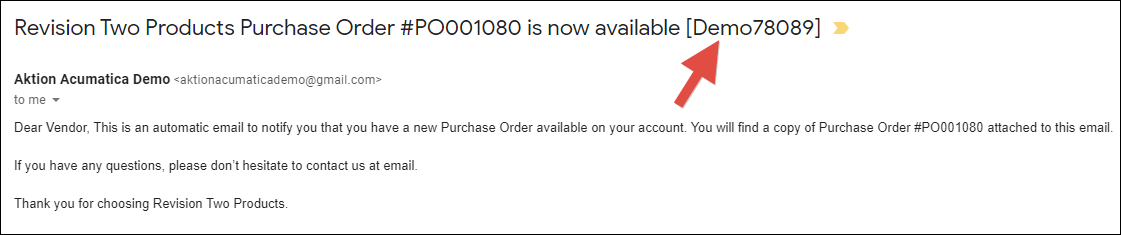
If so, what if you create an Exchange rule with your logic (eg. brackets in the previous paragraph) that moves the email from your Inbox to another folder, maybe a folder called Acumatica. Then populate the Root Folder (on Server) field on the SERVERS tab of the System Email Accounts (SM204002) screen with your new folder (eg. Acumatica).

Would that cause Acumatica to only read the emails that you care about?
Online Members
