AugForums.com

An Acumatica User Group

  • Free
    • Start Here
    • Rolodex
    • Podcast
    • Blog
    • Forums
  • Paid
    • AugSQL
    • GI Course
    • GI Library
    • Consulting
  • Register
Acumatica Forums

By using this website, you agree to our Terms of Use (click here)

Forums
AUG Forums
Everything Else
Sales Order - Preve...
 
Notifications
Clear all

Questions Sales Order - Prevent Automatic Updating of Fields When Changing Customer

 
Everything Else
Last Post by Tim Rodman 7 years ago
11 Posts
4 Users
0 Reactions
3,461 Views
RSS
Posts: 11
 Case Silva
Topic starter
January 30, 2019 11:01 am
(@case-silva)
Member
Joined: 7 years ago

I was wondering if anyone knew of a way to prevent certain fields from updating with default/stored data when updating the Customer field on the Sales Order page under a certain condition.

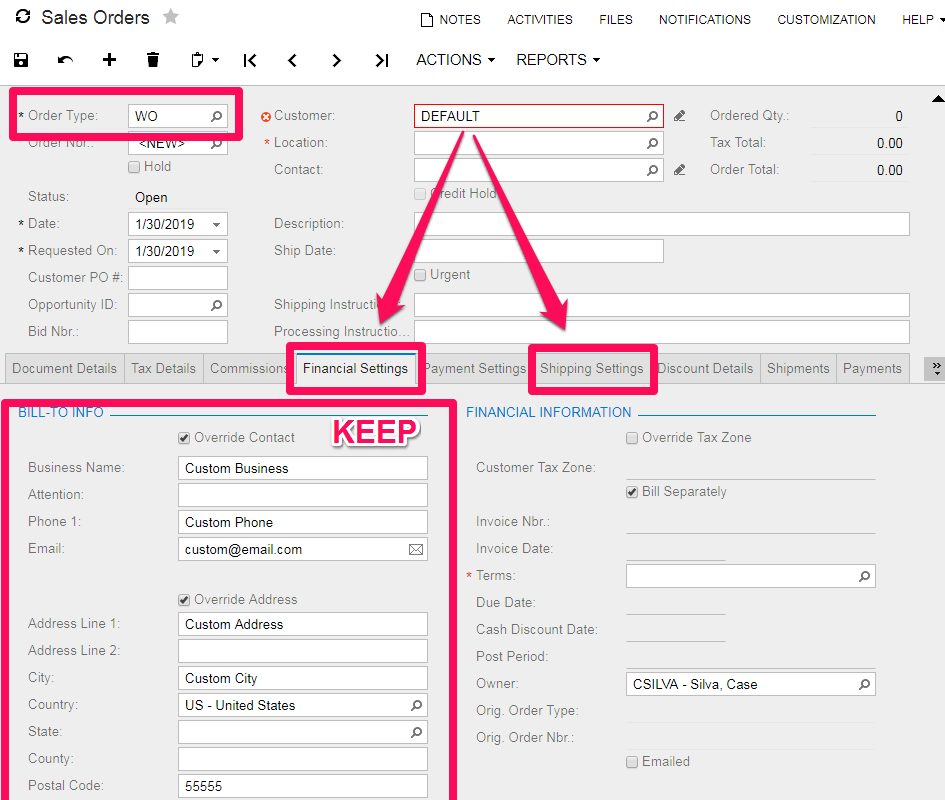
My Goal: When on the Sales Order page, if a certain Order Type is selected (in this case, the order type that signifies it is a Sales Order created and sent from our website), changing the Customer Field does not update/overwrite the Financial Settings or the Shipping Settings.  This is because the Financial and Shipping settings fields are populated and sent from the website, and may have more specific information than the stored Customer information.

I want to keep the loading of default data for other tabs/fields, but keep the customer-entered billing and shipping info. 

Does anyone have any ideas on what I could try in order to achieve this?

10 Replies
Royce Lithgo
Posts: 557
 Royce Lithgo
January 30, 2019 10:16 pm
(@roycelithgo)
Honorable Member
Joined: 6 years ago

I would be looking to have the website update/create the Customer record in Acumatica as part of the order being created. And then ideally, pass the correct Customer ID on the order so you avoid this altogether. 


Reply
 Case Silva
(@case-silva)
Joined: 7 years ago

Member
Posts: 11
January 31, 2019 3:10 pm
Reply toRoyce LithgoRoyce Lithgo

Sorry, I should have given a bit more info.  We are currently using a default "Website User" Customer ID that is passed when a new/non-registered user places an order and a Sales Order is created. When a sales order is created this way, we then have to change the user in Acumatica to their stored existing user ID.  This is when the undesired Billing/Shipping info auto-change happens.

Once we have manually verified and linked the customer info on the website, the Sales Order is created with the correct User ID and this is no longer a problem.  But since the client wants the user to be able to immediately place an order while creating their account, we want the ability to change the Customer ID from the default "Website User" ID to the real Customer ID without the users entered info to be overwritten.


Reply
Royce Lithgo
 Royce Lithgo
(@roycelithgo)
Joined: 6 years ago

Honorable Member
Posts: 557
January 31, 2019 5:59 pm
Reply toCase Silva
Royce Lithgo

So instead of using a default "website customer" record, update your web code to first match the web customer to the Acumatica customer record, if none found, then create new Acumatica customer (with details from website), then create the Sales Order with Acumatica Customer from previous step.

I honestly feel this should be relatively simple coding on the website backend to do it properly than customise Acumatica to do what you are trying to accomplish. 


Reply
 Case Silva
(@case-silva)
Joined: 7 years ago

Member
Posts: 11
January 31, 2019 6:46 pm
Reply toRoyce LithgoRoyce Lithgo
Royce Lithgo

I'll do my best to address both posts here in this response as best as I can.

The reason that we are doing it this way is because we sell primarily to tax-exempt institutions like schools and certain businesses. If a random customer comes on to our website and makes a purchase, we will have to pay the tax and will not ever do any changes to the Customer ID in Acumatica.  They will remain as a default Website Customer ID.

But if an employee of one of those tax exempt institutions (a teacher at a school for instance) uses the website to make a purchase on behalf of the school, they may have their order shipped to their specific school but have a certain branch of their institution listed as billing. We will then need to change the default Website Customer ID to that institutions Customer ID in Acumatica to have the correct tax exemption and accounting applied, but not overwrite that specific information in Acumatica with what is the default stored for that institution. We also don't expect everyone that makes purchases for these institutions to know their accounting details with us. As I mentioned, once we have manually verified that the information a customer provides matches what we have on record, we link their website account to their institutions Acumatica account so that we don't have to do this change for any future purchase they make.

For this reason, we need to allow a purchase from a new account on the website to come in with a default Website Customer ID, but have the ability to change it to an existing Customer ID without the Billing or Shipping info being overwritten by stored defaults if the order type signifies it came from the website.


Reply
Royce Lithgo
 Royce Lithgo
(@roycelithgo)
Joined: 6 years ago

Honorable Member
Posts: 557
January 31, 2019 7:04 pm
Reply toCase Silva
Royce Lithgo
Royce Lithgo

So does this means that at the website end, you are unable to identify whether the website user is either a "random customer" or an "employee of a tax exempt institution"?

If you are able to identify, then you can still do it at the web end.

ie. Use Default if not employee of tax exempt institution, else lookup customer record and default existing Customer ID


Reply
 Case Silva
(@case-silva)
Joined: 7 years ago

Member
Posts: 11
January 31, 2019 7:11 pm
Reply toRoyce LithgoRoyce Lithgo
Royce Lithgo
Royce Lithgo

It means that the business owners want to be able to manually verify the information that a website user enters before the Sales Order is created with an existing customer account (unless we have previously verified and linked accounts). Whether to avoid fraud, frustration, or personal preference on their end, this is the way that they want the integration to work. 

I can understand thinking that it would/should be simpler for the website to do this automatically, but there are situations like this one where a different functionality is needed or wanted. What I'm hoping to find out is if it is possible to change the Customer ID in Acumatica to an existing customer, but not have the billing and shipping info overwritten if the Order Type is of a certain kind.


Reply
Shawn P Slavin
Posts: 196
 Shawn P Slavin
January 31, 2019 5:08 pm
(@shawn-p-slavin)
Estimable Member
Joined: 6 years ago

A couple of points:

1) Financial settings flow from the customer record and the shipping settings flow from the customer location record selected for the customer. This is default behavior and I am not aware of a way to override it without customization.

2) I understand why you are entering an order before the customer record is created in Acumatica. However, aren't you entering the same financial and shipping settings in the customer record when it is created? If so, how is the update causing an issue?

3) If the sale is to a repeat customer, a customer record should already exist. Are you not first validating the customer before creating the order? In this case, when entering orders for an existing customer, the proper, validated customer ID should be used. This would cause the defaults to be pulled and then overwritten by the subsequent lines of the API call.


Reply
Royce Lithgo
Posts: 557
 Royce Lithgo
January 31, 2019 9:19 pm
(@roycelithgo)
Honorable Member
Joined: 6 years ago

I can't see any other way of solving this without customising the code. 


Reply
 Case Silva
(@case-silva)
Joined: 7 years ago

Member
Posts: 11
February 1, 2019 9:35 am
Reply toRoyce LithgoRoyce Lithgo

I'm fine with customizing the code.  Have done it on a few occasions before, was just hoping to get some suggestions.


Reply
Tim Rodman
Posts: 3195
 Tim Rodman
Admin
February 8, 2019 11:17 pm
(@timrodman)
Famed Member
Joined: 10 years ago

I agree with others that you probably need to customize the screen. You can try going here for questions about how to customize:

https://stackoverflow.com/questions/tagged/acumatica


Reply
Forum Jump:
  Previous Topic
Next Topic  
Forum Information
Recent Posts
Unread Posts
Tags
  • 12 Forums
  • 2,526 Topics
  • 10.9 K Posts
  • 29 Online
  • 2,412 Members
Our newest member: kadencewp
Latest Post: Generic inquiry with information from Audit history(CT301000)
Forum Icons: Forum contains no unread posts Forum contains unread posts
Topic Icons: Not Replied Replied Active Hot Sticky Unapproved Solved Private Closed

Online Members

  • Tim Rodman
Acumatica Forums

Terms of Use & Disclaimers :: Privacy Policy

Copyright © 2025 · AUG Forums, LLC. All rights reserved. This website is not owned, affiliated with, or endorsed by Acumatica, Inc.

‹›×

    ‹›×