
By using this website, you agree to our Terms of Use (click here)

Is it possible to add a line break to a formula used in an import scenario:
Need to format an address display for the large summary area of the task screen and want the address to look like an actual address
John Smith
1 Fake Street
Fakeville, CA 90210

Tried both of those and it did not work, may not be possible in an import scenario

What specific screen and field are you trying to import this into?
The tasks screen, I am using the new Business Events feature of 2018 to automate the creation of tasks via an import script.
I tried this:

But I also didn't have any luck. It imported like this:


I'm guessing you already tried <br> ?
Because in reports that's what you have to use for line breaks.


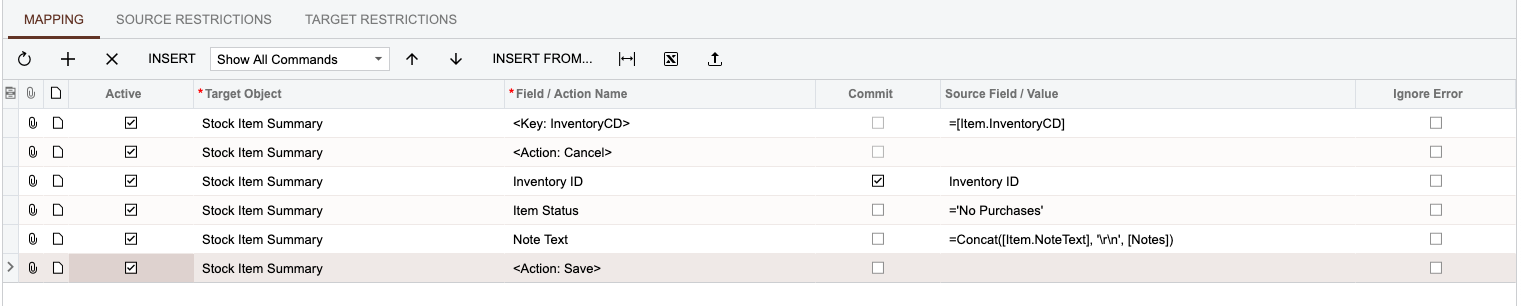
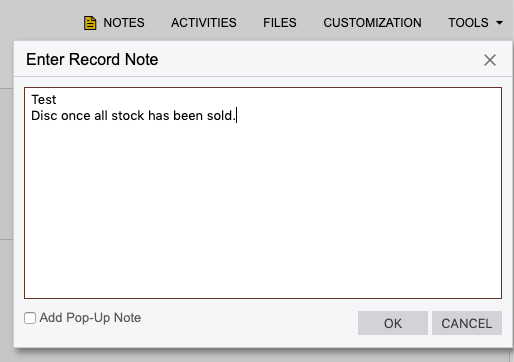
I think it could potentially have something to do with the specific input field that data is being imported into. I had to add an additional note to the Stock Item's Note field and managed to get the text to be added onto a new line. My mission was to add additional text to any existing text that was already present in the note field but as a new line.
I used the concat & '\r\n' approach.
Import Scenario:
Sample Result:
PS. Tested this on 2019R1 so a fix could have been added as well?