— The Forums are now read-only —
— All new activity now takes place here: —

Purchase Receipt needs to be created from a PO to setup the link from the Purchase Receipt line back to the PO. This is a manual step. Now i want to import the allocations for a specific existing Purchase Receipt line. I have something working, but i am unable to implement Line Nbr matching. In other words, my import always applies the allocations to the first line of the Purchase Receipt. This is not what i want. My import file has the PO Receipt Nbr and Line Nbr to update.
I found an example from Acumatica Integration Scenarios training (Example 2.5.2) - which was for updating an AR invoice by Line Nbr. The trick was to use <Line Number> and set it to the line nbr field in the data provider. Here is the example from the training:

Here is my import scenario:

Line Nbr, Lot/Serial Nbr, Qty are the fields in my data provider spreadsheet.
When I try to import some test data, I get "Error: The system failed to commit the splits row"

Maybe you're missing a Dialog Answer row to press the OK button on the Allocations pop-up window?

Hi All,
Sorry to jump into this topic. I was researching for some answers related to serial number allocations on purchase receipt and came across this.
The allocations pop up dialog window could be something missing in the Import scenario. Would be great if the import scenario works - that will save heaps of time.
I have a question here though - somewhat related. I am using serial numbers when used for my stock items. Thus, I do not need to allocate serial numbers during purchase receipt, however, I still need to go into the allocation screen to add the total receipt quantities. I was made to know that I don't even need to go to the allocation screen to enter the purchase receipt quantity (even though it's a serialised item). I have looked all over for a related setting that would allow me to bypass the allocation screen, but to no avail. So, just wondering, if anyone knows if there is such a setting somewhere that i might have missed out, please?
Thank you!
Hi Pamela,
Can't you enter the Quantity on the main screen without going into the Allocation screen?
Hi Tim,
Thanks for the reply. The settings for the stock item and lot serial class appears similar to the DEMO company. However, we do not need to enter the quantities in the allocation screen in the DEMO company , however, in one of the client's site, it came up with an error(per below). There was no customisation on the purchasing screens, so was wondering if anyone has experienced that. I have reported this issue to the principal - will see how it goes. Thank you again once for your help. I find this site is really helpful.
"Error: Inserting 'Purchase Receipt Line' record raised at least one error. Please review the errors.
One or more lines have unassigned Location and/or Lot/Serial Number "
The error means the item is Lot/Serial tracked "When Received" and you need to provide a Lot/Serial number for the PO Receipt Line. This can be done directly on the PO Receipt Line or via Allocations Button. To do it on the line, make sure you've added the Lot/Serial number field to the list of displayed columns. Otherwise you need to press the Allocations button and do it on the popup form.
Hi Royce,
Thank you for the reply. My stock items are tagged to 'Lot/Serial number when used' . Thus, it should not prompt me to go to the allocation screen to enter the serial numbers. It happened to all my stock items which are tagged to 'Lot/Serial number when used'. Just weird.
Do you get the same error if you enter the data manually into the screen?

Hi Tim,
I have a problem with import Purchase Receipts by scenarios and use the button ADD PO but i don't know how to do mapping in scenarios
How can i use this button for import Purchase Receipts?
Thanks you!
I've never tried it before, but I think you could use the technique outlined on Page 111 in this document:
https://openuni.acumatica.com/wp-content/uploads/2017/04/I100-Integration-Scenarios-6_Jan.pdf

@royce-lithgo Were you ever successful importing allocation lines to an existing PO receipt?
I am trying to modify existing PO receipts which t have 1 allocation row ( the default receipt to location ) and split the allocation to multiple warehouse locations.

Tried that. It creates a new po receipt line for each of the allocation lines instead of going into the @@Inventory ID and splitting the qty in allocation rows.
I also tried using the same concept you did here with @@inventory ID but on @@Line nbr. It did not work either.
Not sure why it wouldn't work - make sure that there is no <Line Number> enabled on Document Details (I probably should have deleted that from the IS as it's not doing anything). Can you do it by InventoryID just as a test?
I made sure of that and tried it on inventory ID
This is my current scenario:
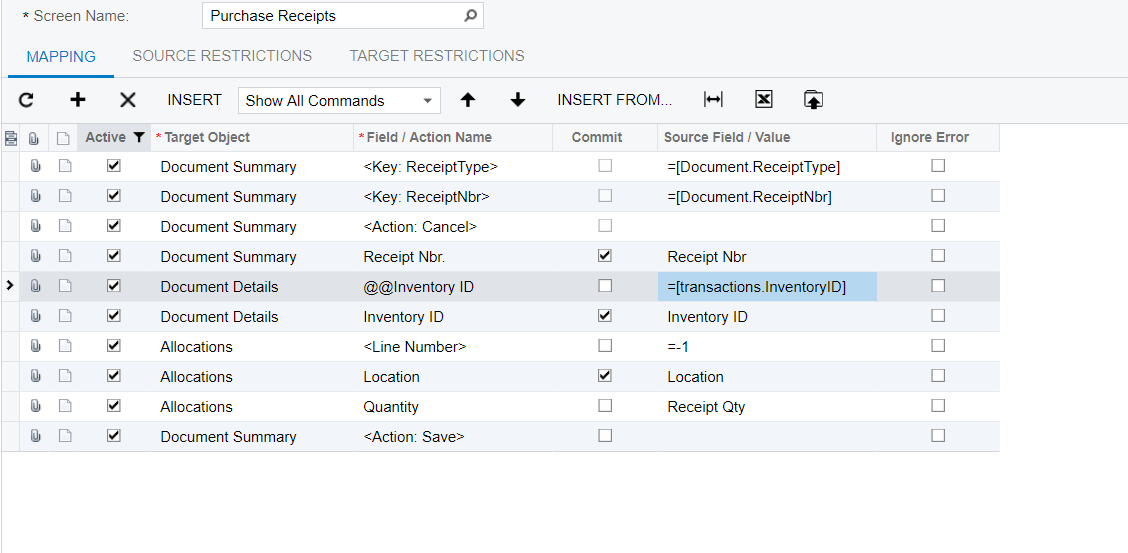
That should work - don't understand why it doesn't.
By using this website, you agree to our Terms of Use (click here)
