AugForums.com

An Acumatica User Group

  • Free
    • Start Here
    • In-Person Gatherings
    • Power BI Workshop
    • Podcast
    • Rolodex
    • Blog
    • Forums
  • Paid
    • AugSQL
    • GI Course
    • GI Library
    • Consulting
  • Register

— The Forums are now read-only —

— All new activity now takes place here: —

AugForums.com Discord Server
Forums
AUG Forums
Everything Else
Filter details line...
 
Notifications
Clear all

Questions Filter details lines for Payroll Tax Settings Import

 
Everything Else
Last Post by Carlos Zarinan 6 years ago
7 Posts
3 Users
2 Reactions
1,921 Views
RSS
lrains
Posts: 8
 lrains
Topic starter
June 20, 2020 3:21 pm
(@lrains)
Active Member
Joined: 6 years ago

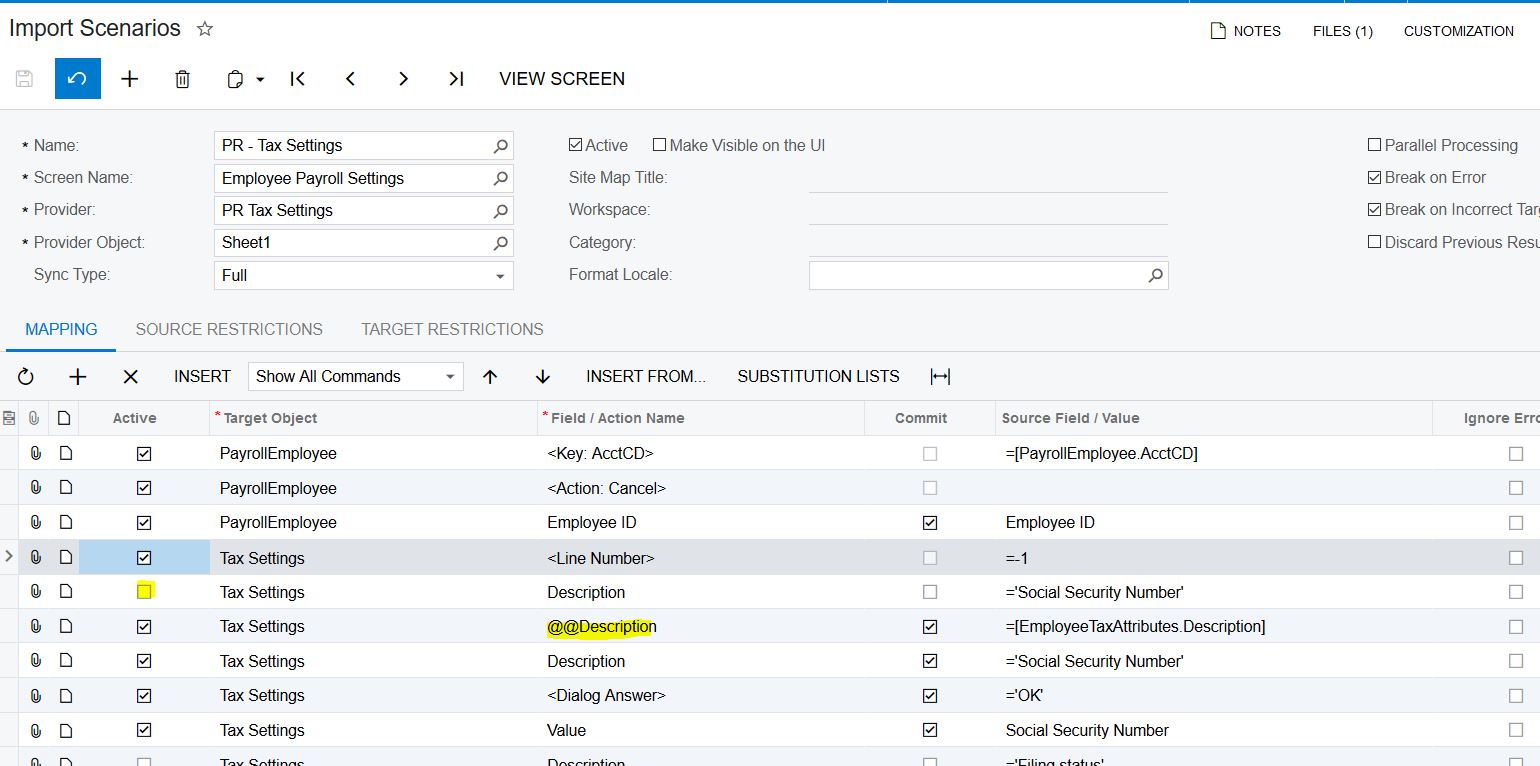
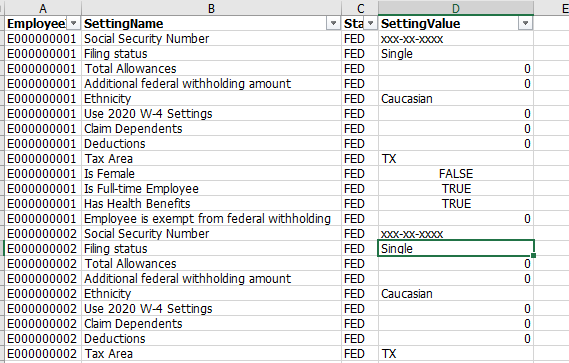
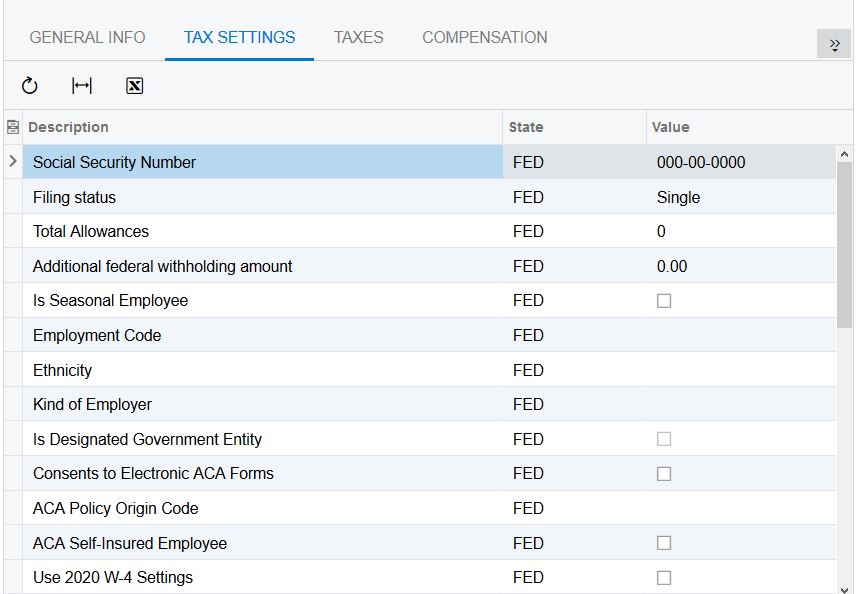
I am trying to load the Tax Settings tab on the Employee Payroll Settings Screen PR.20.30.00

I have tried this a couple different ways with no luck.  The import doesn't fail but no records actually get updated.

It looks like an attribute list so I first tied to load them just like attributes

-1

Description = 'Social Security Number'

Value = 123-45-6789


Next I tired @@Description to filter on the Description field - see attached screen shot


Anyone else have any ideas?
tax
import

 Thanks


6 Replies
Tim Rodman
Posts: 3204
 Tim Rodman
Admin
July 4, 2020 2:49 pm
(@timrodman)
Famed Member
Joined: 11 years ago

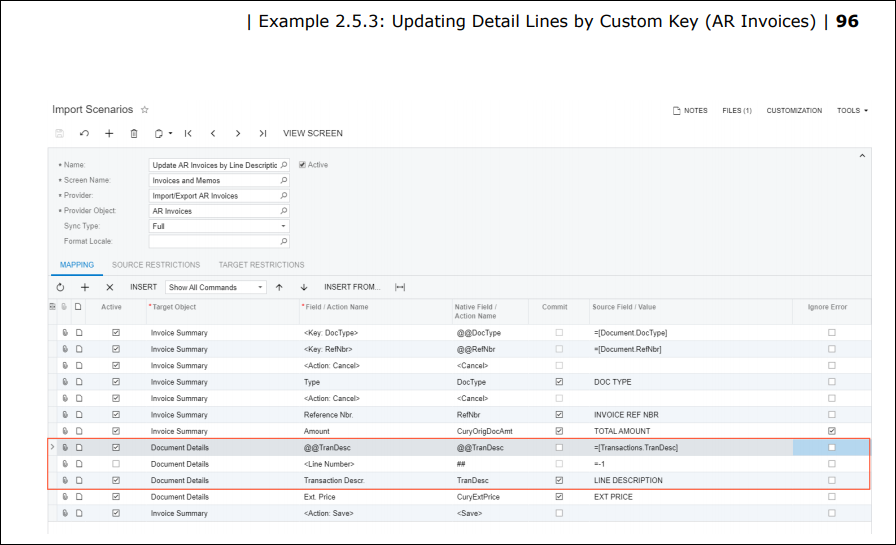
I wonder if, since the row already exists, maybe it wants to "update" the row rather than "insert" the row. If that's the case, you'd need to deactivate the <Line Number> row like here on page 96 of the I100 Course on Acumatica University:
image

Reply
Carlos Zarinan
Posts: 9
 Carlos Zarinan
August 25, 2020 1:21 pm
(@czarinan)
Active Member
Joined: 6 years ago

Irains @lrains

I have the exact problem. The import does not generate any error, but no values are updated. I did what @timrodman suggested with the <Line Number>, but that does help at all.

Here what I did
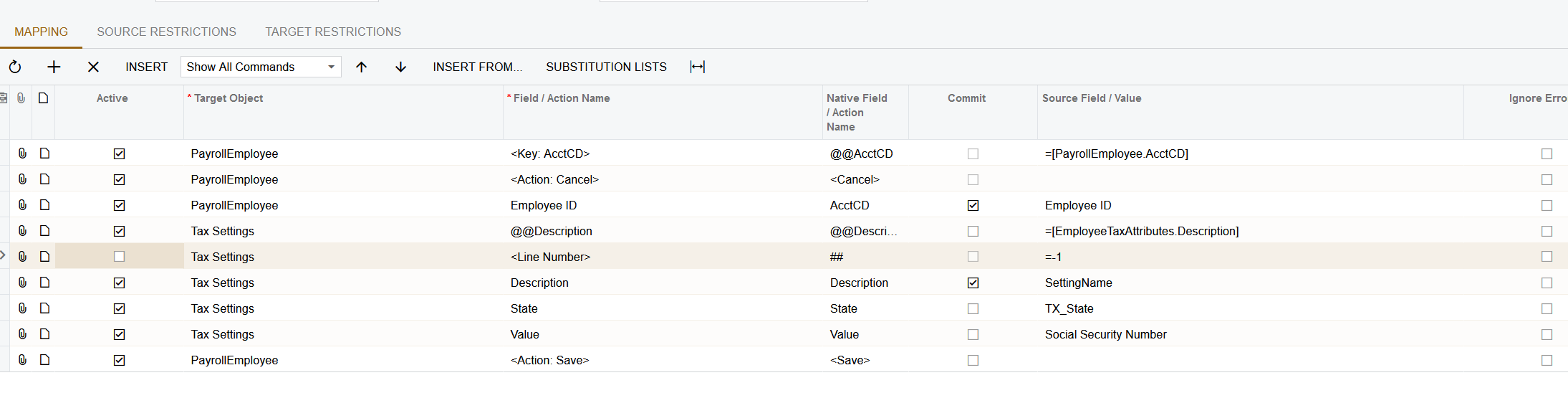
image
 
Thank You

Reply
lrains
 lrains
(@lrains)
Joined: 6 years ago

Active Member
Posts: 8
August 25, 2020 1:28 pm
Reply toCarlos ZarinanCarlos Zarinan

@czarinan I got a customization package from Acumatica with import scenarios that work for this.  Let me see if I can share it with you


Reply
Carlos Zarinan
 Carlos Zarinan
(@czarinan)
Joined: 6 years ago

Active Member
Posts: 9
August 25, 2020 4:44 pm
Reply tolrainslrains
Carlos Zarinan

@lrains

I got one too, but that specific scenario is not on the list. The project has an excel file with a sample for that "Tax Settings" but no actual scenario. Do you mind sharing a snap of your scenario if you have one already working?

Thank You


Reply
lrains
 lrains
(@lrains)
Joined: 6 years ago

Active Member
Posts: 8
August 25, 2020 5:51 pm
Reply toCarlos ZarinanCarlos Zarinan
lrains
Carlos Zarinan

@czarinan

image
image

Reply
Carlos Zarinan reacted
Carlos Zarinan
 Carlos Zarinan
(@czarinan)
Joined: 6 years ago

Active Member
Posts: 9
August 27, 2020 12:23 pm
Reply tolrainslrains
Carlos Zarinan
lrains
Carlos Zarinan

@lrains

Thank You very much, my scenario was missing the @@State. I appreciated it.

Carlos


Reply
Tim Rodman reacted
Forum Jump:
  Previous Topic
Next Topic  
Forum Information
Recent Posts
Unread Posts
Tags
  • 12 Forums
  • 2,533 Topics
  • 11 K Posts
  • 69 Online
  • 2,438 Members
Our newest member: Ralph Torres
Latest Post: Nested SubReport Issue
Forum Icons: Forum contains no unread posts Forum contains unread posts
Topic Icons: Not Replied Replied Active Hot Sticky Unapproved Solved Private Closed

By using this website, you agree to our Terms of Use (click here)

Acumatica Forums

Terms of Use & Disclaimers :: Privacy Policy

Copyright © · AUG Forums, LLC. All rights reserved. This website is not owned, affiliated with, or endorsed by Acumatica, Inc.

‹›×

    ‹›×