AugForums.com

An Acumatica User Group

  • Free
    • Start Here
    • In-Person Gatherings
    • Power BI Workshop
    • Podcast
    • Rolodex
    • Blog
    • Forums
  • Paid
    • AugSQL
    • GI Course
    • GI Library
    • Consulting
  • Register
Acumatica Forums

By using this website, you agree to our Terms of Use (click here)

Forums
AUG Forums
Everything Else
Customization - mak...
 
Notifications
Clear all

Questions Customization - make field editable

 
Everything Else
Last Post by Tim Rodman 7 years ago
4 Posts
3 Users
0 Reactions
5,723 Views
RSS
timg
Posts: 23
 timg
Topic starter
December 17, 2018 5:00 pm
(@timg)
Eminent Member
Joined: 5 years ago

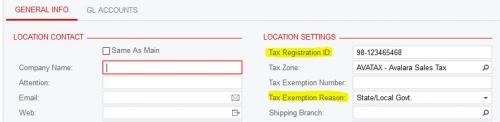
First, let me preface this with the fact that I am not a developer by any means, but I am trying to modify the SO screen as follows.  The site has the external tax integration enabled, running 2018 R2.  The customer would like to be able to see the Tax Registration number and Tax Exemption Reason from the Customer Location screen (fields highlighted in the image below) on the SO:
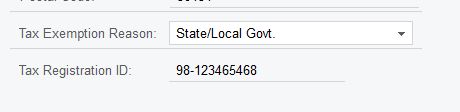
I've added these fields in a customization using the UI Customization tool, and they both appear on the Shipping Settings tab of the SO screen, but only the Tax Registration Reason is editable.  They need to edit both, as they sometimes need to override both on a particular order:
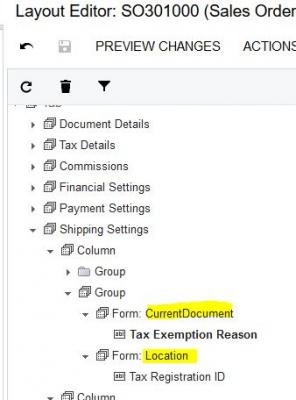
The Tax Registration Reason was available on the CurrentDocument data member in the customization, but the Tax Registration Number was not so I had to add it from the Location data member - don't know if this is what is causing the issue:
The attributes coming in from the registration number field are -

[PXDBString(50, IsUnicode = true)]
[PXUIField(DisplayName = "Tax Registration ID")]
[PXMassMergableField]
[PXPersonalDataField]

If anyone has any ideas on how to get the registration number field editable, I'd love to hear them!  Thanks in advance.


3 Replies
Juriy Zaletsky
Posts: 17
 Juriy Zaletsky
December 19, 2018 9:32 am
(@docotor)
Eminent Member
Joined: 6 years ago

Hm.

It can be that customization in itself makes that field read/only. The way of dealing with it can be via adding code, that will re-enable it. Please read personal message from me, and later we will post here answer in order to avoid big growth of thread.


Reply
timg
 timg
(@timg)
Joined: 5 years ago

Eminent Member
Posts: 23
December 19, 2018 10:43 am
Reply toJuriy ZaletskyJuriy Zaletsky
Posted by: Juriy Zaletsky

Hm.

It can be that customization in itself makes that field read/only. The way of dealing with it can be via adding code, that will re-enable it. Please read personal message from me, and later we will post here answer in order to avoid big growth of thread.

Thanks, but I went ahead and sent this to my development team to handle. 


Reply
Tim Rodman
Posts: 3199
 Tim Rodman
Admin
December 28, 2018 5:28 pm
(@timrodman)
Famed Member
Joined: 10 years ago

You might also try posting this kind of stuff on StackOverflow in the future. That's where most of the developers hangout.

https://stackoverflow.com/questions/tagged/acumatica


Reply
Forum Jump:
  Previous Topic
Next Topic  
Forum Information
Recent Posts
Unread Posts
Tags
  • 12 Forums
  • 2,528 Topics
  • 10.9 K Posts
  • 21 Online
  • 2,412 Members
Our newest member: Peter Paasch
Latest Post: Credit Reference Report Needed
Forum Icons: Forum contains no unread posts Forum contains unread posts
Topic Icons: Not Replied Replied Active Hot Sticky Unapproved Solved Private Closed

Online Members

  • Julie Baker
Acumatica Forums

Terms of Use & Disclaimers :: Privacy Policy

Copyright © 2026 · AUG Forums, LLC. All rights reserved. This website is not owned, affiliated with, or endorsed by Acumatica, Inc.

‹›×

    ‹›×