AugForums.com

An Acumatica User Group

  • Free
    • Start Here
    • In-Person Gatherings
    • Power BI Workshop
    • Podcast
    • Rolodex
    • Blog
    • Forums
  • Paid
    • AugSQL
    • GI Course
    • GI Library
    • Consulting
  • Register
Acumatica Forums

By using this website, you agree to our Terms of Use (click here)

Forums
AUG Forums
Everything Else
Changing the defaul...
 
Notifications
Clear all

Questions Changing the default report in a processing screen

 
Everything Else
Last Post by Alicia Calvillo 5 years ago
3 Posts
2 Users
1 Reactions
1,840 Views
RSS
Alicia Calvillo
Posts: 7
 Alicia Calvillo
Topic starter
February 9, 2021 12:20 pm
(@alicia-calvillo)
Active Member
Joined: 6 years ago

I am looking to change the report that Sales Order : Print/Email Orders : processing screen using.  I tried making a project and creating an action but it did nothing and it would not even let me choose a report because this screen has no action or report drop downs.  Any thoughts on how to do this or what manual i should be reading?  Thanks


    2 Replies
    kevin.ruppert
    Posts: 47
     kevin.ruppert
    February 9, 2021 1:47 pm
    (@kevin-ruppert)
    Trusted Member
    Joined: 6 years ago

    @alicia-calvillo what version of Acumatica are you running, the steps are different based on the versioning?


    In 2020R1 and prior, this is controlled in the automation steps:


    image

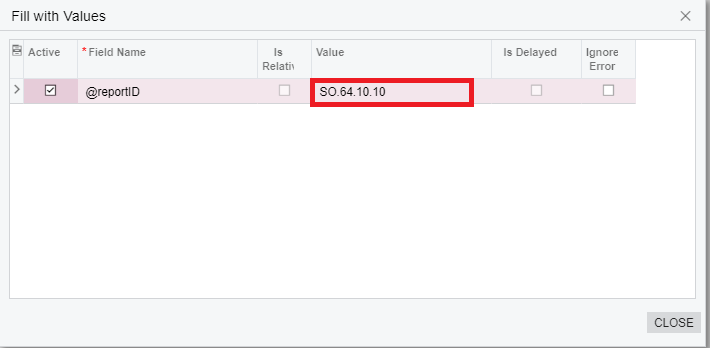
    After selecting the line with the report you want to change select Fill with Values and you can then populate the report ID to call:
    image

    Note: You must change the report ID on all the automation steps you want to impact with this change. 

    In 2020R2+ the sales order automation was moved into the new workflow engine and these changes need to be made via a customization project. While this seems to be more complicated, it actually makes it much easier to manage since you won't need to make this change on every screen + step ID combination. Let me know if you are on 2020R2+ and I will provide the info on how to change this in the newest version. 


    Reply
    Alicia Calvillo
    Posts: 7
     Alicia Calvillo
    Topic starter
    February 9, 2021 4:47 pm
    (@alicia-calvillo)
    Active Member
    Joined: 6 years ago

    Yes I am working on 2020 R2, plus its not the sales order screen ( i can see that screen is still able to be adjusted in the Automation Steps screen).  It is the Print/Email Orders screen SO502000.  thanks !


    Reply
    Tim Rodman reacted
    Forum Jump:
      Previous Topic
    Next Topic  
    Forum Information
    Recent Posts
    Unread Posts
    Tags
    • 12 Forums
    • 2,532 Topics
    • 11 K Posts
    • 35 Online
    • 2,418 Members
    Our newest member: Chad Treadwell
    Latest Post: Limited or no support from Acumatica?
    Forum Icons: Forum contains no unread posts Forum contains unread posts
    Topic Icons: Not Replied Replied Active Hot Sticky Unapproved Solved Private Closed

    Online Members

     No online members at the moment

    Acumatica Forums

    Terms of Use & Disclaimers :: Privacy Policy

    Copyright © 2026 · AUG Forums, LLC. All rights reserved. This website is not owned, affiliated with, or endorsed by Acumatica, Inc.

    ‹›×

      ‹›×