— The Forums are now read-only —
— All new activity now takes place here: —

Good day everyone.
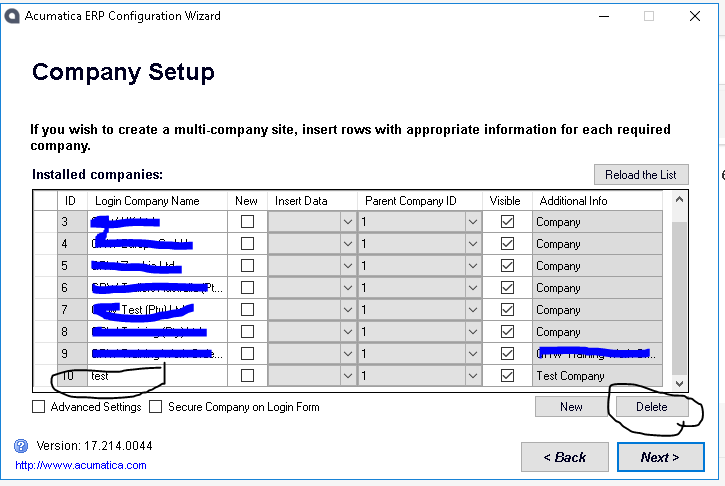
Today I tried adding a new company to my Acumatica instance.
I followed the process as Tim shows on how to add a new company and at the time the progress bar showed, the system seemed to take forever to complete the step so I hit CTRL+ALT+DEL in order to kill the current AcumaticaERP process.
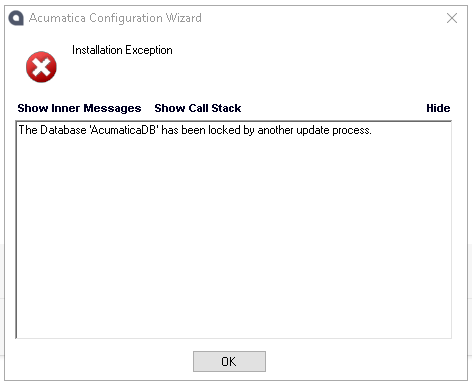
The problem/s I have now is that my site is currently under maintenance mode and if I try to anything in the wizard; I get the error/notification that the Acumatica DB has been locked by another process.
Does anyone know how to get out of this predicament please?
I would like to first delete the test company I created and then recreate a new company again.

Thank you in advance for your assistance.
Kind regards,
Christopher
I have also executed a iisreset command but that is not resolving this lock.
Good news:
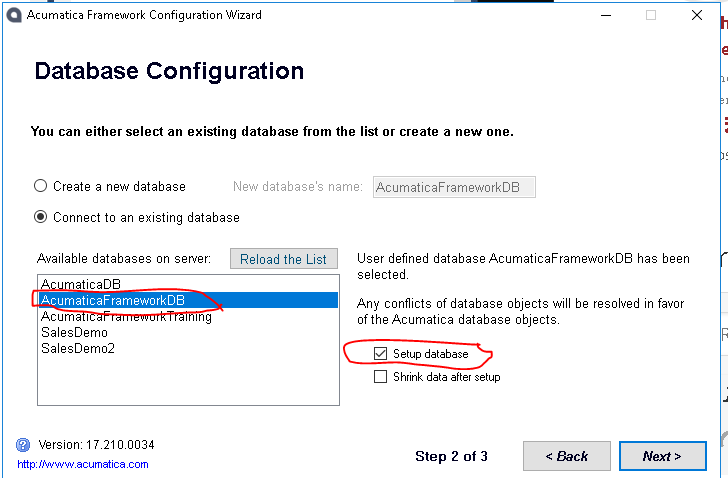
I decided to use the Acumatica Framework Config Wizard and I did a "Setup database" run on the AcumatiFrameworkDB.
Problem seems to be resolved as I can see my new company now and log in at that too.
Warm regards,
Christopher

I wonder if the update process just had to run its course. It takes a while to complete. It might not have been anything that you did, just the process finishing on its own.

I ran into the same issue today (fortunately on a test system), but my machine did a windows reboot during an upgrade.
I could not run the upgrade again (customizations), so had to run the old version, but received this error.
I tried the Acumatica Framework suggestion, but that Setup Database was not available for me (2018 R1).
I ended up deleting a record from the UPLock table in the relevant Acumatica database, and that seemed to help me get past the error.
Thanks for sharing MWA. I didn't know about the UPLock table.
By using this website, you agree to our Terms of Use (click here)
