AugForums.com

An Acumatica User Group

  • Free
    • Start Here
    • In-Person Gatherings
    • Power BI Workshop
    • Podcast
    • Rolodex
    • Blog
    • Forums
  • Paid
    • AugSQL
    • GI Course
    • GI Library
    • Consulting
  • Register
Acumatica Forums

By using this website, you agree to our Terms of Use (click here)

Forums
AUG Forums
Everything Else
Accepted Quantity o...
 
Notifications
Clear all

Questions Accepted Quantity on Sales Order Greater than 0

 
Everything Else
Last Post by Tim Rodman 6 years ago
5 Posts
3 Users
0 Reactions
3,654 Views
RSS
pturok
Posts: 2
 pturok
Topic starter
May 21, 2020 10:23 am
(@pturok)
New Member
Joined: 6 years ago

Hello,
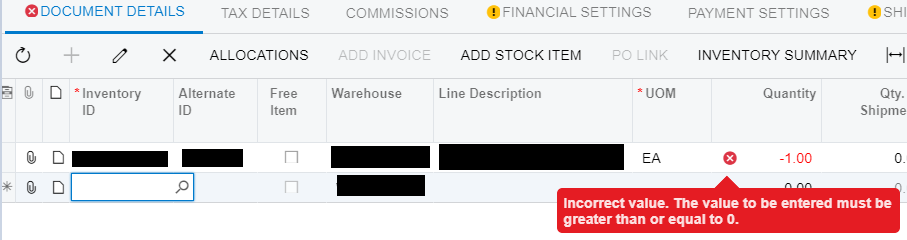
We've run into a few issues with people not properly double checking their work prior to finalizing a sales order.  Yes, hard to believe, I know.  They "complete" a sales order and leave a 0 quantity for an item on the sales order.  Then we go to place a purchase order for the items (after doing a prepare replenishment) and the items never get ordered because Acumatica doesn't know that we need a quantity greater than 0 because we entered 0. 
Anyways, I'm quite curious as to know if there is a way alter the MINIMUM required quantity to be GREATER THAN 0 (not greater than OR EQUAL TO 0).  Having the "OR EQUAL TO 0" part is what is causing an issue.

Thanks in advance!
image


4 Replies
Carl Brooks
Posts: 121
 Carl Brooks
May 27, 2020 8:11 pm
(@kingcarlos)
Estimable Member
Joined: 6 years ago

Is this what you are after - How to set the order quantity to default to 1 in a sales order
 

http://myobexo.custhelp.com/app/answers/detail/a_id/38177/kw/38177/session/L3RpbWUvMTU5MDYyNDU5MS9zaWQvdWF6azJaSm8%3D


Reply
pturok
 pturok
(@pturok)
Joined: 6 years ago

New Member
Posts: 2
May 28, 2020 9:20 am
Reply toCarl BrooksCarl Brooks
Posted by: @kingcarlos

Is this what you are after - How to set the order quantity to default to 1 in a sales order


http://myobexo.custhelp.com/app/answers/detail/a_id/38177/kw/38177/session/L3RpbWUvMTU5MDYyNDU5MS9zaWQvdWF6azJaSm8%3D

kingcarlos,

Thank you for your response, however, this is not exactly what I am asking for.  I do not want it to default as 1.  I want the default to still remain zero, however, I want the error message to show up there is no data input greater than 0.

Having a default of 1 instead of 0 makes me assume we'll end up with even more errors than we currently are already having at the order entry point.

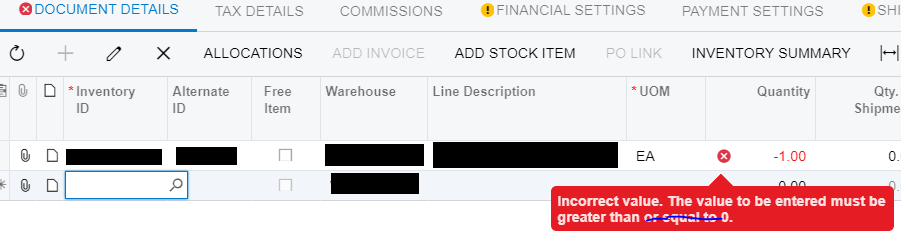
Again, the reason for having this is because sometimes our people entering orders will forget to double check quantities and leave the quantity at the default of 0.  In order to avoid this issue, I would like the error message that currently pops up to read "Incorrect value. The value to be entered must be greater than 0." However, it currently reads "Incorrect value. The value to be entered must be greater than OR EQUAL TO 0."

image

Does this make sense?


Reply
Carl Brooks
Posts: 121
 Carl Brooks
May 29, 2020 2:52 am
(@kingcarlos)
Estimable Member
Joined: 6 years ago

Now I am with you, I wonder what will happen if the second line was just [PXDefault]. Just thinking out aloud, this would mean it would have no value and when you press save it would error out, now there is nothing stopping the end user typing in 0 but that would be dumb.


Reply
Tim Rodman
Posts: 3204
 Tim Rodman
Admin
July 26, 2020 3:29 am
(@timrodman)
Famed Member
Joined: 11 years ago

I don't know of a setting for this. I think you just need to customize the screen to throw an error message similar to the -1 message in your screenshot, but for anything that is 0 or less, not less than 0.


Reply
Forum Jump:
  Previous Topic
Next Topic  
Forum Information
Recent Posts
Unread Posts
Tags
  • 12 Forums
  • 2,532 Topics
  • 11 K Posts
  • 23 Online
  • 2,418 Members
Our newest member: Chad Treadwell
Latest Post: Limited or no support from Acumatica?
Forum Icons: Forum contains no unread posts Forum contains unread posts
Topic Icons: Not Replied Replied Active Hot Sticky Unapproved Solved Private Closed

Online Members

 No online members at the moment

Acumatica Forums

Terms of Use & Disclaimers :: Privacy Policy

Copyright © 2026 · AUG Forums, LLC. All rights reserved. This website is not owned, affiliated with, or endorsed by Acumatica, Inc.

‹›×

    ‹›×