AugForums.com

An Acumatica User Group

  • Free
    • Start Here
    • Rolodex
    • Podcast
    • Blog
    • Forums
  • Paid
    • AugSQL
    • GI Course
    • GI Library
    • Consulting
  • Register
Acumatica Forums

By using this website, you agree to our Terms of Use (click here)

Forums
AUG Forums
Acumatica Report De...
Visible Expression ...
 
Notifications
Clear all

Questions [Solved] Visible Expression & Note Text

 
Acumatica Report Designer
Last Post by Kelly Burns 5 years ago
4 Posts
2 Users
3 Reactions
4,390 Views
RSS
TRA_User
Posts: 15
 TRA_User
Topic starter
May 18, 2021 7:18 pm
(@tra_user)
Eminent Member
Joined: 6 years ago

I am having trouble and hoping for some help with the Visible Expression field in the report designer regarding NoteText.

The goal is to display a highlighted text box containing the note text of a sales order when a note is present.

The value field is listed as: =[Note.NoteText]

Visible Field is listed as: True

It seems to work great as long as I do not enter anything into the VisibleExpr field.

As far as the visible expression I have tried multiple expressions and always end with the same result, a highlighted yet blank text box.  You can see the text box, but not the text when it should be present.  It seems that any visibility expression I enter caused the NoteText to vanish/not display.  If I remove the visibility expression it comes back.

VisibleExpression's I have tried:

=True

True

=([Note.NoteText]<>Null)

=(Len([Note.NoteText])>2)

All have the same result.

Help Please!

image

3 Replies
Kelly Burns
Posts: 11
 Kelly Burns
May 19, 2021 9:47 am
(@kburns)
Active Member
Joined: 6 years ago

This works for me when I set the VisibleExpr on the Detail Section.  It looks like you might be trying it on the text box, which should still work, I think.  However, try looking at the default OOTB PM641000 report in Report Designer.  Highlight the Detail Section(s) and check out the VisibleExpr.    

image

Reply
Kaavya Anupindi reacted
TRA_User
Posts: 15
 TRA_User
Topic starter
May 19, 2021 10:16 am
(@tra_user)
Eminent Member
Joined: 6 years ago

Kelly, thank you for the input.  That did not work either.  But I found the problem.  Sometimes you just need a break and some shuteye for the old ticker to start working.  I had the ProcessOrder field set to "WhilePrint" I don't even really know what that does.  But I changed it back to the default of WhileRead and everything started working.
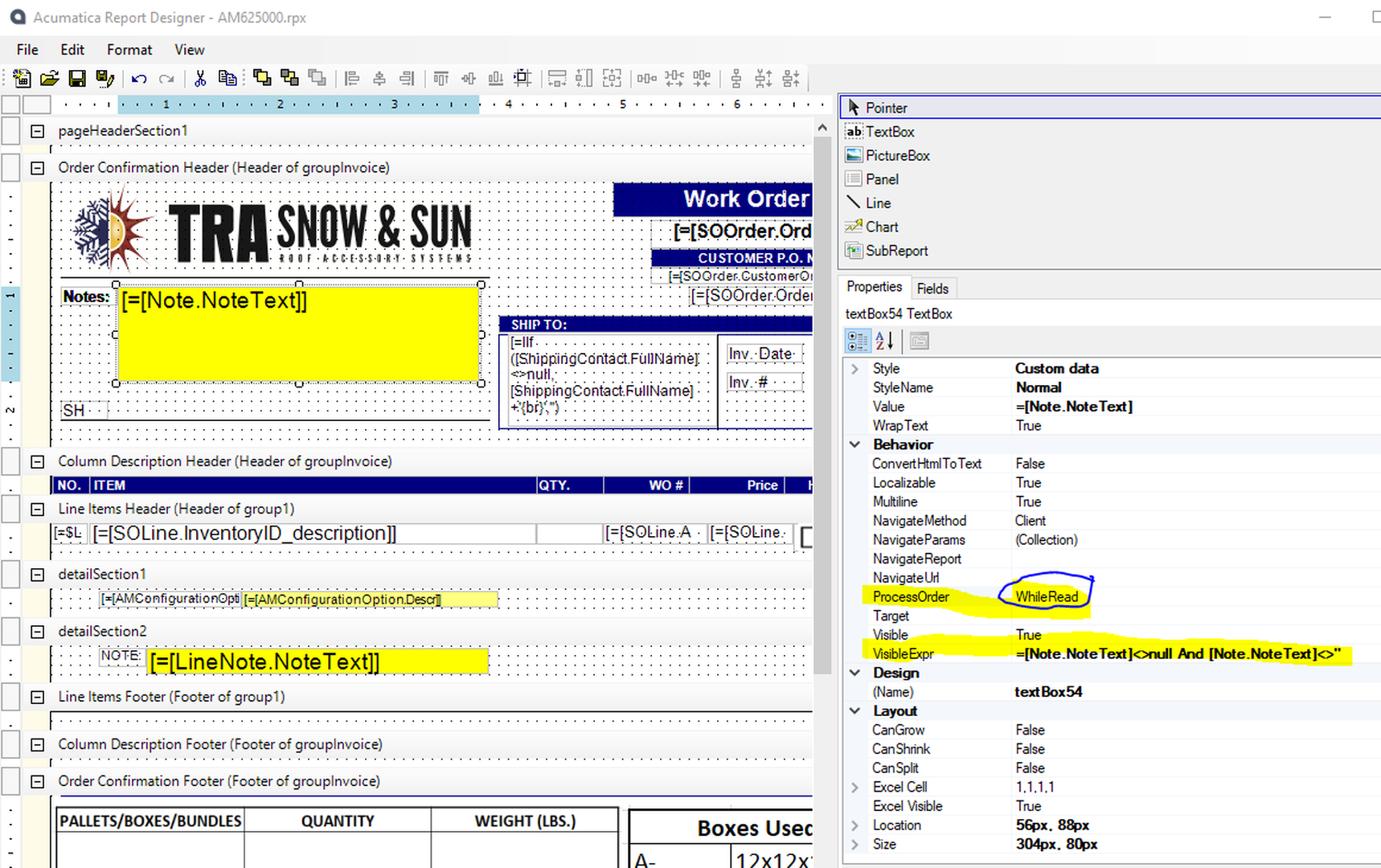
image

Reply
Kelly Burns reacted
Kelly Burns
 Kelly Burns
(@kburns)
Joined: 6 years ago

Active Member
Posts: 11
May 19, 2021 10:46 am
Reply toTRA_UserTRA_User

@tra_user Ahh...yes...I should have looked at that as well.  I didn't notice it was "bold" (meaning not default).  I never touch that ProcessOrder setting.  Glad you got it working!


Reply
Tim Rodman reacted
Forum Jump:
  Previous Topic
Next Topic  
Forum Information
Recent Posts
Unread Posts
Tags
  • 12 Forums
  • 2,526 Topics
  • 10.9 K Posts
  • 23 Online
  • 2,411 Members
Our newest member: thollings
Latest Post: Generic inquiry with information from Audit history(CT301000)
Forum Icons: Forum contains no unread posts Forum contains unread posts
Topic Icons: Not Replied Replied Active Hot Sticky Unapproved Solved Private Closed

Online Members

 No online members at the moment

Acumatica Forums

Terms of Use & Disclaimers :: Privacy Policy

Copyright © 2025 · AUG Forums, LLC. All rights reserved. This website is not owned, affiliated with, or endorsed by Acumatica, Inc.

‹›×

    ‹›×