AugForums.com

An Acumatica User Group

  • Free
    • Start Here
    • In-Person Gatherings
    • Power BI Workshop
    • Podcast
    • Rolodex
    • Blog
    • Forums
  • Paid
    • AugSQL
    • GI Course
    • GI Library
    • Consulting
  • Register
Acumatica Forums

By using this website, you agree to our Terms of Use (click here)

Forums
AUG Forums
Acumatica Report De...
Using values from I...
 
Notifications
Clear all

Questions Using values from InventoryTranHistEnqResult table

 
Acumatica Report Designer
Last Post by sunwayfan 8 years ago
16 Posts
2 Users
1 Reactions
5,375 Views
RSS
Posts: 58
 sunwayfan
Topic starter
February 20, 2018 11:45 am
(@sunwayfan)
Member
Joined: 8 years ago

How can I use QtyOut values from InventoryTranHistEnqResult table?

Since this table is created specifically for Transaction History page it is not present in the database.


I want to add the QtyOut column to a report in report designer but I am getting error as "Invalid object name 'InventoryTranDetEnqResult'" in the Trace screen.

Is there any other table where the shipped quantities are stored in the database?


15 Replies
 sunwayfan
(@sunwayfan)
Joined: 8 years ago

Member
Posts: 58
February 20, 2018 1:02 pm
Reply tosunwayfan

The report I created is Sales Profitability by Customer Class and Item


Trying to display shipped quantity for item of a particular Customer class


Reply
Tim Rodman
Posts: 3204
 Tim Rodman
Admin
February 20, 2018 3:02 pm
(@timrodman)
Famed Member
Joined: 10 years ago

For profitability, I would do this off of ARTran.

Actually, there are a few reports available in the Accounts Receivable module that do just that.


Reply
Posts: 58
 sunwayfan
Topic starter
February 20, 2018 3:16 pm
(@sunwayfan)
Member
Joined: 8 years ago

Yes, But I am trying to create a new profitability report by Customer Class and Item. I want to display the quantities shipped for a Particular item of a Customer Class as in this screenshot
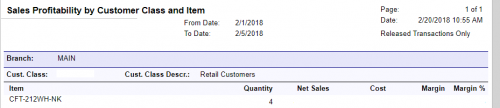
 

But in this report that I made the quantities column is not showing desired values


Reply
Tim Rodman
Posts: 3204
 Tim Rodman
Admin
February 20, 2018 3:43 pm
(@timrodman)
Famed Member
Joined: 10 years ago

Is there any reason why you want "shipped quantities" instead of "invoiced quantities?


Reply
Posts: 58
 sunwayfan
Topic starter
February 20, 2018 3:48 pm
(@sunwayfan)
Member
Joined: 8 years ago

Aren't they same? shipped quantities and invoiced quantities?

Because whatever gets shipped will be invoiced


Reply
Posts: 58
 sunwayfan
Topic starter
February 20, 2018 4:02 pm
(@sunwayfan)
Member
Joined: 8 years ago

I tried using Qty from AR and the report showed these values(36 qty shipped)
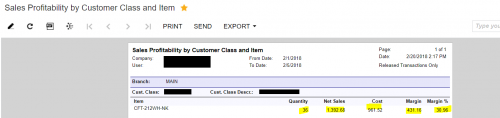
Even the net sales are not accurate (the net sales should be 391.4 because the unit price is 10.30)

Whereas it should be 38
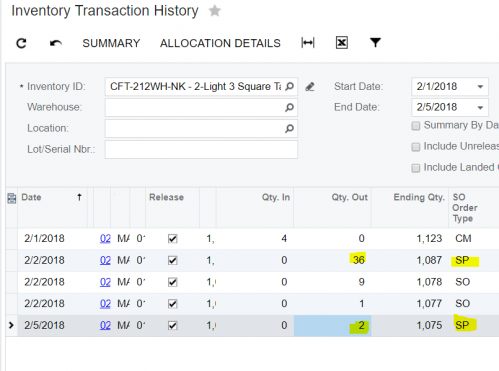
Am I missing out something? I thing the tables are not related correctly...it is not able to pull correct item data for a customer class


Reply
Tim Rodman
Posts: 3204
 Tim Rodman
Admin
February 20, 2018 4:05 pm
(@timrodman)
Famed Member
Joined: 10 years ago

I would think that they should be the same, but I'd want to do some validation like you are doing.

Are you using ARTran.Qty?

It might have something to do with Unit of Measure. You might try ARTran.BaseQty.


Reply
Posts: 58
 sunwayfan
Topic starter
February 20, 2018 4:08 pm
(@sunwayfan)
Member
Joined: 8 years ago

Yes I am using ARTran.Qty.

I tried using ARTran.BaseQty but it didn't show any difference

Reply
 sunwayfan
(@sunwayfan)
Joined: 8 years ago

Member
Posts: 58
February 20, 2018 5:33 pm
Reply tosunwayfan

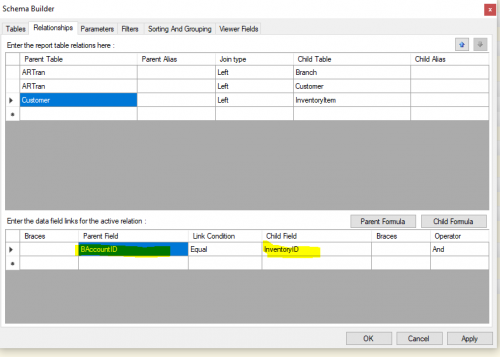
I think it is something to do with the table relationships in the schema builder


What should be the relationship between Customer and InventoryItem table in this case?


Reply
Tim Rodman
Posts: 3204
 Tim Rodman
Admin
February 21, 2018 6:10 pm
(@timrodman)
Famed Member
Joined: 10 years ago

Ya, that relationship definitely isn't right. But I wouldn't actually do the relationship between Customer and InventoryItem. Shouldn't it be between ARTran and InventoryItem?


Reply
 sunwayfan
(@sunwayfan)
Joined: 8 years ago

Member
Posts: 58
February 21, 2018 8:55 pm
Reply toTim RodmanTim Rodman

I tried with ARTran and InventoryItem table too, but still it didn't work


Reply
Tim Rodman
Posts: 3204
 Tim Rodman
Admin
February 22, 2018 10:33 pm
(@timrodman)
Famed Member
Joined: 10 years ago

Where are you getting the quantity of 38 from?


Reply
Posts: 58
 sunwayfan
Topic starter
February 27, 2018 9:45 am
(@sunwayfan)
Member
Joined: 8 years ago

The quantity 38 is for the items with customer class SP


Reply
Tim Rodman
Posts: 3204
 Tim Rodman
Admin
February 27, 2018 11:24 pm
(@timrodman)
Famed Member
Joined: 10 years ago

Ah, looks like that field is actually SO Order Type. Are you sure that every customer with a Customer Class of "SP" is using an SO Order Type of "SP"?


Reply
Posts: 58
 sunwayfan
Topic starter
March 1, 2018 9:50 am
(@sunwayfan)
Member
Joined: 8 years ago

Yes,

It worked after changing the Group Collection in the Report designer
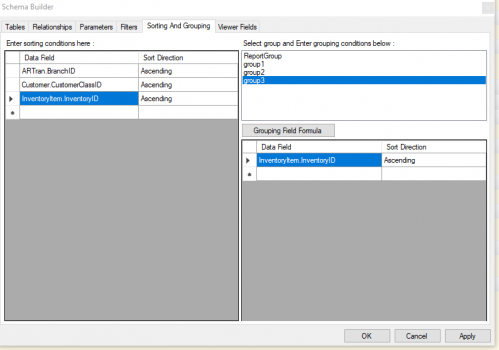
The mapping wasn't right before


Reply
Tim Rodman reacted
Forum Jump:
  Previous Topic
Next Topic  
Forum Information
Recent Posts
Unread Posts
Tags
  • 12 Forums
  • 2,530 Topics
  • 11 K Posts
  • 7 Online
  • 2,418 Members
Our newest member: Chad Treadwell
Latest Post: Negative/Credit Inventory Value?
Forum Icons: Forum contains no unread posts Forum contains unread posts
Topic Icons: Not Replied Replied Active Hot Sticky Unapproved Solved Private Closed

Online Members

  • Johnny Tang
Acumatica Forums

Terms of Use & Disclaimers :: Privacy Policy

Copyright © 2026 · AUG Forums, LLC. All rights reserved. This website is not owned, affiliated with, or endorsed by Acumatica, Inc.

‹›×

    ‹›×