
By using this website, you agree to our Terms of Use (click here)

Has anyone had success adding a variable to report designer to output when printing the user name and email address of the user generating the report? We're trying to create an output for a sales quotation and variables for the customer and such, but in the footer we want to include the specific user who initiated the report. This may be different than the person who created or last modified the report. Any ideas? My first question so please take that into consideration... 😀

Hi, Netesh. We use =Report.GetDefUI('AccessInfo.DisplayName') in a text box for the username of the logged-in user running the report. I assume there is an analogous field for email address and other items but I haven't looked that up.
Dianne

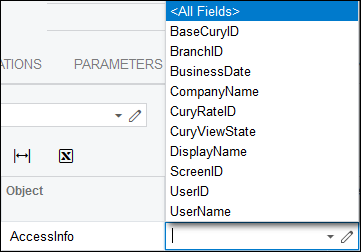
Looks like Email isn't one of the available fields unfortunately:
Good first question Netesh. Looking forward to seeing more 🙂

Hey Tim,
After playing around with a few different ideas, we were able to figure out how to pull in the Users table to the report. Once we did that, we opened the door for a couple pretty cool additions to our reports:
We started with creating a parameter that grabs the username of the person printing the document. The AccessInfo table is limited to the fields available, but this at least gives us the username:
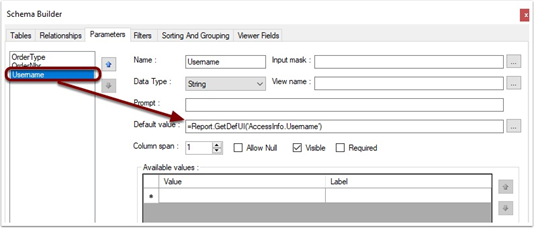
Next, we created a table “link” between the SOOrder table and the Users table. This might sound odd, but if you look at the relationships, you can see I used the @username parameter as the Parent field and then linked it to the username field in the Users table.
This allows us to see the full Users table on the report that is linked to the user that PRINTS the document. This is big because we can easily link the CreatedBy and LastModifiedBy field from the SOOrder, but sometimes a user will need to print a Quote, but they are not the last one to modified it.

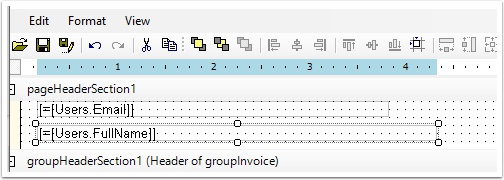
Now that we have the Users table, I can add any field I need. In the example below, I grabbed the Full Name and Email from the Users table.
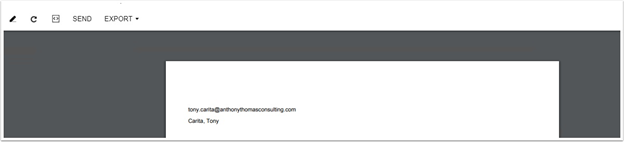
Here is the printout showing my email address since I printed the document. Another user is listed as the LastModifiedBy, so the AccessInfo parameter is properly pulling my username:
The other benefit that this created was the ability to add the email address to the Mail Settings on the report. This lets us put the email in as the BCC or CC field and then it automatically pulls the email from the user printing the document
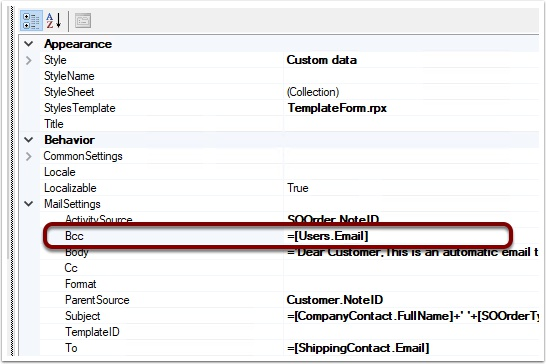
Here is the Email Activity box with my email as the BCC:

This is beautful. Awesome solution! I love learning clever tricks like this from others. Thanks so much for sharing Tony and Netesh!
Online Members
