
By using this website, you agree to our Terms of Use (click here)

We have custom reports for our Sales Order Confirmations, Packing Lists, Invoices, etc. I want to send all Sales Order Confirmations to the Main Contact Email Address of my Customers. I thought I had everything set up correctly, but the Sales Order Confirmations are still being sent to the customer's billing contact email.
I know there are 4 different locations that these settings can exist:
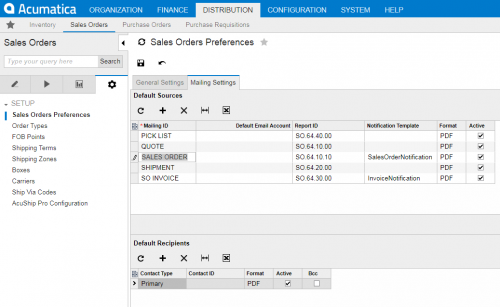
1. Distribution | Sales Orders | Configuration | Sales Orders Preferences | Mail Settings
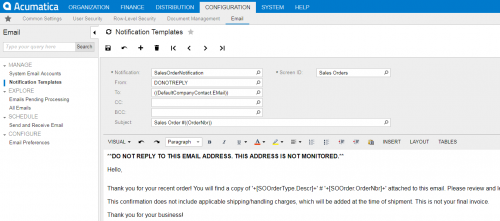
2. Confirguration | Email | Manage | Notification Templates
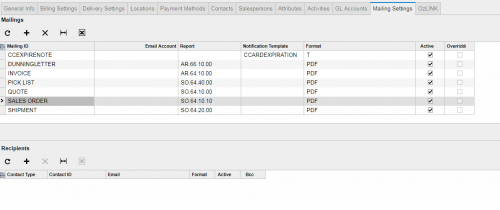
3. Finance | Accounts Receivable | Customers | Mail Settings
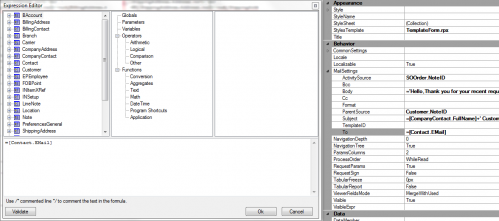
4. Acumatica Report Designer | Sales Order Report | Mail Settings
I've attached screen shots of my settings for each location. What am I missing?

[bad joke] The attachments... [/bad joke]
But seriously, it looks like you may have forgotten to attach the images of your setup. Would you mind reposting them please?
Well now, this IS interesting. I dumped the table with those emails (having made two for this test) and at the onset the only difference between them is their Contact ID. It appears that making changes to the contact info will not change the ID and that the ID's are sequential. This means that billing's ContactID is always greater than the default's ID.
What you "really" need though is to be able to isolate what view you're in. I've not had to do that before, so I don't know how myself. The billing email is under Contact.Email, but is in the BillContact view not the DefContact view (use CTRL+ALT+LeftMouseButton on the fields to see this).
If you don't use unique emails in the Customer's shipping tab, then max(Contact.ContactID) should be your unique key, but this is an awfully dirty method.

Ugh, I've looked at this in depth twice now. Each time I've thought, "man, I need to write-up a post on it". But there's a lot going on and I haven't made the time. So basically I have to re-learn it every time. Someday I'd like to write a post on it.
Three things:
1. How are you sending them out? Are you using ACTIONS -> Email Sales Order/Quote on the Sales Orders (SO301000) screen? Or are you using the SEND button on the report itself? Try both because I think they pull the email from two different places (which is totally annoying).
2. I'm pretty sure that Sales Orders Preferences -> Mail Settings can be eliminated from this discussion because I think it's just used as default values for Customers -> Mail Settings.
3. After you try #1, can you try copying "SalesOrderNotification" into the Notification Template column on Customers -> Mailing Settings and then try #1 again to see if it changes anything?

Michael - I can't even pretend I understand what you're suggesting. Sorry.
Tim -
1.) I tried sending emails using both methods and received the same results.
3.) I added the "SalesOrderNotification". ACTIONS -> Email Sales Order/Quote on the Sales Orders (SO301000) screen sent an email to my company's main email address. The SEND button on the report itself sent an email to the customer's billing contact email.
Do we have the To: settings wrong in the Notification Template? We currently have ((DefaultCompanyContact.Email)) intending to go to the customer's General Info | Main Contact email.
3. This is what I was expecting so this is good.
When you click the SEND button on the report, it pulls the To Email from here:

When you click ACTIONS -> Email Sales Order/Quote on the Sales Orders (SO301000) screen, it pulls the To Email from here:

Those fields on the Notification Templates (SM204003) screen aren't always very intuitive. Sometimes you just have to try several things and see what works. Just browse through the options using the magnifying glass and see what is available.
This option might be the one you are looking for:
((customer.DefContactID.EMail))

That worked for the ACTIONS ->Email Sales Order/Quote!
I don't have that option for the SEND button though. Do you know how I can get that put into my report? Or can we only send through the Notification Template way?
Right now you're telling the report to get the To Email from Contact.EMail. You'll need to check the joins to see how it's joining to the Contact table.
Or attach the .rpx file and I can check the joins.
Online Members
