
By using this website, you agree to our Terms of Use (click here)

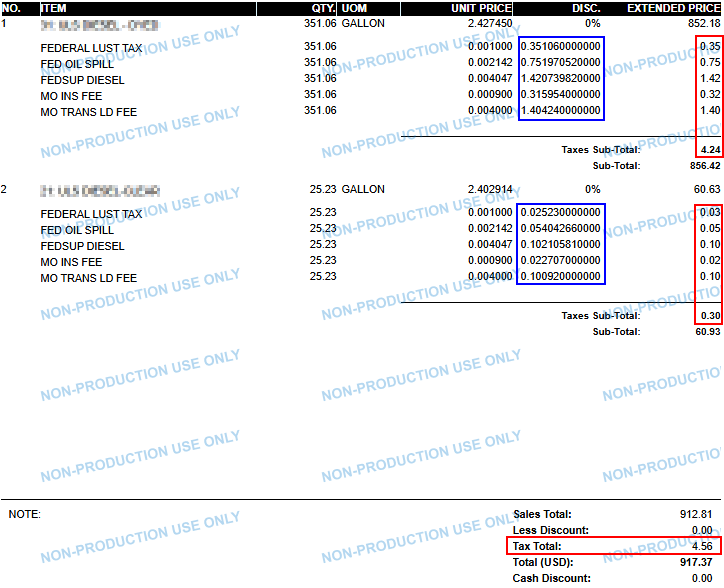
We have a customer with a modified SO invoice form that includes a subreport based on ARTax table. It generally works well but occasionally has rounding differences because the main report shows subtotals by line. The tax for the subtotal ties to the breakdown of the tax subreport, but the total of those subtotals do not tie to the main invoice tax total. In the screenshot here, the red outlined areas show the issue. I added a calculated field (outlined in blue) to display the subreports line-level taxes more detailed, which reduced the frequency of the issue, but it still happens occasionally. Has anyone dealt with anything like this? Our current workarounds include changing the invoice's main tax (in the invoice subtotal section) to be a sum of all the subreport's taxes, and when customer pay the invoice, just writing off the difference (or scheduling an automated write-off). Or manually adding a non-printing line to force the tax subtotal to match, but that would still leave the printed invoice inaccurate.
All ideas welcome and appreciated!

It's not really an Acumatica problem huh; it's a math problem. And the only people who care about it are Accountants. Takes one to know one 😀
Everyone's brains work differently, but I'll give my opinion. I like to see "apples to apples" when moving down a column. Since the individual tax lines are not really "apples to apples" with the totals in that they contain hidden decimals, what if you remove all of the tax numbers from the EXTENDED PRICE column and shift the 2 Taxes Sub-Total values to be in line with the blue column, showing the same number of decimals in the Taxes Sub-Total field.
Then someone would have the data to calculate the Tax Total, having a 13 decimal column and a 2 decimal column, without muddying the two columns together.
Online Members
