
By using this website, you agree to our Terms of Use (click here)

Hi All.
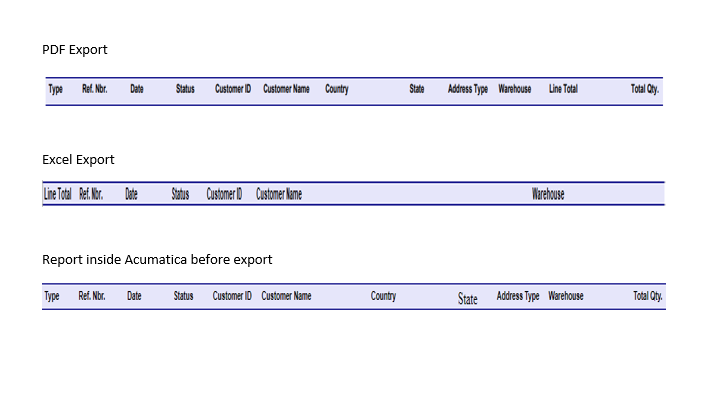
I'm having trouble with a report under Sales Orders. We can run the report and it looks good. When we export it to Excel, it moves some columns and drops a couple of other columns off the Spreadsheet. When we export to PDF it looks fine. Please see the pic attached for a better explanation. You can see where the Excel sheet is not even close to the other two.
Thanks for any advice.

Thank you!
That did help with most of the issue I am having. Then a new issue popped up on the report.
Under the Address Type Column it brings up a number instead of the actual type (Commercial, Residential and so on...)
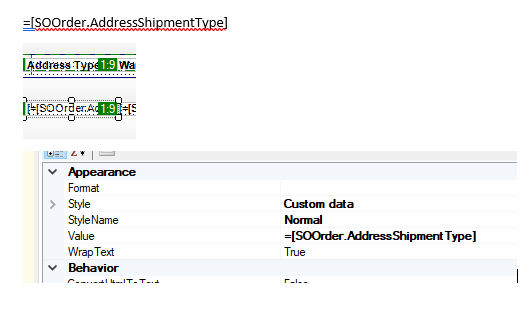
Here is the string I am using: =[SOOrder.AddressShipmentType]
Please see below for my issue. What do I need to tweak in the report for it to display the words instead of the Numerical value?


My first inclination would be to link the table that has the lookup values for that field and then display the full name/description from there but I can't find that field (AddressShipmentType) anywhere in my version to help me determine what table that would be. Hopefully another user can provide more detailed assistance.
=[SOOrder.AddressShipmentType]
Is what is in the field in the Report
The DAC that defaults to an alias of SOOrder in my system doesn't have a field named AddressShipmentType. There is [SOOrder.ShipAddressID] which I assume links to an address record in another table but we don't use SO's and I'm unfamiliar with the data and just poking around. I'd look for an AddressType table and link your field to its ID field if that exists.
Thanks.
No luck finding that anywhere else.

Is that a custom field? It doesn't look familiar to me.
You can attach the .rpx file to this Topic.
Seems like a bug to me with the Excel manual export.
Online Members
