
By using this website, you agree to our Terms of Use (click here)

hai everyone, i had an error issue report SO with the error code like this : 'Error #366: The report does not contain parameters: SOOrder.OrderType0, SOOrder.OrderNbr0.'
anyone can help me
sorry for my bad english

Can you attach the .rpx file? Also, are you trying to run the report from a screen or independently from the Acumatica menu?
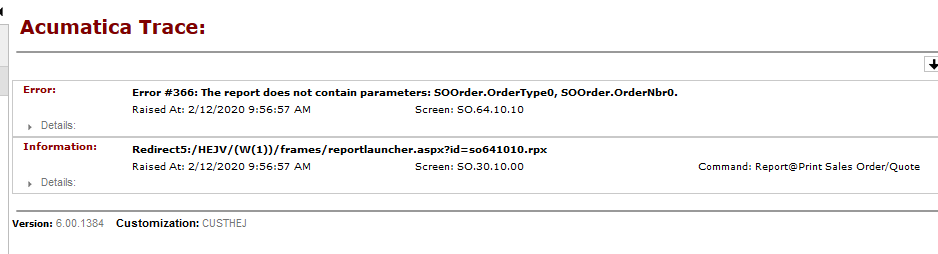
When a report is launched from a screen, the screen passes parameters to the report. The report has to have appropriately named parameters to receive what the screen passes to it.
The Sales Orders (SO301000) screen passes the following parameters:
OrderType
OrderNbr
So, your report has to have those two parameters or you'll get the error message that you're seeing.
Your report has these two parameters:
OrderType
RefNbr
Take a look at this standard Sales Order (SO641010) report to see the appropriate parameters setup and how they are used in the report:
Also, note that you can change what parameters get passed to a report using some low code / no code techniques in a Customization Project. But simply changing the report parameters to match what the screen is already passing would be simpler in your case.
Still same error when the report call from the Sales Order Screen->action-Print, but when call from the report menu no error
I'm getting the same error message in my environment, but the error message doesn't make any sense to me.
One thing I did notice is that your report doesn't have any fields in the Groups:
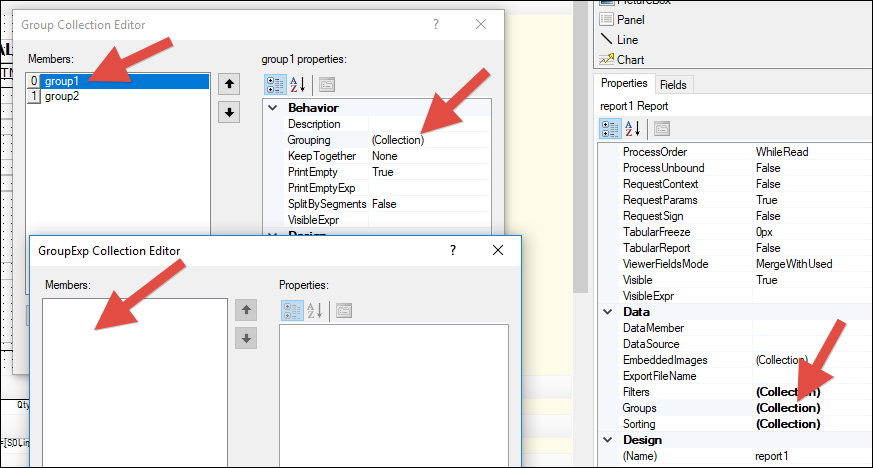
Compare that to the standard report which does have field in the Groups:

Online Members
