AugForums.com

An Acumatica User Group

  • Free
    • Start Here
    • In-Person Gatherings
    • Power BI Workshop
    • Podcast
    • Rolodex
    • Blog
    • Forums
  • Paid
    • AugSQL
    • GI Course
    • GI Library
    • Consulting
  • Register

— The Forums are now read-only —

— All new activity now takes place here: —

AugForums.com Discord Server
Forums
AUG Forums
Acumatica Report De...
Drill Through Navig...
 
Notifications
Clear all

Questions Drill Through NavigateReport property

 
Acumatica Report Designer
Last Post by Tim Rodman 9 years ago
7 Posts
2 Users
0 Reactions
2,855 Views
RSS
Posts: 20
 egates17
Topic starter
August 9, 2017 6:44 pm
(@egates17)
Member
Joined: 9 years ago

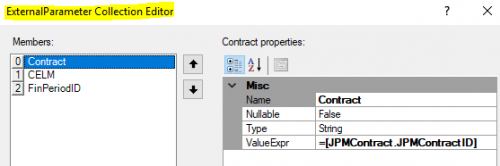
I have a requirement to develop a drill through report,  drilling from a summary value (parent) to a detail costs breakout (child).  I am following Step 4.4.5 'Making a Link for a Text Box' from the S130 training guide (page 116-118) and have hit the wall.  Who out there has been able to drill through from a parent report to a child using the NavigateReport property?  Can it be done? Attached is a screen shot of what I have thus far.  So close...
  TIA


6 Replies
Tim Rodman
Posts: 3204
 Tim Rodman
Admin
August 9, 2017 9:30 pm
(@timrodman)
Famed Member
Joined: 11 years ago

Hi egates17,

Hmmm, nothing stands out to me at first glance. Nice looking report by the way.

Do you have a Contract, CELM, and FinPeriodID parameter in your PM6899DR report?

What happens when you try to drill? Do you get an error message?


Reply
Posts: 20
 egates17
Topic starter
August 10, 2017 7:00 pm
(@egates17)
Member
Joined: 9 years ago

I have the parameters setup properly,  the drill through does not give an error.  When I attempt to drill it opens the child report with no date.  I validated that the child report works when entering parameter values.  No error message.  Let me know if I can supply more info.


Reply
Tim Rodman
Posts: 3204
 Tim Rodman
Admin
August 10, 2017 11:59 pm
(@timrodman)
Famed Member
Joined: 11 years ago

Hmmm, could you attach the two reports (main report and sub report)?

I could try reproducing on my end and see if I notice anything.


Reply
Posts: 20
 egates17
Topic starter
August 11, 2017 11:25 am
(@egates17)
Member
Joined: 9 years ago

Here they are.  JJ is the parent,  DR is the child.  Thanks!

pm6899dr.rpx

pm6899jj.rpx


Reply
Posts: 20
 egates17
Topic starter
August 11, 2017 6:22 pm
(@egates17)
Member
Joined: 9 years ago

We found a solution.  Joe Satlin found the issue was with passing the FinPeriodID value.  It needed to be in the format ='01' + [FinPeriod.FinYear]

Thanks!


Reply
Tim Rodman
 Tim Rodman
Admin
(@timrodman)
Joined: 11 years ago

Famed Member
Posts: 3204
August 11, 2017 10:15 pm
Reply toegates17

Ah, ha! Glad you all were able to figure it out.

I guess the report was handing the financial period off in the format 201707 since that's how the data is stored in the database, but the parameter was expecting 07-2017 since that's how you would enter it into the parameter field when running the report.


Reply
Forum Jump:
  Previous Topic
Next Topic  
Forum Information
Recent Posts
Unread Posts
Tags
  • 12 Forums
  • 2,533 Topics
  • 11 K Posts
  • 41 Online
  • 2,437 Members
Our newest member: Matt Butler
Latest Post: Nested SubReport Issue
Forum Icons: Forum contains no unread posts Forum contains unread posts
Topic Icons: Not Replied Replied Active Hot Sticky Unapproved Solved Private Closed

By using this website, you agree to our Terms of Use (click here)

Acumatica Forums

Terms of Use & Disclaimers :: Privacy Policy

Copyright © · AUG Forums, LLC. All rights reserved. This website is not owned, affiliated with, or endorsed by Acumatica, Inc.

‹›×

    ‹›×