
By using this website, you agree to our Terms of Use (click here)

The Report Designer appears to be pretty limited in it's rendering capabilities when it comes to optional fields. I see in the delivered reports that a lot of reports use concatenated strings to build dynamic content but this limits the ability to place different fields in different location in the report (eg. 3 fields on 1 line) and also, doesn't allow for different styles to be applied to labels vs data. Not to mention the fact that data columns do not align with this method. In short, reports look ugly. I've built better looking report with much older report writer engines.
I thought that Panel's might be my saving grace, but even using VisibleExpr to hide the panels when the fields inside them aren't needed, this still leaves a gap on the report output rather than collapsing that section of the report.
Is there really no way to achieve dynamic report layout and have the output look nice?

Hi Royce,
Sounds like you want dynamic columns depending on whether or not they have data in them? Maybe you could provide a mockup sample in Excel.
In my experience, Report Designer is similar to Crystal, but not as robust. It primarily is a WYSIWYG (What You See Is What You Get) report writer that works best for printed forms.
Hi Tim,
Not dynamic columns but rows. I had some limited success with using Panels. Basically I grouped related fields in Panels which were sized the page width. The panels were able to expand down the page if their contents expanded, but I wasn't able to make them disappear if all their fields were all null, so you end up with whitespace gaps in the report output.
I find the Report Designer pretty limited in it's capabilities.
Ah, I see. Now I see to that you were referring to labels. So you want a different set of label fields to be displayed depending on what kind of item it is? Like maybe show the Lot if it's a lot-tracking item, but don't show it if it's not?
Have you though about using Subreports for this? You might have several Subreports at play and use suppression logic to only display the one that you want to see.
I agree with you though. Report Designer is limited.
No, I want different "Label: Value" to be displayed depending on the data.
The issue I have is that when fields have been disabled via VisibleExpr, they still take up space on the report output. There's no way to have sections of a report collapse when they aren't needed. I would imagine that subreports operate the same way.
Here's an example:

So lets say in our data, there is no flight schedule information (2nd panel), I would like the 2nd panel to collapse so the bottom panel moves up. At the moment it just leaves a gap in the report output which doesn't look nice.
What about using a suppressed section for this?
The out-of-the-box Sales Order report has a good example of this where there are two detail sections: detailSection1 and detailSection2
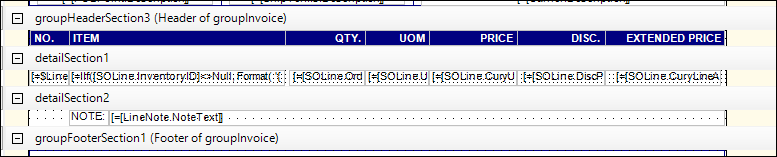
detailSection2 above has a formula in the VisibleExpr field for the entire section which suppresses the section when it doesn't have any data to display.
Since detailSection2 is a separate section, it won't take up extra space when it is suppressed.
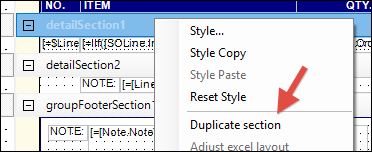
To add an additional section for any section (including Group sections), just right-click on the section and choose Duplicate section like this:
Tim, that's awesome. I think that would solve the problem!