— The Forums are now read-only —
— All new activity now takes place here: —

I was wondering if anybody has created a report where the aging of AR is based on the FinPeriod instead of Date. We have a client who has this requirement.
I have not been able to achieve this as i cant -1 from a Fin Period

I would think that something like this is possible to do.
Can you describe a little more about what the finished report should look like?
Also, I'm missing what the challenge is with subtracting 1 from a Financial Period. Can you describe that more too?
Hi Tim,
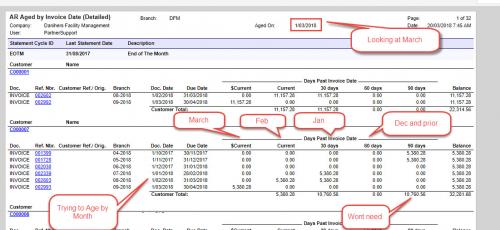
I have attached the Aged report which i am trying to update as well as a screen shot of what i am trying to achieve as the final outcome. I got a bit further with the aging by changing the variable AgeBal00,AgeBal01,AgeBal02,AgeBal03to look at the Month instead of the day but i am having issues around the "Current, 30 Days, 60 days" part of the report where i cant get the months in the correct columns. Dont worry about the FinPeriod section cause i dont think it is the correct way looking at the report.
Thanks for the screenshot. Very helpful.
Let's zoom in on your AgeBal00 and AgeBal01 formulas:
AgeBal00 = IIF($DueDate < @AgeDate And $DueDate >= DateAdd(@AgeDate,'M', -1), $DocBal, 0)
AgeBal01 = IIF($DueDate < @AgeDate And $DueDate >= DateAdd(@AgeDate,'M', -2), $DocBal, 0)
The first thing I notice is that your logic would allow the amount to get displayed in both columns if the DueDate is within one month prior to the AgeDate which I don't think is what you want.
I think you might want to modify the AgeBal01 formula to look more like this:
AgeBal01 = IIF($DueDate < @AgeDate And $DueDate >= DateAdd(@AgeDate,'M', -2) And $DueDate < DateAdd(@AgeDate,'M', -1), $DocBal, 0)
Hi Tim,
Your totally awesome, this worked a treat.
Thankyou so much for your help with this
Cheers
Matt
Awesome! Glad to hear that did the trick.
By using this website, you agree to our Terms of Use (click here)
