AugForums.com

An Acumatica User Group

  • Free
    • Start Here
    • In-Person Gatherings
    • Power BI Workshop
    • Podcast
    • Rolodex
    • Blog
    • Forums
  • Paid
    • AugSQL
    • GI Course
    • GI Library
    • Consulting
  • Register

— The Forums are now read-only —

— All new activity now takes place here: —

AugForums.com Discord Server
Forums
AUG Forums
Acumatica Report De...
Alternating colors ...
 
Notifications
Clear all

Questions Alternating colors in a table on a report

 
Acumatica Report Designer
Last Post by Tim Rodman 6 years ago
7 Posts
5 Users
2 Reactions
7,279 Views
RSS
Jeff T
Posts: 8
 Jeff T
Topic starter
October 22, 2018 6:39 pm
(@jt)
Member
Joined: 8 years ago

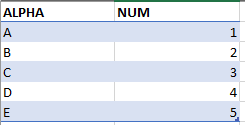
Is it possible to have the data rows in the details of a report alternate background colors, similar to the preset table formats in excel?

6 Replies
Ellie
 Ellie
(@ellie)
Joined: 6 years ago

Estimable Member
Posts: 129
October 24, 2018 11:53 am
Reply toJeff TJeff T

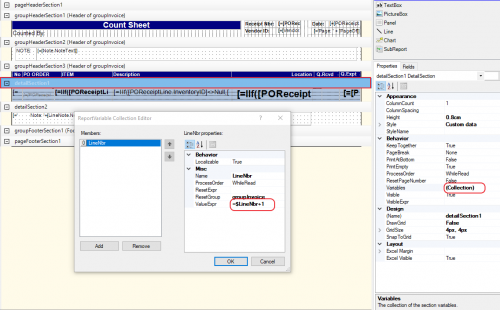
Create a variable for your line number in the detail section of the report (in this example the variable is called 'LineNbr' )

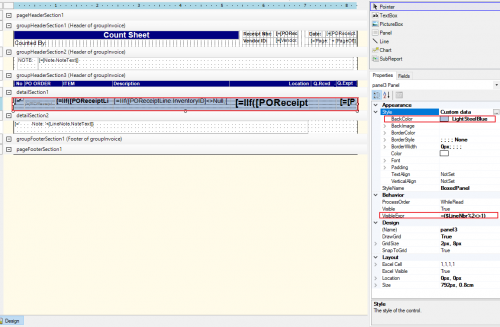
Put all your row fields in a 'Panel', set the BackColor to blue (or any other color) and set the visible condition of entire panel to "=($LineNbr%2<>1)".

Copy and paste the entire panel with all fields, set BackColor to nothing (or any other color) and set the visible condition of entire panel to "=($LineNbr%2=1)".

Position your panels on top of each other and you should get your desired result.

-----

If anyone knows a more straight forward way, please share. The above is not very clean, but does the job.


Reply
Noah reacted
MichaelHansen
Posts: 149
 MichaelHansen
October 24, 2018 3:39 pm
(@michaelhansen)
Estimable Member
Joined: 6 years ago

@ellie that's a great use for the feature! No one has asked for colored rows yet, but I think I'll try adding some to a couple of our reports that won't be changing.

As a side note, setting visible conditions and stacking fields is immensely helpful if you need to use conditional formatting to show issues in a report. You can display the same field but make it bright red text based on a set of conditions, bringing data issues to the forefront for your users. That somewhat hidden feature is a huge life-saver in my company.


Reply
Tim Rodman
Posts: 3204
 Tim Rodman
Admin
October 26, 2018 7:56 pm
(@timrodman)
Famed Member
Joined: 11 years ago

Nice trick @ellie !


Reply
Jeff T
Posts: 8
 Jeff T
Topic starter
November 1, 2018 4:12 pm
(@jt)
Member
Joined: 8 years ago

@Ellie, thank you so much for your help, that worked perfectly!


Reply
Tim Rodman reacted
Claire Walton
Posts: 3
 Claire Walton
June 30, 2020 11:12 am
(@claire-walton)
Active Member
Joined: 6 years ago

Is it possible to achieve banded rows on the Pick List (SO644000)? I tried applying @Ellie's solution to detailSection1 with no luck. Not sure if I needed to apply the solution across detailSection1_InventoryLocked and/or groupHeaderSection5 (Header of groupKit), and/or adjust the VisibleExpression on the groupHeader to reference the $KitLineNbr variable. Any help is appreciated!

Banded rows on picklist


Reply
Tim Rodman
Posts: 3204
 Tim Rodman
Admin
August 21, 2020 9:47 pm
(@timrodman)
Famed Member
Joined: 11 years ago

I would think that you'd need to put the variable in groupHeaderSection5.


Reply
Forum Jump:
  Previous Topic
Next Topic  
Forum Information
Recent Posts
Unread Posts
Tags
  • 12 Forums
  • 2,533 Topics
  • 11 K Posts
  • 76 Online
  • 2,438 Members
Our newest member: Ralph Torres
Latest Post: Nested SubReport Issue
Forum Icons: Forum contains no unread posts Forum contains unread posts
Topic Icons: Not Replied Replied Active Hot Sticky Unapproved Solved Private Closed

By using this website, you agree to our Terms of Use (click here)

Acumatica Forums

Terms of Use & Disclaimers :: Privacy Policy

Copyright © · AUG Forums, LLC. All rights reserved. This website is not owned, affiliated with, or endorsed by Acumatica, Inc.

‹›×

    ‹›×