AugForums.com

An Acumatica User Group

  • Free
    • Start Here
    • Rolodex
    • Podcast
    • Blog
    • Forums
  • Paid
    • AugSQL
    • GI Course
    • GI Library
    • Consulting
  • Register
Acumatica Forums

By using this website, you agree to our Terms of Use (click here)

Forums
AUG Forums
Acumatica Report De...
Alternating colors ...
 
Notifications
Clear all

Questions Alternating colors in a table on a report

 
Acumatica Report Designer
Last Post by Tim Rodman 5 years ago
7 Posts
5 Users
2 Reactions
6,768 Views
RSS
Jeff T
Posts: 8
 Jeff T
Topic starter
October 22, 2018 5:39 pm
(@jt)
Member
Joined: 7 years ago

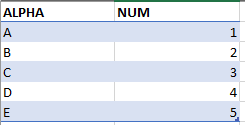
Is it possible to have the data rows in the details of a report alternate background colors, similar to the preset table formats in excel?

6 Replies
Ellie
 Ellie
(@ellie)
Joined: 6 years ago

Estimable Member
Posts: 129
October 24, 2018 10:53 am
Reply toJeff TJeff T

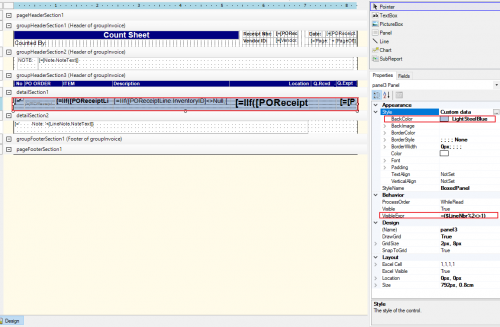
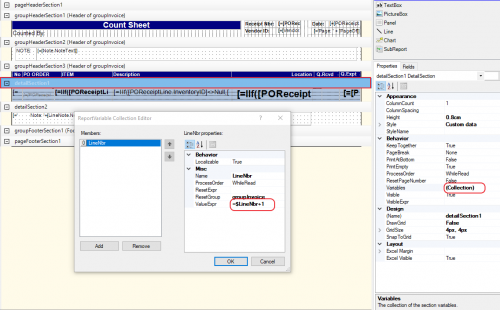
Create a variable for your line number in the detail section of the report (in this example the variable is called 'LineNbr' )

Put all your row fields in a 'Panel', set the BackColor to blue (or any other color) and set the visible condition of entire panel to "=($LineNbr%2<>1)".

Copy and paste the entire panel with all fields, set BackColor to nothing (or any other color) and set the visible condition of entire panel to "=($LineNbr%2=1)".

Position your panels on top of each other and you should get your desired result.

-----

If anyone knows a more straight forward way, please share. The above is not very clean, but does the job.


Reply
Noah reacted
MichaelHansen
Posts: 149
 MichaelHansen
October 24, 2018 2:39 pm
(@michaelhansen)
Estimable Member
Joined: 6 years ago

@ellie that's a great use for the feature! No one has asked for colored rows yet, but I think I'll try adding some to a couple of our reports that won't be changing.

As a side note, setting visible conditions and stacking fields is immensely helpful if you need to use conditional formatting to show issues in a report. You can display the same field but make it bright red text based on a set of conditions, bringing data issues to the forefront for your users. That somewhat hidden feature is a huge life-saver in my company.


Reply
Tim Rodman
Posts: 3199
 Tim Rodman
Admin
October 26, 2018 6:56 pm
(@timrodman)
Famed Member
Joined: 10 years ago

Nice trick @ellie !


Reply
Jeff T
Posts: 8
 Jeff T
Topic starter
November 1, 2018 3:12 pm
(@jt)
Member
Joined: 7 years ago

@Ellie, thank you so much for your help, that worked perfectly!


Reply
Tim Rodman reacted
Claire Walton
Posts: 3
 Claire Walton
June 30, 2020 10:12 am
(@claire-walton)
Active Member
Joined: 6 years ago

Is it possible to achieve banded rows on the Pick List (SO644000)? I tried applying @Ellie's solution to detailSection1 with no luck. Not sure if I needed to apply the solution across detailSection1_InventoryLocked and/or groupHeaderSection5 (Header of groupKit), and/or adjust the VisibleExpression on the groupHeader to reference the $KitLineNbr variable. Any help is appreciated!

Banded rows on picklist


Reply
Tim Rodman
Posts: 3199
 Tim Rodman
Admin
August 21, 2020 8:47 pm
(@timrodman)
Famed Member
Joined: 10 years ago

I would think that you'd need to put the variable in groupHeaderSection5.


Reply
Forum Jump:
  Previous Topic
Next Topic  
Forum Information
Recent Posts
Unread Posts
Tags
  • 12 Forums
  • 2,527 Topics
  • 10.9 K Posts
  • 28 Online
  • 2,412 Members
Our newest member: Peter Paasch
Latest Post: Can't export GI's to excel that contain the FATrans DAC after upgrade to 2025 R1 in less than 25 min
Forum Icons: Forum contains no unread posts Forum contains unread posts
Topic Icons: Not Replied Replied Active Hot Sticky Unapproved Solved Private Closed

Online Members

  • amassey
Acumatica Forums

Terms of Use & Disclaimers :: Privacy Policy

Copyright © 2026 · AUG Forums, LLC. All rights reserved. This website is not owned, affiliated with, or endorsed by Acumatica, Inc.

‹›×

    ‹›×