AugForums.com

An Acumatica User Group

  • Free
    • Start Here
    • In-Person Gatherings
    • Power BI Workshop
    • Podcast
    • Rolodex
    • Blog
    • Forums
  • Paid
    • AugSQL
    • GI Course
    • GI Library
    • Consulting
  • Register
Acumatica Forums

By using this website, you agree to our Terms of Use (click here)

Forums
AUG Forums
Acumatica Report De...
Add Tracking inform...
 
Notifications
Clear all

Questions Add Tracking information to SO Invoice form

 
Acumatica Report Designer
Last Post by Nathan Trauscht 2 years ago
16 Posts
7 Users
7 Reactions
5,510 Views
RSS
nickheuer
Posts: 36
 nickheuer
Topic starter
January 3, 2018 3:14 pm
(@nickheuer)
Trusted Member
Joined: 6 years ago

Has anyone been successful in adding the tracking information from the boxes tab of a shipment to the SO invoice form and if so how did you map the fields?


15 Replies
MichaelHansen
Posts: 149
 MichaelHansen
January 3, 2018 6:46 pm
(@michaelhansen)
Estimable Member
Joined: 6 years ago

Hello nheuer!

I've edited mine extensively, but let's assume you've included the SOOrder table in your joins on the invoice report and start from there, so we don't bloat this post:

Additional Table Join #1:
SOOrder LeftJoin SOOrderShipment
Relations:
OrderNbr
OrderType (prevents collisions should you have two types with identical numbering schemes)
Additional Table Join #2:
SOOrderShipment LeftJoin SOPackageDetail
Relations:
ShipmentNbr

From here, you should have access to all your line level items shown under: Shipments -> Packages. If this is not what you needed, let me know and I'll try to dig around a bit more for you. This unlocks fields such as: SOPackageDetail.TrackNumber and SOPackageDetail.CustomRefNbr1.

I ran these joins in a Generic Inquiry as a test (we don't use the packages tab in my company). If for some reason the report writer won't accept the logic above, I'll edit my invoices report directly and send you screen shots, just let me know if anything is amiss.


Reply
mcraig and Nathan Trauscht reacted
Nathan Trauscht
 Nathan Trauscht
(@ntrauscht)
Joined: 3 years ago

Active Member
Posts: 8
December 21, 2022 5:09 pm
Reply toMichaelHansenMichaelHansen

@michaelhansen

I added the table:

SOOrderShipment LeftJoin SOPackageDetail

I am getting the fields I want, but it duplicates the line item multiple times. Does this have something to do with the field relationship settings?

Screenshot 2022 12 21 150841
Screenshot 2022 12 21 150813

Reply
Nathan Trauscht
 Nathan Trauscht
(@ntrauscht)
Joined: 3 years ago

Active Member
Posts: 8
January 6, 2023 11:16 am
Reply toNathan TrauschtNathan Trauscht
MichaelHansen

So I made some progress by adding

  • SOShipment - Left Join - SOPackageDetail
  • Parent Field - ShipmentNbr
  • Link Condition - Equal
  • Chil Field - ShipmentNbr

But now, it repeats lines based on how many packages there were in the shipment.

In the attached test example, there were (4) packages.

Screenshot 2023 01 06 091255
Screenshot 2023 01 06 091314

Reply
Tim Rodman
Posts: 3199
 Tim Rodman
Admin
January 4, 2018 6:14 pm
(@timrodman)
Famed Member
Joined: 10 years ago

Just make sure you do it as a Subreport since there could easily be more than one Package for a given Shipment.


Reply
Nathan Trauscht reacted
nickheuer
 nickheuer
(@nickheuer)
Joined: 6 years ago

Trusted Member
Posts: 36
January 8, 2018 5:49 pm
Reply toTim RodmanTim Rodman

Just found that out and working on a sub report now.


Reply
 Ron Brown
(@ron-brown)
Joined: 8 years ago

Member
Posts: 5
April 18, 2018 1:08 pm
Reply tonickheuernickheuer
Tim Rodman

I need to do the same with both the Invoice and the Shipment Notification.   Were you able to develop the sub report and if so, could you attach your SO Invoice and the sub report?


Reply
mcraig and Tim Rodman reacted
Nathan Trauscht
 Nathan Trauscht
(@ntrauscht)
Joined: 3 years ago

Active Member
Posts: 8
January 3, 2023 3:01 pm
Reply tonickheuernickheuer
Tim Rodman

@nickheuer did you have success? I am struggling with getting this setup.


Reply
Nathan Trauscht
 Nathan Trauscht
(@ntrauscht)
Joined: 3 years ago

Active Member
Posts: 8
January 10, 2023 5:10 pm
Reply toNathan TrauschtNathan Trauscht
nickheuer
Tim Rodman

If it is helpful for anyone, I successfully made a subreport showing package tracking numbers. I used this subreport on the Shipment Confirmation Report SO642000

1) Create a SubReport

2) Add SOPackageDetail table

Screenshot 2023 01 10 143226

3) Add Parameters

- ShipmentNbr

Screenshot 2023 01 10 143251

4) Add Filters

- SOPackageDetail.ShipmentNbr = @ShipmentNbr

Screenshot 2023 01 10 143317

5) Add Detail Section & Header

Screenshot 2023 01 10 142908

Format it to the size you want to display on your main report.

5) Add to Main Report (My example is Shipment Confirmation SO642000)

6) Add Report Name

Screenshot 2023 01 10 143814

7) Add Parameters

Screenshot 2023 01 10 143833

 Now, if anyone knows how to format the tracking numbers to:

"Tracking1, Tracking2, Tracking3, etc."

Instead of:

"Tracking 1

Tracking 2

Tracking 3

etc"

Screenshot 2023 01 10 145252

Please let me know!


Reply
mcraig
Posts: 65
 mcraig
December 21, 2022 6:00 pm
(@mcraig)
Estimable Member
Joined: 6 years ago

You have to wonder why Acumatica has not included this in the main form . With a check mark in  Sales Preference  area to allow users to use the feature out of the box. 

One to many relationship.  



Reply
Nathan Trauscht reacted
Rick Piester
Posts: 21
 Rick Piester
February 10, 2023 12:19 pm
(@rpiester)
Eminent Member
Joined: 3 years ago

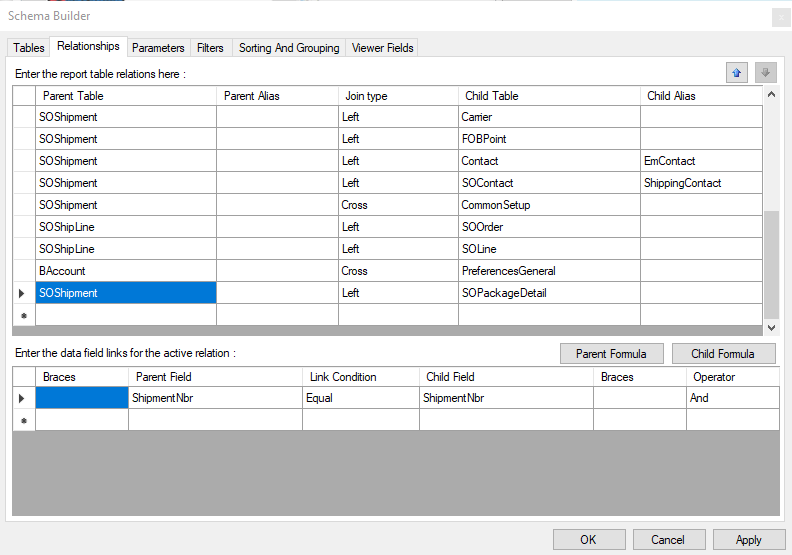
Sometimes we ship as many as 25 packages for one shipment so there is no room to list all tracking numbers.    Since most carriers (UPS and FedEx, at least) will group multiple packages using one tracking number, we just show the tracking number from carton 1.  We did it as follows:

On the invoice:

image

Establish a parameter "One" in order to designate the carton number...

image

Join to Package Detail and carton 1...

image

Use this expression on the invoice:

=[SOPackageDetail.TrackNumber]


We also list =[SOShipment.ShipVia_description] in order to display "FedEx Ground" or whatever.


Reply
Tim Rodman reacted
Nathan Trauscht
 Nathan Trauscht
(@ntrauscht)
Joined: 3 years ago

Active Member
Posts: 8
July 30, 2024 12:00 pm
Reply toRick PiesterRick Piester

@rpiester did you add these SOShipment details to the invoice report using a subreport?


Reply
Rick Piester
 Rick Piester
(@rpiester)
Joined: 3 years ago

Eminent Member
Posts: 21
July 30, 2024 12:05 pm
Reply toNathan TrauschtNathan Trauscht
Rick Piester

@ntrauscht No.  Just directly in the report.


Reply
Nathan Trauscht
 Nathan Trauscht
(@ntrauscht)
Joined: 3 years ago

Active Member
Posts: 8
July 30, 2024 12:33 pm
Reply toRick PiesterRick Piester
Nathan Trauscht
Rick Piester

@rpiester how did you join SOShipment in the report? I only see the join from SOShipment to SOPackageDetail

We are trying to pull in the Ship Via Description and Ship Date to AR Invoice AR641000. We were using SOShipVia_description, but sometimes we have to change the ship via on the shipment, so if that happens it is not an accurate description.

Adding the master tracking number would be a bonus after we figure that part out.


Reply
Rick Piester
 Rick Piester
(@rpiester)
Joined: 3 years ago

Eminent Member
Posts: 21
July 30, 2024 12:53 pm
Reply toNathan TrauschtNathan Trauscht
Rick Piester
Nathan Trauscht
Rick Piester

@ntrauscht

We are doing this on the SO Invoice.  I think we never figured out how to do that on the AR Invoice.  We pretty much only use the SO Invoice in daily operations and with customers.

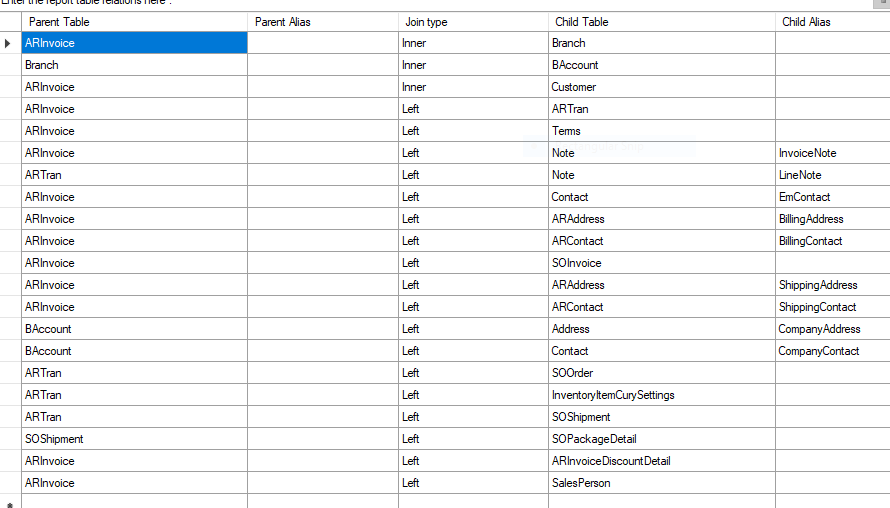
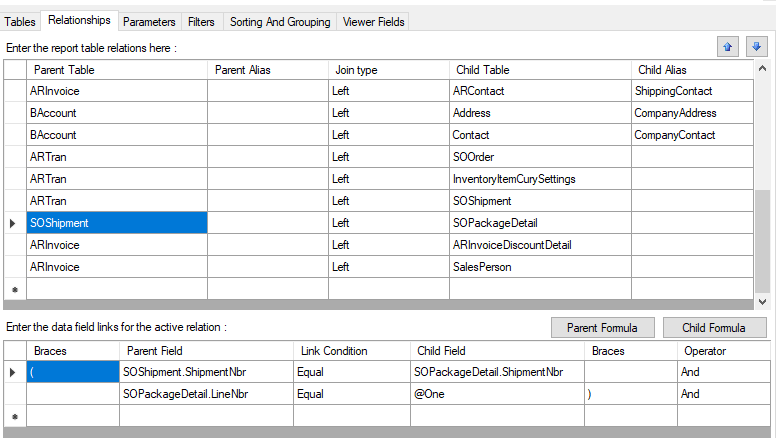
That being said, when I look at the joins on my SO invoice, it looks like it's possible to get this in the AR Invoice.  See those relationships below.

I think you could join SOShipment to ARTran (using ShipmentNbr)and then SOPackageDetail to SOShipment.  For the latter, we only need line one of the detail to get that master tracking number so that is joined with ShipmentNbr and SOPackageDetail.LineNbr equals @One.

Good luck.

image


image


Reply
Nathan Trauscht
 Nathan Trauscht
(@ntrauscht)
Joined: 3 years ago

Active Member
Posts: 8
July 30, 2024 2:47 pm
Reply toRick PiesterRick Piester
Nathan Trauscht
Rick Piester
Nathan Trauscht
Rick Piester

@rpiester this worked, thank you for your help!


Reply
Forum Jump:
  Previous Topic
Next Topic  
Forum Information
Recent Posts
Unread Posts
Tags
  • 12 Forums
  • 2,528 Topics
  • 10.9 K Posts
  • 24 Online
  • 2,412 Members
Our newest member: Peter Paasch
Latest Post: Credit Reference Report Needed
Forum Icons: Forum contains no unread posts Forum contains unread posts
Topic Icons: Not Replied Replied Active Hot Sticky Unapproved Solved Private Closed

Online Members

 No online members at the moment

Acumatica Forums

Terms of Use & Disclaimers :: Privacy Policy

Copyright © 2026 · AUG Forums, LLC. All rights reserved. This website is not owned, affiliated with, or endorsed by Acumatica, Inc.

‹›×

    ‹›×