— The Forums are now read-only —
— All new activity now takes place here: —

I'd love to know if anyone (ahem, maybe @wyatt-erp) has come up with a creative way to make a Parameter in a Generic Inquiry filter aggregate results.
Aggregate results just mean that you applied an aggregation (a fancy word for SUM, COUNT, MIN, MAX) to multiple records. If I had 3 Invoices for $100, $200, and $300, the SUM aggregate result would be $600 and the COUNT aggregate result would be 3.
Let me explain the problem using an example.
Let's say that I build a simple Generic Inquiry to grab some Vendor AP Bill data.
I group the Generic Inquiry results by VendorID:


When I run the Generic Inquiry, I'll sort it by Amount in Descending Order. I'm going to call this screenshot our first results screenshot:

Now, let's say that I want to exclude Vendors with an Amount of less than 2,000,000. I can apply an on-the-fly filter to the column like this:

And I get the results that I expect. RIVERBUILD is now at the top of the list because it's the first Vendor with an Amount of less than $2,000,000 which is what I expected. Let's call this the second results screenshot:

But what if I wanted the user to be able to enter their own amount using a Parameter in a Generic Inquiry. So I create a Parameter with a default value of $2,000,000:
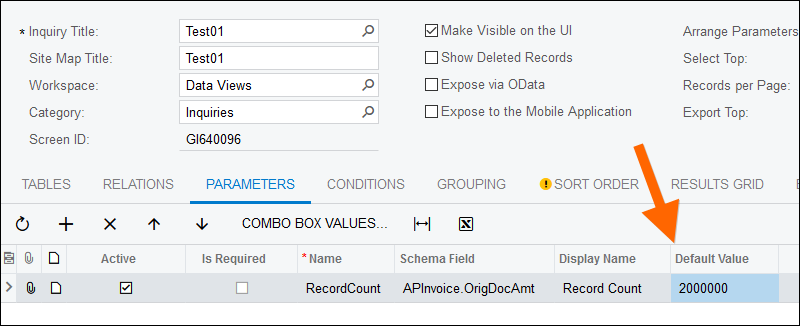
Of course, a Parameter by itself doesn't do anything. It just sits on top the results:

So I need to add the Parameter to the CONDITIONS tab like this:

Now it actually does something by filtering the results, but not in the way that I expect. Let's call this the third results screenshot:

First of all, why is FOODWESTER with an amount of $35,863,809.77 even on the list? That amount is more than $2,000,000 so shouldn't it be excluded?
Second of all, compare the FOODWESTER amount of $35,863,809.77 to the FOODWESTER amount in the first results screenshot where the amount was $38,287,959.77. Why did the amount decrease?
The problem with a Parameter in a Generic Inquiry is that it first filters the underlying data, not the aggregate results. So, what's happening here is that first the Generic Inquiry is excluding all AP Bills that have an amount of more than $2,000,000. Then, it's summing up the results. FOODWESTER must have an AP Bill that is more than $2,000,000 and that AP Bill is getting filtered out of the results after the Parameter was added. To be precise, the amount of the AP Bill must be $38,287,959.77 - $35,863,809.77 = $2,424,150.
Hmmm, let's see if we can find an AP Bill for $2,424,150. Yep, here it is:

This is not what I want the Parameter to do. I want the Parameter to behave the same as the on-the-fly filter.
We can look at this problem from another angle, from the angle of SQL.
You can see the SQL code by going to TOOLS -> Trace... after the Generic Inquiry runs.
The first results screenshot generates the following SQL Code:
SELECT TOP (23) MAX( [APInvoice_APRegister].[DocType]) AS [APInvoice_DocType], MAX( [APInvoice_APRegister].[RefNbr]) AS [APInvoice_RefNbr], [APInvoice_APRegister].[VendorID] AS [APInvoice_VendorID], MAX( [APInvoice_APRegister].[CuryID]) AS [APInvoice_CuryID], SUM( [APInvoice_APRegister].[CuryInfoID]) AS [APInvoice_CuryInfoID], SUM( [APInvoice_APRegister].[OrigDocAmt]) AS [APInvoice_OrigDocAmt], MAX( [APInvoice_APRegister].[NoteID]) AS [APInvoice_NoteID]
FROM
(
[APInvoice] [APInvoice_APInvoice]
INNER JOIN [APRegister] [APInvoice_APRegister] ON ( [APInvoice_APRegister].[CompanyID] = 2) AND [APInvoice_APRegister].[DeletedDatabaseRecord] = 0 AND ( [APInvoice_APRegister].[BranchID] IS NULL OR [APInvoice_APRegister].[BranchID] IN ( 22, 16, 20, 17, 21)) AND [APInvoice_APInvoice].[DocType] = [APInvoice_APRegister].[DocType] AND [APInvoice_APInvoice].[RefNbr] = [APInvoice_APRegister].[RefNbr]
)
WHERE ( [APInvoice_APInvoice].[CompanyID] = 2)
GROUP BY [APInvoice_APRegister].[VendorID]
ORDER BY SUM( [APInvoice_APRegister].[OrigDocAmt]) DESC, MAX( [APInvoice_APRegister].[DocType]), MAX( [APInvoice_APRegister].[RefNbr]) OPTION(OPTIMIZE FOR UNKNOWN)
The second results screenshot generates the following SQL Code:
SELECT TOP (23) MAX( [APInvoice_APRegister].[DocType]) AS [APInvoice_DocType], MAX( [APInvoice_APRegister].[RefNbr]) AS [APInvoice_RefNbr], [APInvoice_APRegister].[VendorID] AS [APInvoice_VendorID], MAX( [APInvoice_APRegister].[CuryID]) AS [APInvoice_CuryID], SUM( [APInvoice_APRegister].[CuryInfoID]) AS [APInvoice_CuryInfoID], SUM( [APInvoice_APRegister].[OrigDocAmt]) AS [APInvoice_OrigDocAmt], MAX( [APInvoice_APRegister].[NoteID]) AS [APInvoice_NoteID]
FROM (
[APInvoice] [APInvoice_APInvoice]
INNER JOIN [APRegister] [APInvoice_APRegister] ON ( [APInvoice_APRegister].[CompanyID] = 2) AND [APInvoice_APRegister].[DeletedDatabaseRecord] = 0 AND ( [APInvoice_APRegister].[BranchID] IS NULL OR [APInvoice_APRegister].[BranchID] IN ( 22, 16, 20, 17, 21)) AND [APInvoice_APInvoice].[DocType] = [APInvoice_APRegister].[DocType] AND [APInvoice_APInvoice].[RefNbr] = [APInvoice_APRegister].[RefNbr]
)
WHERE ( [APInvoice_APInvoice].[CompanyID] = 2)
GROUP BY [APInvoice_APRegister].[VendorID]
HAVING ( SUM( [APInvoice_APRegister].[OrigDocAmt]) < 2000000.0)
ORDER BY SUM( [APInvoice_APRegister].[OrigDocAmt]) DESC, MAX( [APInvoice_APRegister].[DocType]), MAX( [APInvoice_APRegister].[RefNbr]) OPTION(OPTIMIZE FOR UNKNOWN)
The third results screenshot generates the following SQL Code:
DECLARE @P0 Decimal(16) SET @P0='2000000'
SELECT TOP (21) MAX( [APInvoice_APRegister].[DocType]) AS [APInvoice_DocType], MAX( [APInvoice_APRegister].[RefNbr]) AS [APInvoice_RefNbr], [APInvoice_APRegister].[VendorID] AS [APInvoice_VendorID], MAX( [APInvoice_APRegister].[CuryID]) AS [APInvoice_CuryID], SUM( [APInvoice_APRegister].[CuryInfoID]) AS [APInvoice_CuryInfoID], SUM( [APInvoice_APRegister].[OrigDocAmt]) AS [APInvoice_OrigDocAmt], MAX( [APInvoice_APRegister].[NoteID]) AS [APInvoice_NoteID]
FROM (
[APInvoice] [APInvoice_APInvoice]
INNER JOIN [APRegister] [APInvoice_APRegister] ON ( [APInvoice_APRegister].[CompanyID] = 2) AND [APInvoice_APRegister].[DeletedDatabaseRecord] = 0 AND ( [APInvoice_APRegister].[BranchID] IS NULL OR [APInvoice_APRegister].[BranchID] IN ( 22, 16, 20, 17, 21)) AND [APInvoice_APInvoice].[DocType] = [APInvoice_APRegister].[DocType] AND [APInvoice_APInvoice].[RefNbr] = [APInvoice_APRegister].[RefNbr]
)
WHERE ( [APInvoice_APRegister].[OrigDocAmt] < @P0) AND ( [APInvoice_APInvoice].[CompanyID] = 2)
GROUP BY [APInvoice_APRegister].[VendorID]
ORDER BY SUM( [APInvoice_APRegister].[OrigDocAmt]) DESC, MAX( [APInvoice_APRegister].[DocType]), MAX( [APInvoice_APRegister].[RefNbr]) OPTION(OPTIMIZE FOR UNKNOWN)
The second results screenshot SQL Code has the filter in the HAVING clause and the third results screenshot SQL Code has the filter in the WHERE clause.
The HAVING clause filters the aggregate results while the WHERE clause filters the underlying data.
Does anyone know how to make a Parameter in a Generic Inquiry filter the aggregate results like in the second results screenshot rather than the underlying data like in the third results screenshot?

Hey @timrodman, I've been summoned 😀
I don't think we can clever our way out of this until we can use one GI as a table in another GI. The parameters are passed directly into the Where of the TSQL Acumatica builds off of the GI definition, which hamstrings us in this case. We're stuck with either creating a PXProjection or making a DAC that sits on top of a sql view. (I have made PXProjections, but none using Group By. This looks like a good example though: https://stackoverflow.com/questions/40037827/bql-group-by-in-acumatica )
Honestly, given the options, I've just chosen to bide my time until that feature gets implemented.
Last thought though... I am too tired to test myself, but you may have luck if you slap the GI into a dashboard as a GI widget and use Dashboard parameters to control what you're looking for? The Dashboard parameters I think get ran against the result set, so it should work. If you can live with it being a Dashboard that is!
Thanks for chiming in @wyatt-erp.
I did some more testing and came up with a clunky workaround.
I removed the condition from the CONDITIONS tab, but left the Parameter in place. Then I used the Parameter to add a new field to the RESULTS GRID tab using this formula:
=IIf(SUM([APInvoice.OrigDocAmt])<[RecordCount],SUM([APInvoice.OrigDocAmt]),null)

I have to do 3 clicks when I run the Generic Inquiry to filter on Display? Is Not Empty which is clunky:

But I only need to set the Quick Filter once. Then I can play with the Parameter values and they filter the grid instantaneously:

Good point about the Dashboard. Filters in the Dashboard act like on-the-fly filters in that they populate the HAVING clause in SQL which is a good thing, a very good thing. In my case, the user wants to keep changing the Generic Inquiry Parameter value to see how it affects the grid so a Dashboard probably isn't the best tool, but Dashboards are great in many cases.
@wyatt-erp Thanks for being a sounding board on this. I liked your idea to turn my formula into a checkbox so i did just that:

Now my Display ? column correctly shows a checkbox for grouped records that should be displayed and an unchecked box for grouped records that should not be displayed.

If I change the Record Count parameter value then the Display ? column recalculates immediately:

But I was still missing the default filter that would exclude the grouped records that shouldn't be displayed.
Rather than try an on-the-fly filter like I did earlier, I tried a saved filter and it worked! I also made it a Default and Shared filter so this is the default filter for all users. Now, when I go into the Generic Inquiry, it only shows me the records that meet the default criteria of the Record Count parameter:

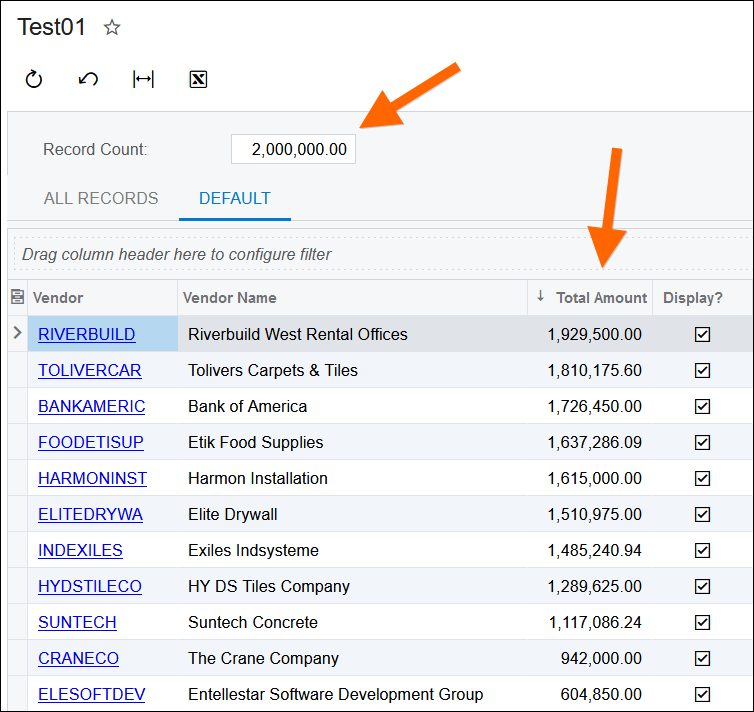
What's cool about this is that, not only is it the default filter, but I can change my Record Count parameter and the grid immediately updates to only show grouped records that are less than the Record Count.

Not a bad workaround!
To dot the i's and cross the t's, I thought I'd check the SQL code. Yep, it's applying the filter in the HAVING clause which is what I wanted:
DECLARE @P0 nvarchar(MAX) SET @P0='8000000' DECLARE @P1 nvarchar(MAX) SET @P1='8000000'
SELECT TOP (1) MAX( [APInvoice_APRegister].[DocType]) AS [APInvoice_DocType], MAX( [APInvoice_APRegister].[RefNbr]) AS [APInvoice_RefNbr], [APInvoice_APRegister].[VendorID] AS [APInvoice_VendorID], MAX( [APInvoice_APRegister].[CuryID]) AS [APInvoice_CuryID], SUM( [APInvoice_APRegister].[CuryInfoID]) AS [APInvoice_CuryInfoID], SUM( [APInvoice_APRegister].[OrigDocAmt]) AS [APInvoice_OrigDocAmt], MAX( [APInvoice_APRegister].[NoteID]) AS [APInvoice_NoteID], (CASE WHEN SUM( [APInvoice_APRegister].[OrigDocAmt]) < @P0 THEN 1 ELSE 0 END) AS [APInvoice_Formulabbc6603e8b88466b97cb25bf37874e1e]
FROM (
[APInvoice] [APInvoice_APInvoice]
INNER JOIN [APRegister] [APInvoice_APRegister] ON ( [APInvoice_APRegister].[CompanyID] = 2) AND [APInvoice_APRegister].[DeletedDatabaseRecord] = 0 AND  ( [APInvoice_APRegister].[BranchID] IS NULL  OR [APInvoice_APRegister].[BranchID] IN ( 22, 16, 20, 17, 21)) AND [APInvoice_APInvoice].[DocType] = [APInvoice_APRegister].[DocType] AND [APInvoice_APInvoice].[RefNbr] = [APInvoice_APRegister].[RefNbr]
)
WHERE ( [APInvoice_APInvoice].[CompanyID] = 2)
GROUP BY [APInvoice_APRegister].[VendorID]
HAVING ( MAX( [APInvoice_APRegister].[DocType]) = 'INV' AND MAX( [APInvoice_APRegister].[RefNbr]) = '002566' AND CASE WHEN SUM( [APInvoice_APRegister].[OrigDocAmt]) < @P1 THEN 1 ELSE 0 END = CONVERT (BIT, 1))
ORDER BY MAX( [APInvoice_APRegister].[DocType]), MAX( [APInvoice_APRegister].[RefNbr]) OPTION(OPTIMIZE FOR UNKNOWN)
By using this website, you agree to our Terms of Use (click here)
